34D-Link DCS-5222L User Manual
Section 4 - Conguration
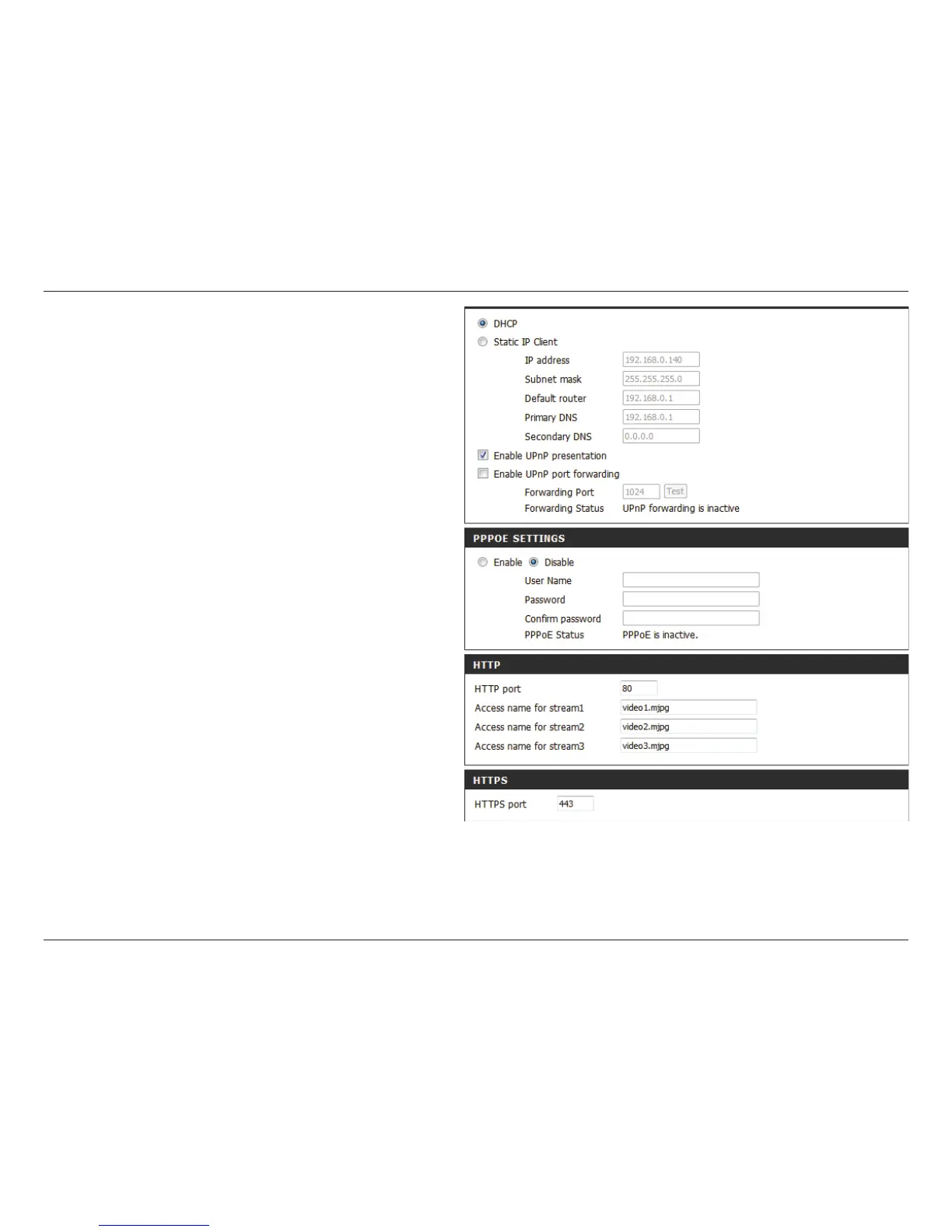
Enable UPnP
Presentation:
Enable
UPnP Port
Forwarding:
Enable PPPoE:
User Name /
Password:
HTTP Port:
Access Name
for Stream 1~3:
HTTPS Port:
Enabling this setting allows your camera to be
congured as a UPnP device on your network.
Enabling this setting allows the camera to add port
forwarding entries into the router automatically
on a UPnP capable network.
Enable this setting if your network uses PPPoE.
Enter the username and password for your PPPoE
account. Re-enter your password in the Conrm
Password eld. You may obtain this information
from your ISP.
The default port number is 80.
The default name is video#.mjpg, where # is the
number of the stream.
You may use a PC with a secure browser to connect
to the HTTPS port of the camera. The default port
number is 443.


 To Next Page