4–30 CLIMATE CONTROL AND AUDIO SYSTEM
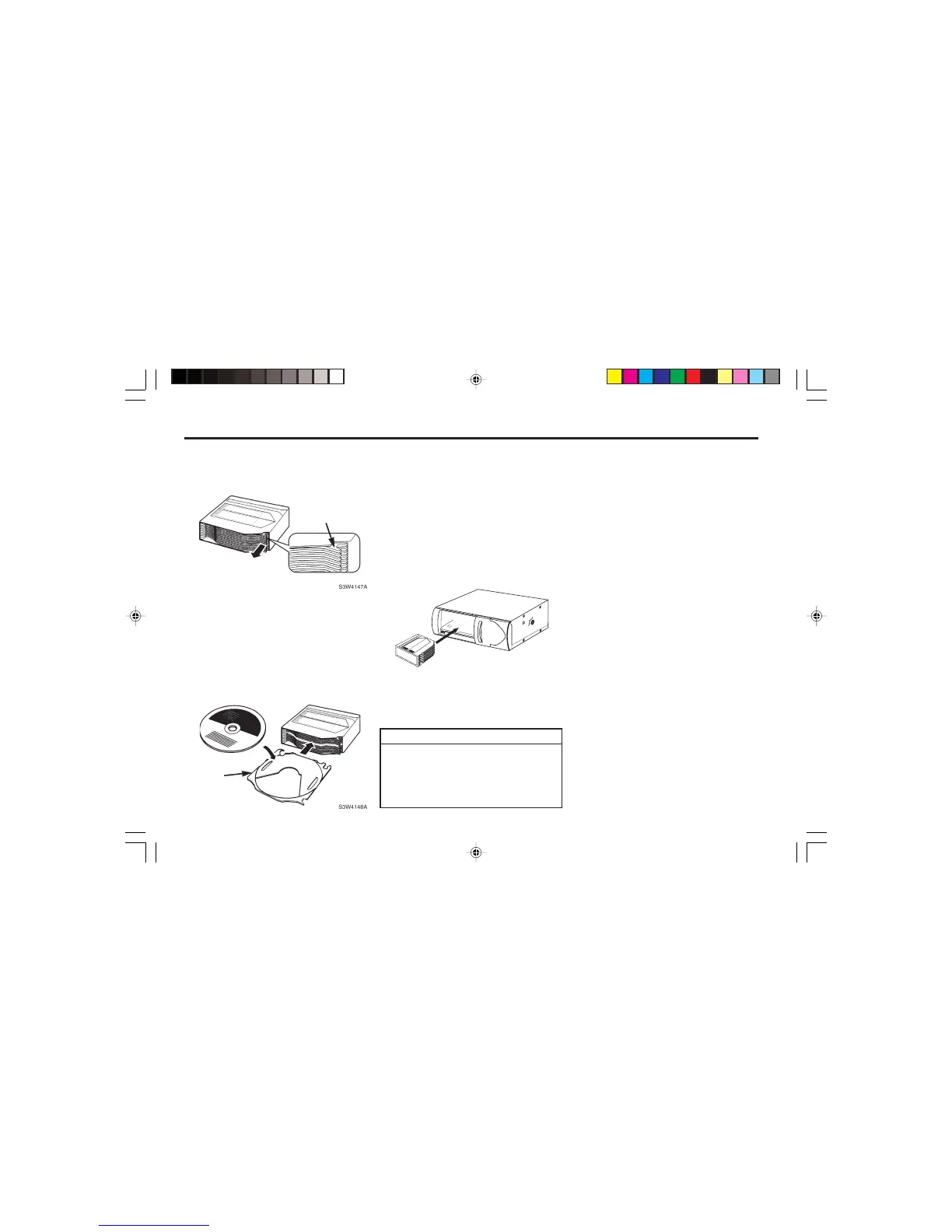
½ Place the CD – with its printed side
facing uppermost – onto the CD tray.
½ Carefully slide the CD tray back into
the magazine's guide slot. Make sure
that the CD tray is positioned straight
in the guide slot.
5. Inserting the magazine:
½ Slide the magazine back into the
changer until it clicks into place.
½ Close the door of the CD changer.
NOTE
• Always keep the door of the CD
changer closed.
• To remove a CD, proceed in the
same way as described.
Switching to CD changer mode
½ Keep pressing the SRC button (8) un-
til "CHANGER" appears in the dis-
play.
Playback begins with the first CD that
the CD changer detects.
Selecting CDs
To move up or down to another CD,
½ press the B or Y button (9) once or
several times.
Selecting tracks
To move up or down to another track
on the current CD,
½ press the << or >> button (9) once or
several times.
Quick track selection
To quickly select tracks backwards or
forwards,
½ keep one of the B / Y buttons (9)
pressed until fast-reverse / fast-for-
ward track selection begins.
3. Removing the CD trays:
½ Hold one of the CD trays by the
"hook" that is located on its right
hand side (arrow in the zoomed sec-
tion of the diagram), and carefully
pull the tray out in the direction of
the arrow.
4. Inserting a CD:
EJECT
S3W4149A



 To Next Page