4–56 CLIMATE CONTROL AND AUDIO SYSTEM
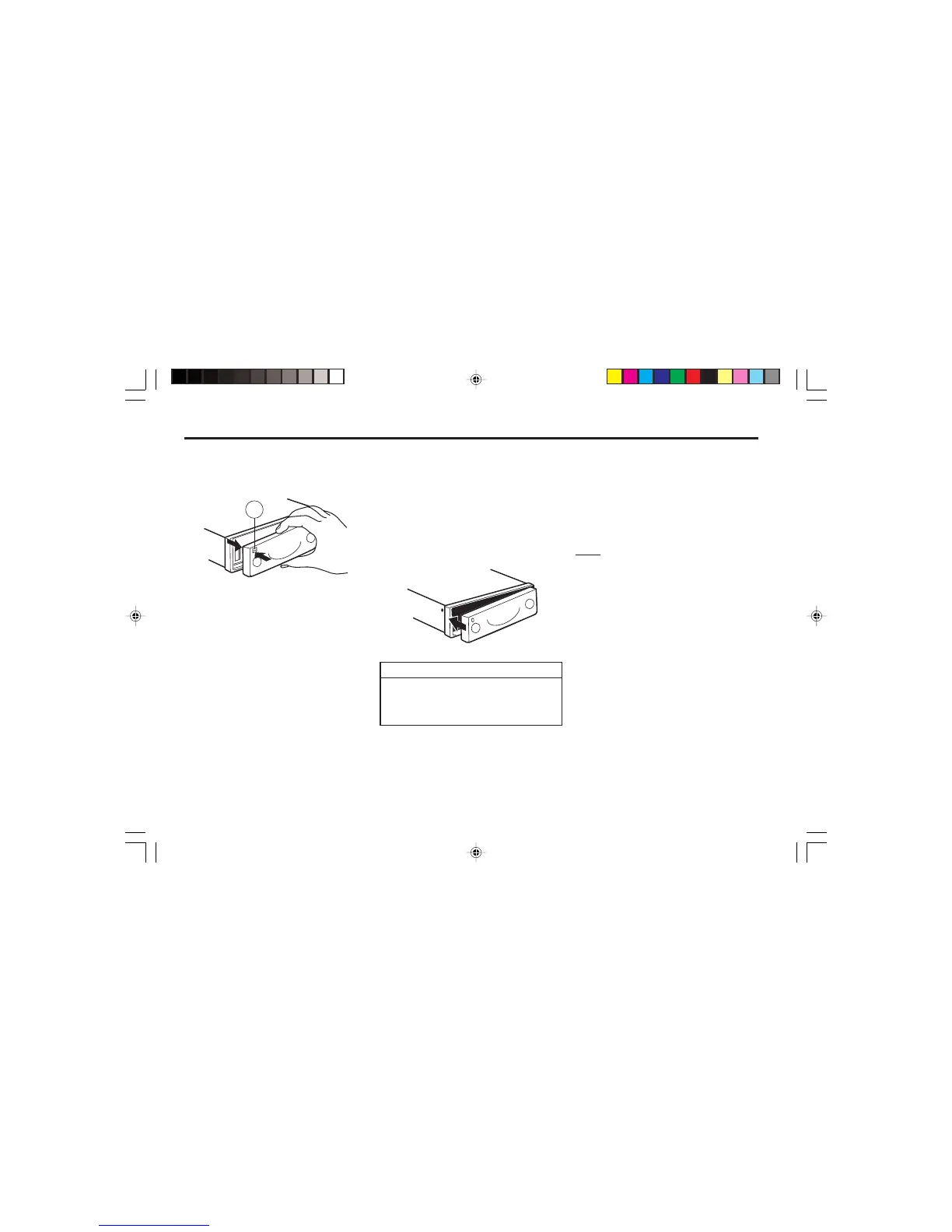
Attaching the control panel
½ Slide the control panel from left to
right into the unit's guide.
½ Press the left-hand edge of the con-
trol panel into the unit until it clicks
into place.
Detaching the control panel
½ Press the r button (2).
The control panel locking mechanism
opens.
½ First, pull the control panel straight
off the unit and then out towards the
left.
• The unit switches off after the con-
trol panel is removed.
• All the current settings are saved.
• Any cassette already inserted in the
unit remains there.
If the unit was still switched on when
you detached the control panel, the unit
will automatically switch on with the
last settings activated (i.e. radio, cassette
or CD changer) when the panel is re-
placed.
NOTE
When attaching the control panel,
make sure you do not press the dis-
play.
CARE AND CLEANING TIPS
Please observe the following points
when looking after and cleaning the
unit.
Never leave audio cassettes in one of the
following places:
• On top of the dashboard.
• In areas subjected to direct sunlight
or high temperatures.
• Near loudspeakers or strong mag-
netic fields.
Cleaning the audio head:
• To maintain the highest possible
sound quality when playing cassettes,
clean the audio head regularly.
• If you use a cleaning tape, read the
cleaning tape's operating instructions
before using.
2
S3W4152A
S3W4153A



 To Next Page