32
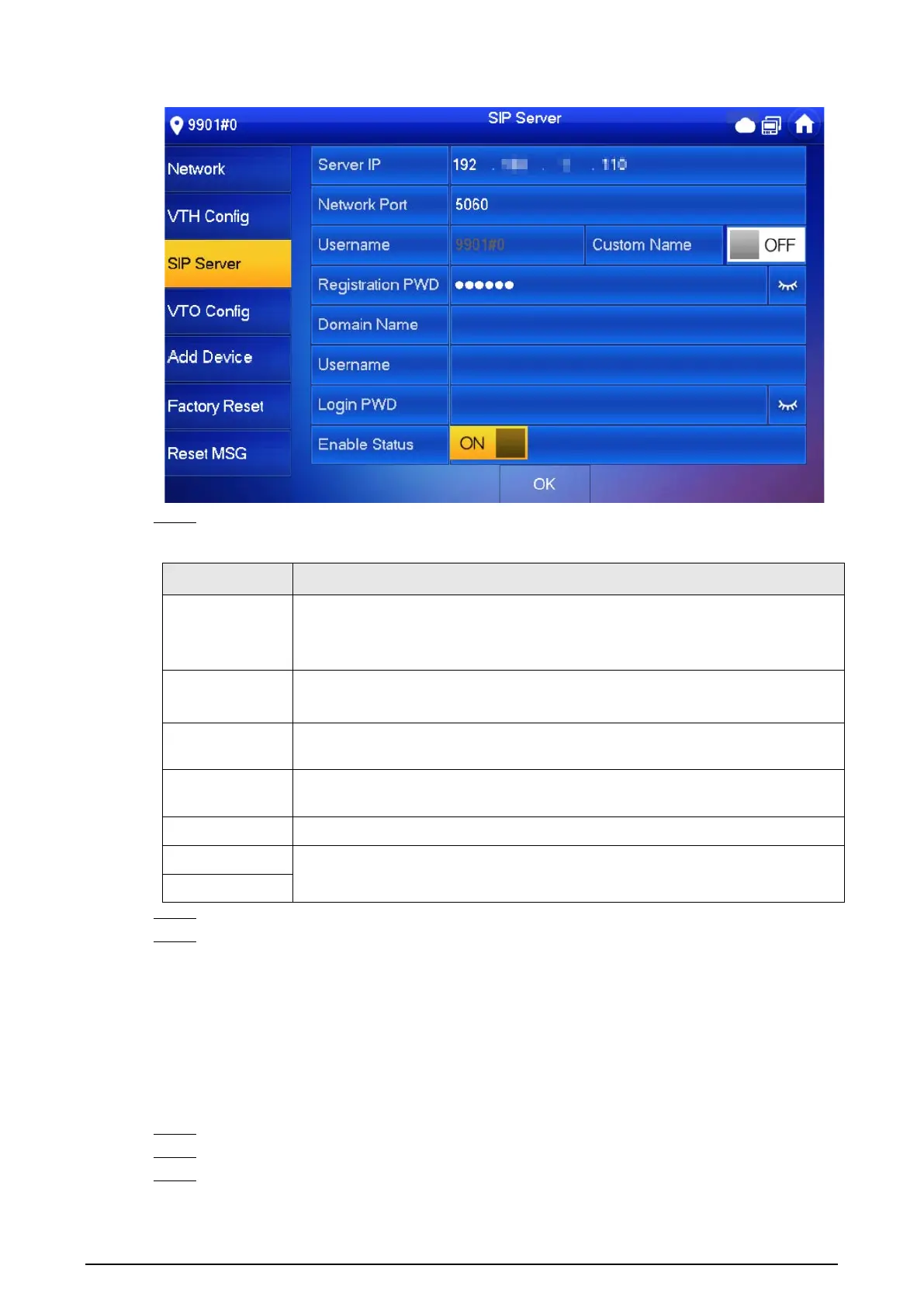
Figure 2-28 SIP server
Step 4 Configure the parameters.
Table 2-5 SIP server parameters
Parameter Description
Server IP
●
When a platform works as the SIP server, it is the IP address of the
platform.
●
When a VTO works as the SIP server, it is the IP address of the VTO.
Network Port
●
5080 when a platform works as the SIP server.
●
5060 when a VTO works as the SIP server.
Username
Keep it default, or turn on
Custom Name
, and then you can edit the
username.
Registration
PWD
Keep it default.
Domain Name When a VTO works as the SIP server, it must be VDP; otherwise, it can be null.
Username
SIP server login username and password.
Login PWD
Step 5 Turn on
Enable Status
to enable the SIP server function.
Step 6 Tap
OK
.
2.3.5 VTO Configuration
Background Information
Add VTOs and fence stations to bind them with the VTH.
Procedure
Step 1 On the main screen, select
Setting
>
Project Setting
.
Step 2 Enter password and tap
OK
.
Step 3 Tap
VTO Config
.


 To Next Page
 Loading...