36
3 VTH Screen Operation
3.1 Home Screen
There are two kinds of main screens.
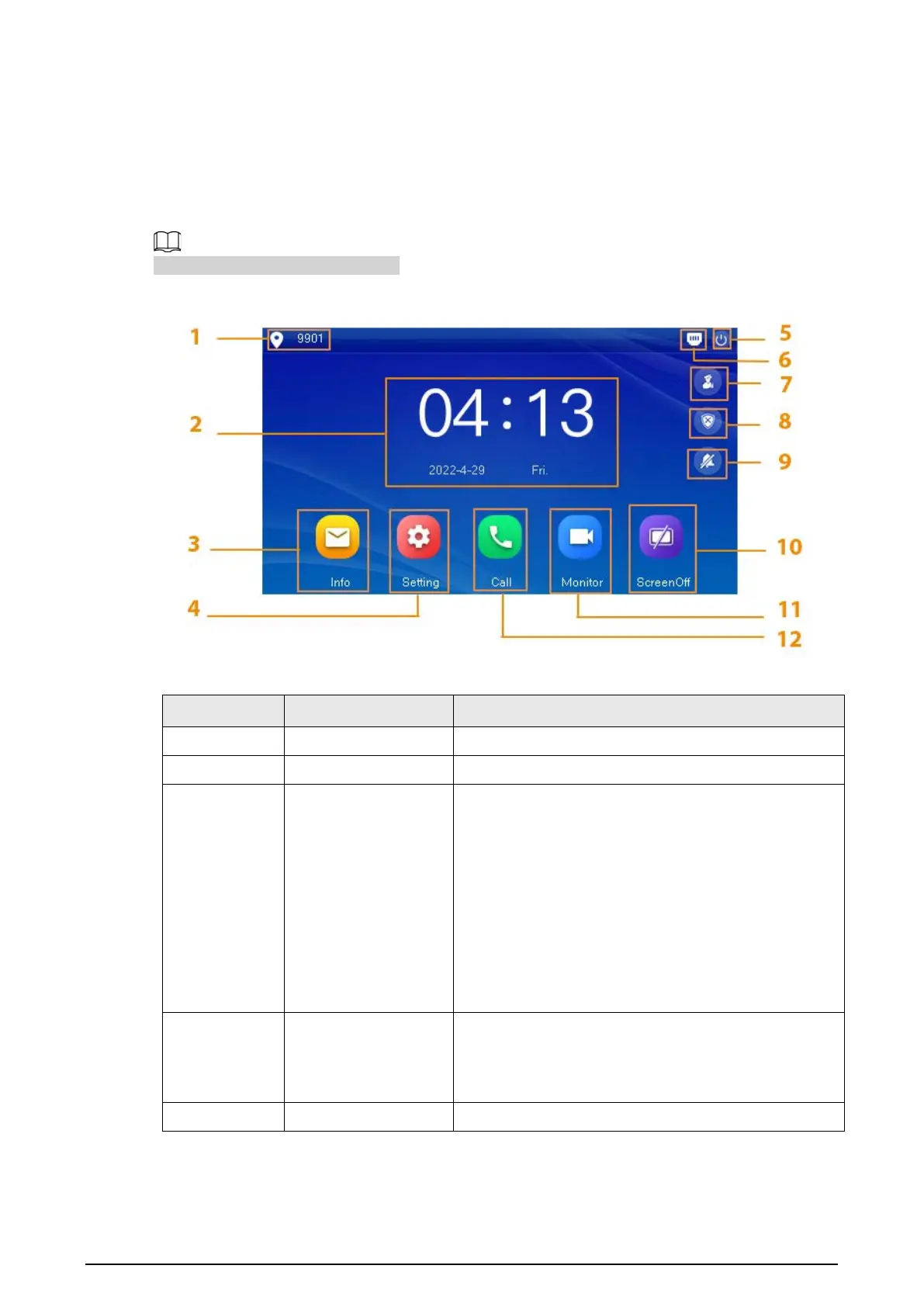
Figure 3-1 Home screen-type 1
Table 3-1 Home screen description (1)
No. Name Description
1 Room number Number of the room where the VTH is located.
2 Time and Date —
3 Info
●
View, delete and clear announcements or security
alarm information.
●
When the VTH does not have an SD card, and the
video-audio message uploading function is
enabled on the VTO, three tabs will be displayed,
Guest MSG
,
Guest Snap
and
Guest Video
. You
can view, delete and clear the messages.
●
When the VTH has an SD card, the
Video Pic
tab
will be displayed. View, delete and clear the
videos and pictures.
4 Setting
●
Tap to enter system setting.
●
Tap the icon, and then select
Project Setting
.
Enter the password you set during initialization,
and then go to the project setting screen.
5 Restart Tap the icon to restart the VTH.


 To Next Page
 Loading...