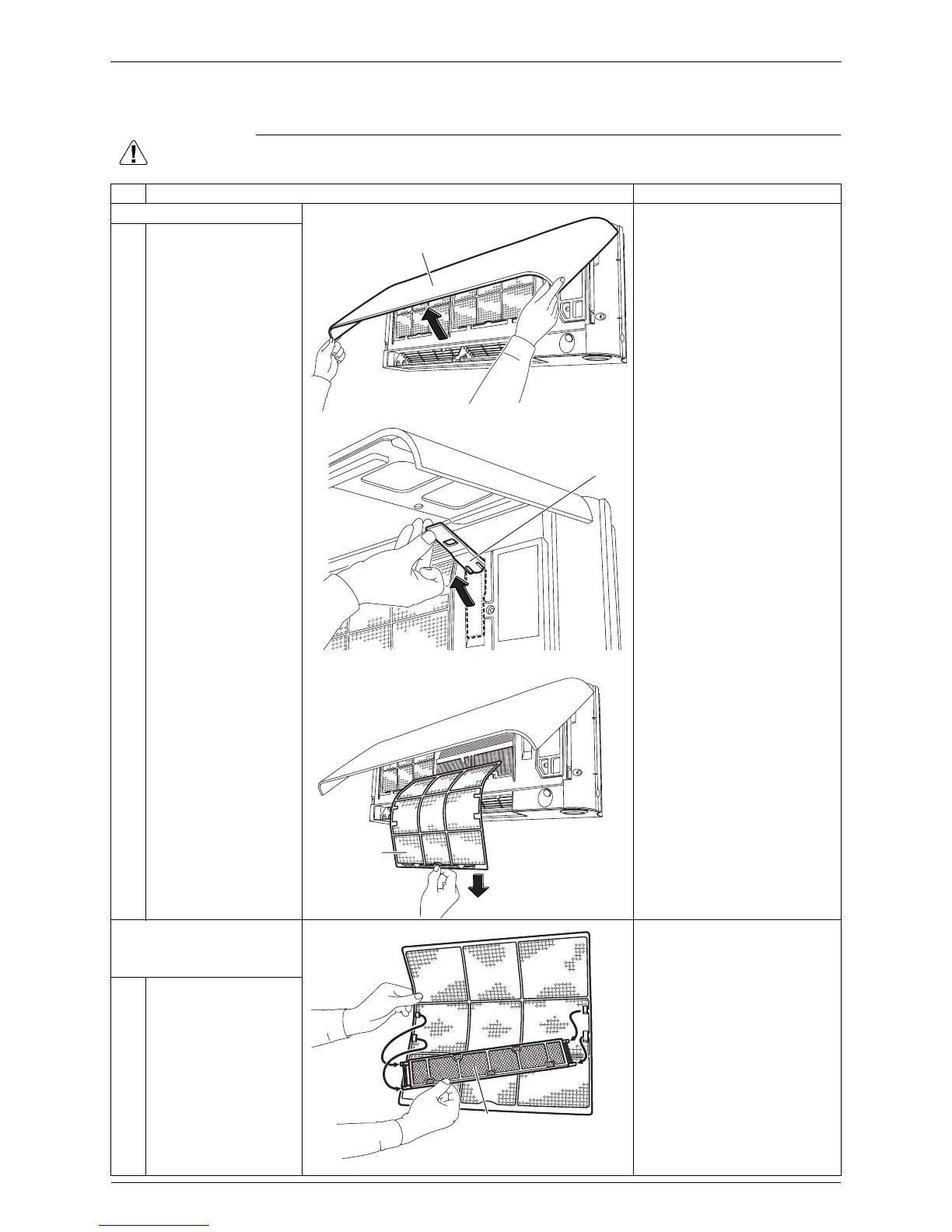
Air Filters / Front Panel Si041256
2 Removal Procedure
1. Air Filters / Front Panel
Warning
Be sure to wait for 10 minutes or more after turning off all power supplies before
disassembling work.
Step
Procedure Points
1. Remove the air filters.
1
Open the front panel.
2
Keep the front panel
open with the support
plate.
3
Remove the air filter.
The air filter is not marked
for difference between the
right and left sides.
The air filter can be set
easily by inserting it along
the guides.
Be sure to insert the hooks
(at 2 lower positions) when
installing the air filter.
2. Remove the Titanium
apatite photocatalytic air-
purifying filter.
The Titanium apatite
photocatalytic air-purifying
filter is not marked for
difference between the right
and left sides.
1
Remove the Titanium
apatite photocatalytic
air-purifying filter.
Front panel
(R12069)
(R12070)
Support plate
(R18232)
Air filter
Titanium apatite
photocatalytic air-
purifying filter
(R18168)



 To Next Page