ESIE09-05 Field Setting
Test Operation 107
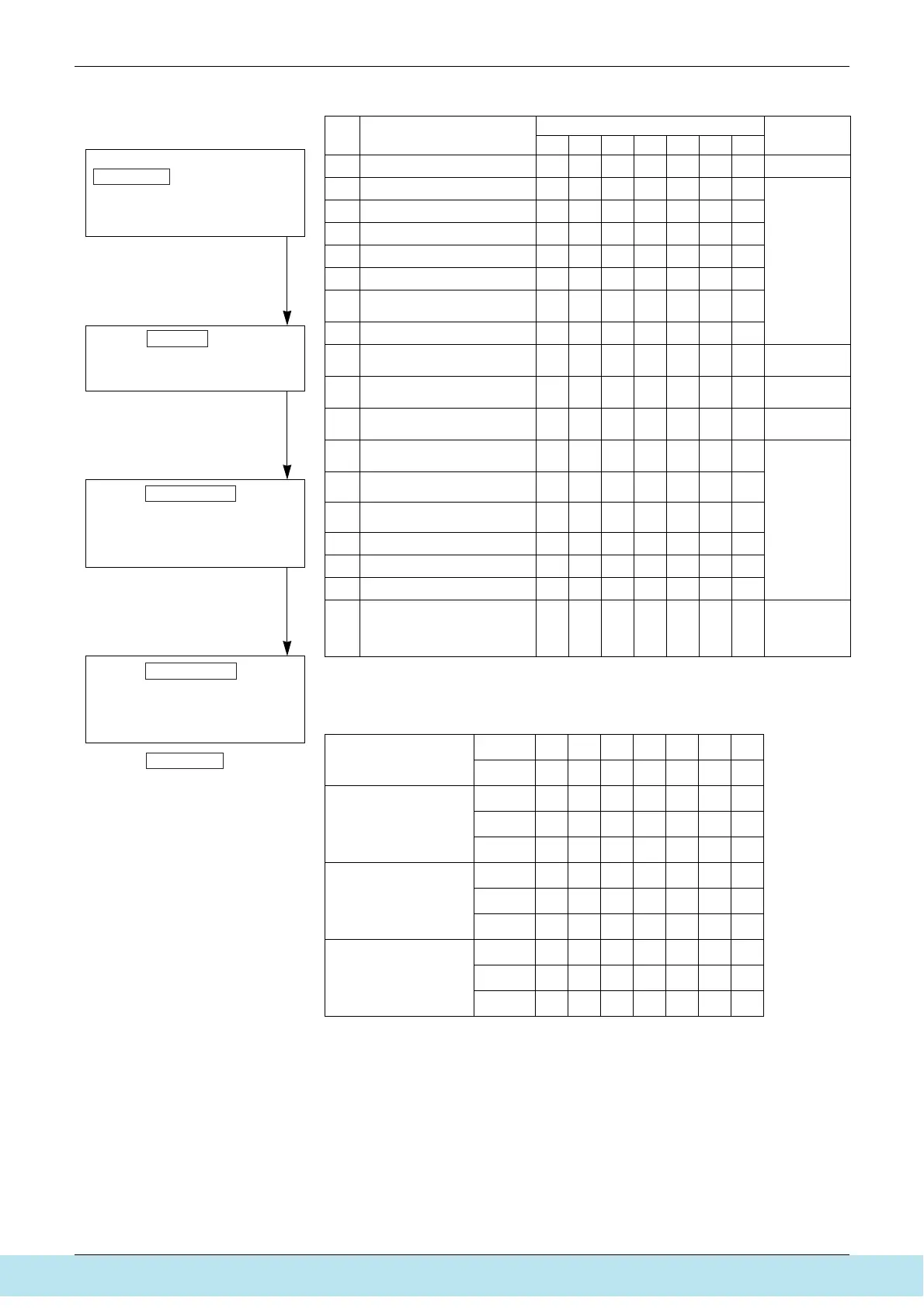
The numbers in the "No." column represent the number of times to press the
SET (BS2) button.
Setting item 0 Display contents of “Various setting”
No. Setting item
LED display
Data display
H1P H2P H3P H4P H5P H6P H7P
0 Various setting
cxxxxxx
See below
1 C/H unified address
cxxxxxw
Lower 6 digits
2 Low noise/demand address
cxxxxwx
3 Not used
cxxxxww
4 Airnet address
cx x xwx x
5 Number of connected AHUs
cx x xwxw
7
Number of connected zone units
(excluding outdoor and BS unit)
c x x x www
8 Number of outdoor units
cx xwx x x
11
Number of zone units (excluding
outdoor and BS unit)
cx xwxww
Lower 6 digits
12 Number of terminal blocks
cx xwwx x
Lower 4 digits:
upper
13 Number of terminal blocks
cx xwwxw
Lower 4 digits:
lower
14
Contents of malfunction (the
latest)
wx xwwwx
Malfunction
code table
Refer to page
161, 162.
15
Contents of malfunction
(1 cycle before)
w x x wwww
16
Contents of malfunction
(2 cycle before)
wxwx x x x
20 Contents of retry (the latest)
wxwxwx x
21 Contents of retry (1 cycle before)
wxwxwxw
22 Contents of retry (2 cycle before)
wxwxwwx
25
Normal judgment of outdoor units
PC board
cxwwx xw
Lower 2 digits:
wx
Abnormal
xw
Normal
xx
Unjudgment
EMG operation /
backup operation
setting
ON
cxxwxxx
OFF
cxxxxxx
Defrost select setting Short
cxxxwxx
Medium
cxxxcxx
Long
cxxxxxx
Te setting H
cxxxxwx
M
cxxxxcx
L
cxxxxxx
Tc setting H
cxxxxxw
M
cxxxxxc
L
cxxxxxx
c. Monitor mode
<Selection of setting item>
<Confirmation on setting contents>
To enter the monitor mode, push the
MODE (BS1) button when in
“Setting mode 1”.
Push the SET (BS2) button and set
the LED display to a setting item.
Push the RETURN (BS3) button to
display different data of set items.
Push the RETURN (BS3) button and
switches to the initial status of
“Monitor mode”.
∗ Push the MODE (BS1) button and
returns to “Setting mode 1”.
(V2765)
Все каталоги и инструкции здесь: http://splitoff.ru/tehn-doc.html



 To Next Page