386
FTX-N/U, FVXS-N, FDMQ-R Series EDUS091558E
1P398933-1C
1.
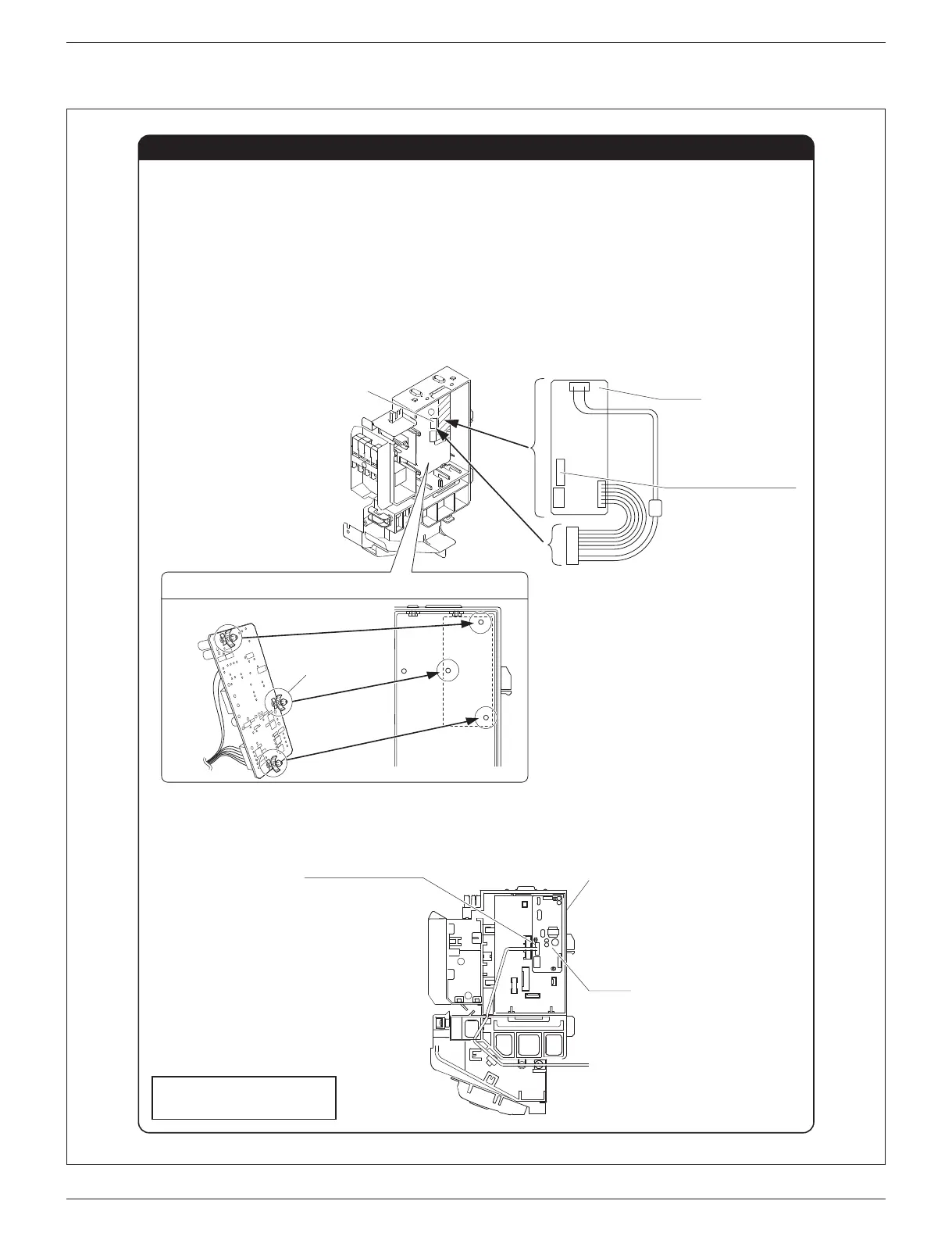
Install the HA PCB (this set). (See Fig. 1)
1) Install the HA PCB (this set) to the electrical wiring box.
2) Insert the connector of the HA PCB (this set) to the connector (S403) on the electrical wiring box.
2.
Connect the HA connection cord. (See Fig. 1 and 2)
1) Insert the HA connection cord into the HA connector “S21” (white) on the HA PCB (this set).
2) Route the HA connection cord as shown in Fig. 2.
Connecting HA PCB
Fig. 1 Connection points of the HA PCB
Fig. 2 Routing HA connection cord
HA PCB
HA connector “S21” (white)
Installing HA PCB on the electrical wiring box
Electrical wiring box
Back of the HA PCB
Spacer
S403
Insert the cord
into the S403
connector.
HA connector “S21” (white)
HA PCB
Electrical wiring box
After connecting the HA PCB (this set),
return all removed parts to their original
positions.




 To Next Page