3-37
Voltage indicator
(
Battery check meter
)
Rechargeable battery
(
Battery fixing plate
)
3.5.4 Battery replacement (Rechargeable battery)
First, turn off the power supply to the refrigeration unit. Then, detach the cover of battery and replace the
battery. At this time, be sure to use the specified type of battery.
· A Ni-Cd battery is used. Remove the used battery from the refrigeration unit, and
then safely collect and dispose it.
· Before scrapping the refrigeration unit, be sure to remove the battery from the unit.
CAUTION
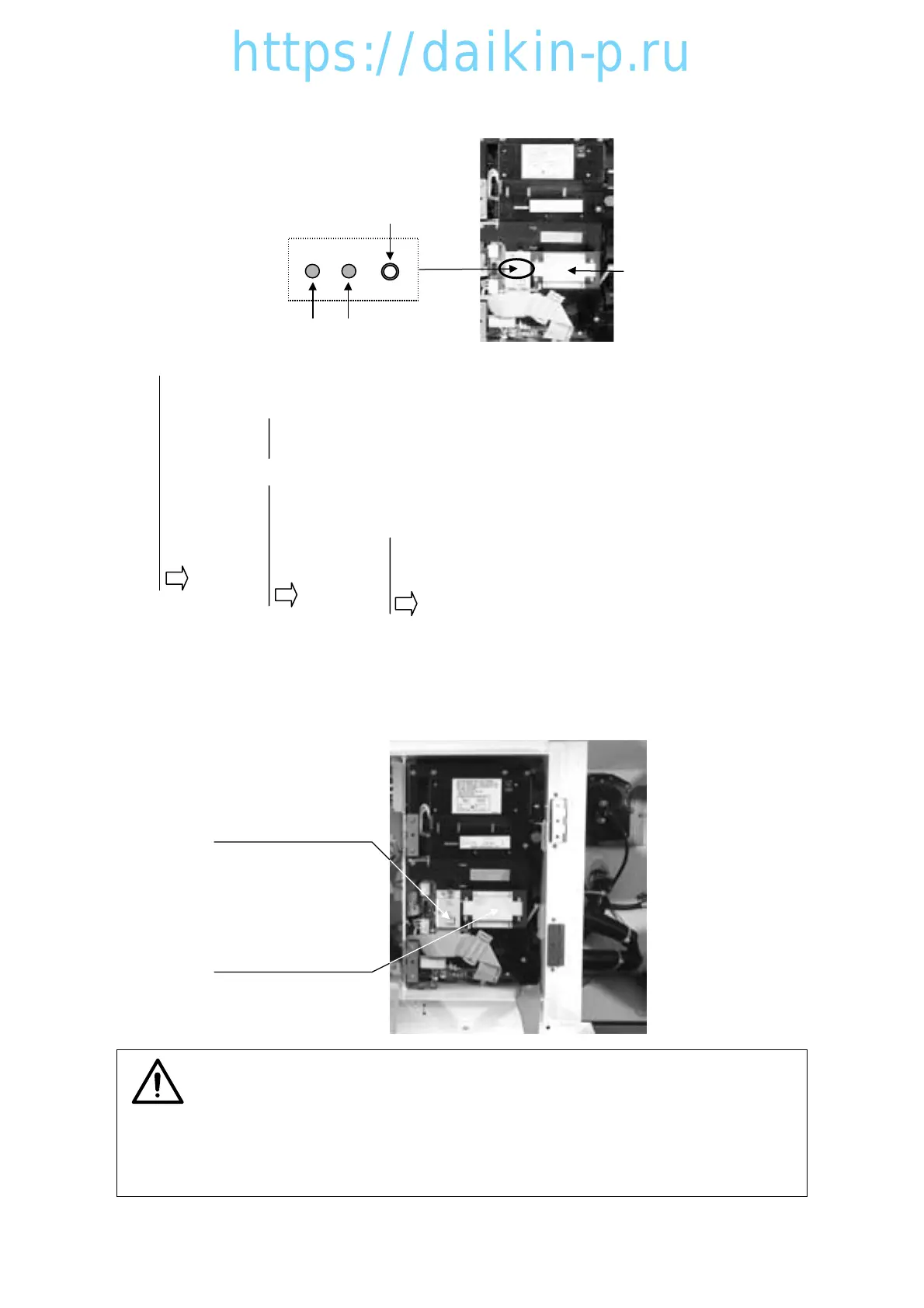
2) Battery check
Rechargeable Battery
Battery check button
Red Green
LED
Green : Full charge
Red : Check again after charging for 8 hrs, then ---
Green : Full charge
Red : Replace the battery
N o light :Check again after charging for 8 hrs, then ---
Green : Full charge
Red or No light : Check again after charging for another 4 hrs, then ---
Green : Full charge
Red or No light : Replace the battery
1st check
2nd check
3rd check
To test residual voltage, check color of LED by pressing battery check button.
03LXE10E-A(33-47)07.2.232:21PMページ3-37




 To Next Page