AIR CONDITIONER FEATURES
Electronic control operating instructions
Before you begin, thoroughly familiarize yourself with the control panel and remote controller and all its
functions, then follow the symbol for the functions you desire.
The unit can be controlled by the unit control panel alone or with the remote controller.
NOTE:
This manual does not include Remote Controller Operations, see the <<Remote Controller Instruction>>
packed with the unit for details.
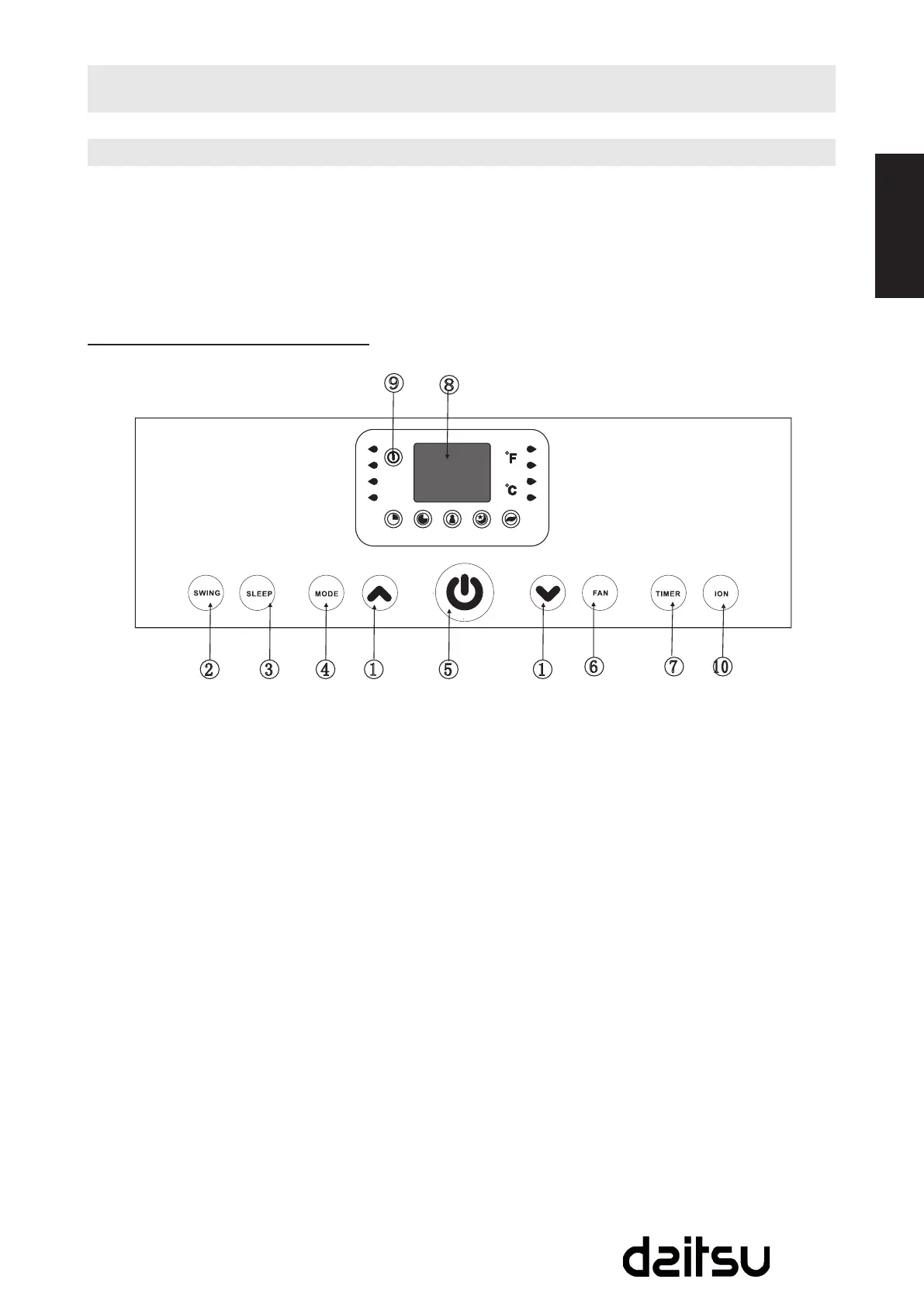
Operation panel of the Air Conditioner
UP () and DOWN () button
Used to adjust (increasing/decreasing)
temperature settings (1ºC/2ºF increments) in
a range of 17ºC (62ºF) to 30ºC (88ºF) or the
TIMER setting in a range of 0~24hrs.
NOTE:Thecontroliscapableofdisplaying
temperature in degrees Fahrenheit or degrees
Celsius. To convert from one to the other, press
and hold the Up and Down buttons at the same
time, for 3 seconds.
SWING button
Use this button to initiate the auto swing feature
or lock the louver at the desired position .
SLEEP button
Used to initiate the SLEEP operation.
MODE select button
Selects the appropriate operating mode. Each
time you press the button, a mode is selected in
a sequence that goes from AUTO, COOL, DRY,
HEAT(coolingonlymodelswithout)andFAN.
The mode indicator light illuminates under the
different mode setting.
1
7
5
6
2 3
8
4
9
POWER
TIME
ON
TIME
OFF
FO LLOW
ME
SIEEP
ION
AUTO
HEAT
C OOL
DRY
FA N
HIGH
LO W
MED
1
10
POWER button
Power switch on/off.
FAN button
Press to select the fan speed in four steps-LOW,
MED (on some models), HIGH and AUTO.
The fan speed indicator light illuminates under
differentfansettingsexceptAUTOspeed.When
select AUTO fan speed, all the fan indicator
lights turn dark.
TIMER button
UsedtoinitiatetheAUTOONstarttimeand
AUTO OFF stop time program, in conjunction
with the & buttons.
LED Display
-Shows the set temperature in “ºC” or “ºF” and
theAuto-timersettings.WhileonDRYandFAN
modes, it shows the room temperature.
Fig. 3



 To Next Page