Dakewe(Shenzhen)Medical Equipment Co,. Ltd 24 V4.1
5.1.2 Slice and Retouch Setting
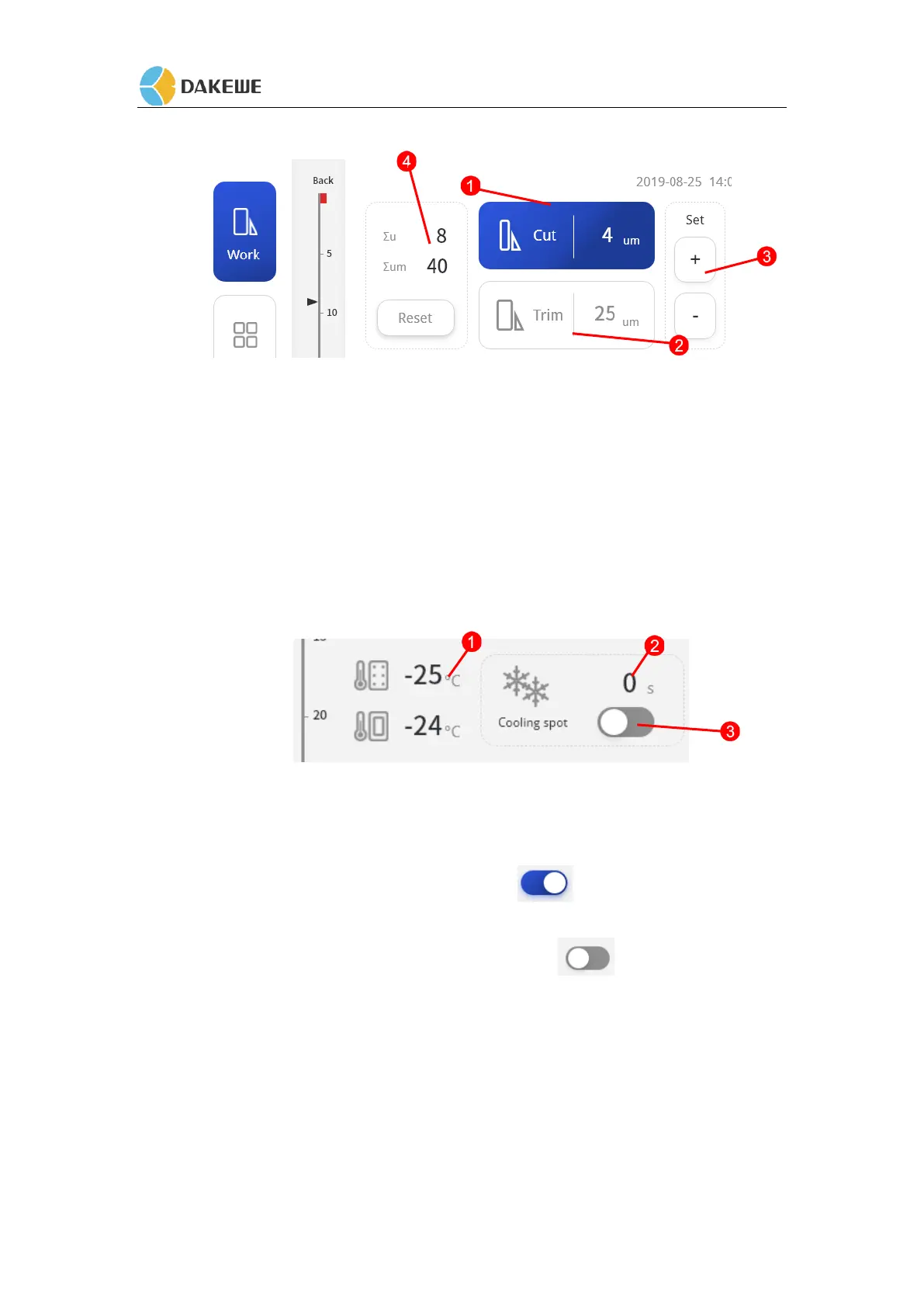
1. The background color is on, which means the slice state, indicating that the current slice
thickness is 4um.
2. The background color is on, which means the Trim state, indicating that the current
retouching thickness is 25um.
3. Indication 3 is slice, trim thickness value +/- adjustment key.
4. "Indication 4" is the cumulative value of the number of slices and slice thickness. Touch
"Reset" to clear the data.
5.1.3 Cold Stage Temperature Setting / Semiconductor Cooling Function
1. The current temperature of the cold station.
2. The Semiconductor cooling countdown time
3. It is semiconductor cooling. After the touch icon , the semiconductor cooling is
turned on, the turn-on time is 300s, and the countdown is automatic. When the value is 0,
the semiconductor cooling is automatically turned off , and the icon is touched
before turn-off, and the semiconductor cooling function is closed.
The semiconductor cooling chip switch must meet two conditions:
1: cold station temperature is lower than -10 °C.
2: The compressor is in the startup state.
If the above two conditions are not met, the semiconductor refrigeration time will be fixed at
300S, and the countdown will not start,it will automatically turn on when the startup conditions
are met.


 To Next Page