Dakewe(Shenzhen)Medical Equipment Co,. Ltd 26 V4.1
4: In order to avoid accidentally closing the glass door to enter the cooling state during the
"drying" process, it is recommended to set the target box temperature to 40°C when
opening the "drying" to prevent the equipment from entering the cooling state after the glass
door is accidentally closed.
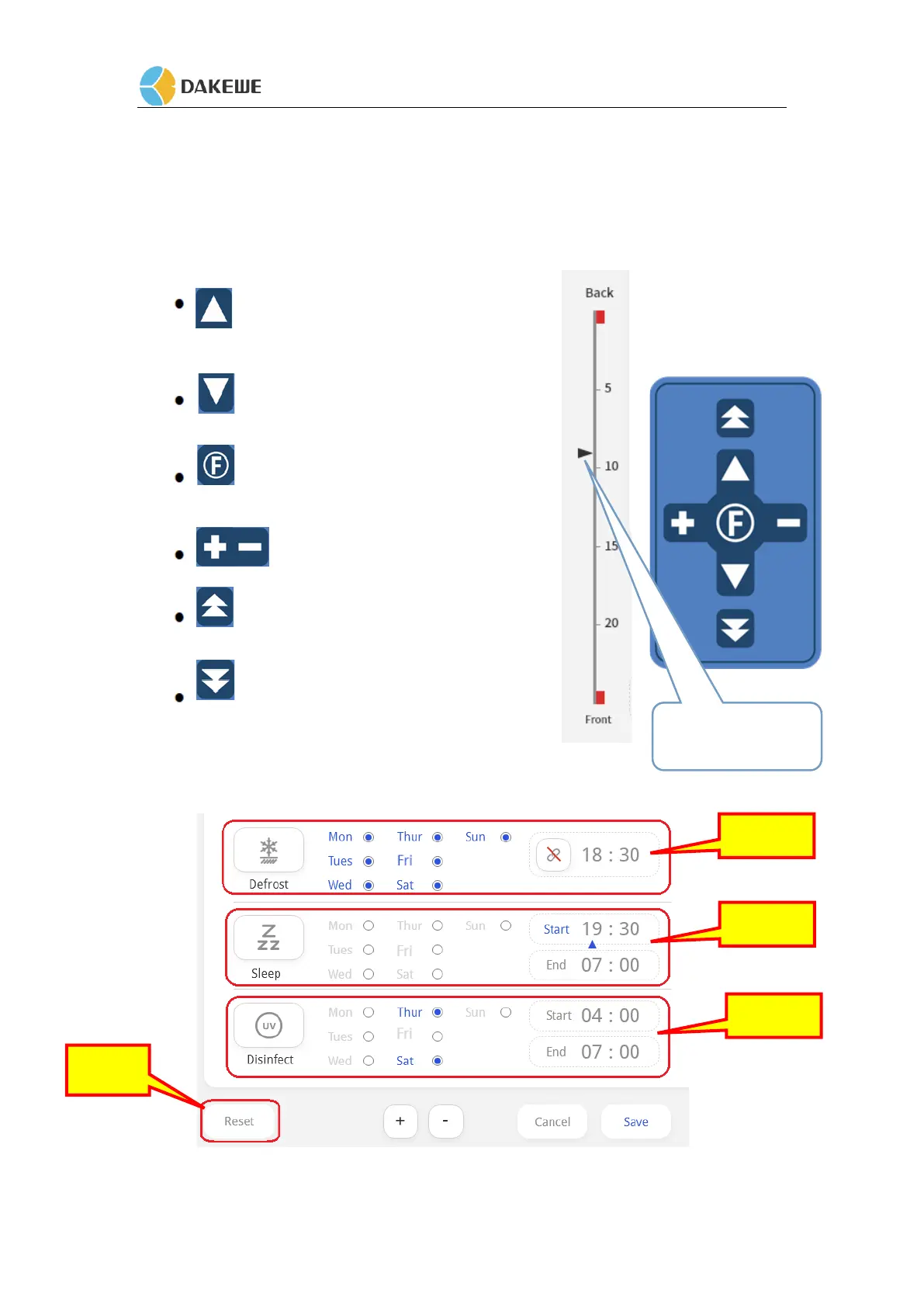
5. 2 Button Panel
The chuck core moves back slowly, and the
position icon moves slowly in the "Back" direction;.
The chuck core advances slowly, and
the position icon moves slowly to the "Front" direction;
Press this key to switch the sectioning/retouching
mode cyclically;
Thickness value adjustment.
The chuck core moves back quickly, and the
position icon moves quickly in the "Back" direction
The card head core moves forward quickly,
and the position icon moves quickly to the "Front" direction
5. 3 Function Setting and Introduction
During operational process, the screen enters the function setting interface.


 To Next Page