Control Equipment Conguration
15
Ethernet Control Port
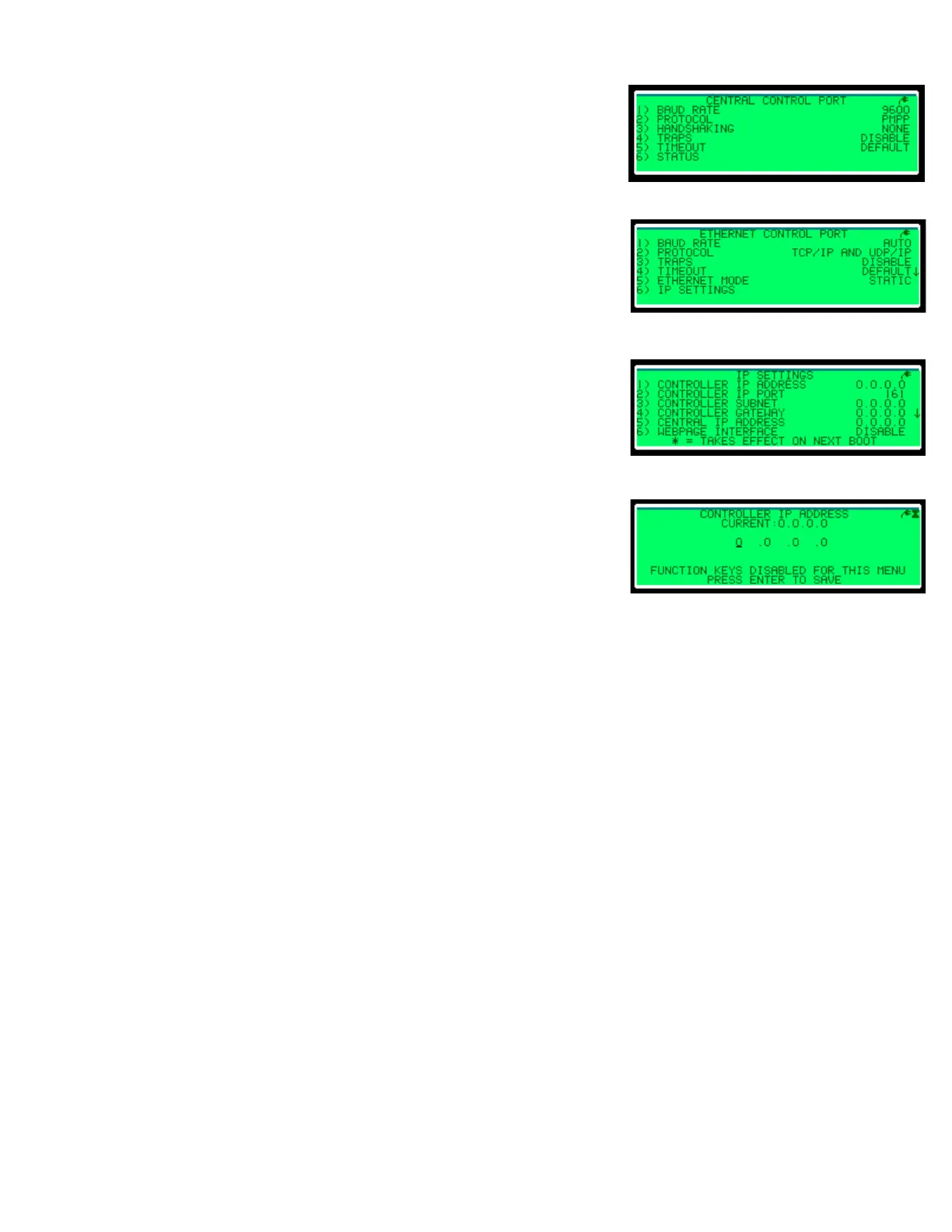
The Ethernet port conguration is shown in Figure 11, and
it controls settings for the Ethernet port on the controller.
Once an option is set, an asterisk appears next to the
entry, showing that this value will be changed. All
changes take effect immediately after exiting the
Ethernet Control Port menu. The controller may
automatically reset to load the changes.
• Daktronics recommends setting the Baud Rate to
Auto, but if communications are failing, it may be
set to Full or Half Duplex and 10 Mbps or 100 Mbps.
• Standard Protocol is TCP/IP and UDP/IP, but the
controller can use a port server with a serial TCP/IP
protocol as well.
IP Settings
IP addresses and ports may be changed in the IP Settings
menu; refer to Figure 12. Once an option is set, the
controller performs a soft reset.
Press the number of the eld to change. Figure 13
illustrates the Controller IP Address menu. Then enter
the IP address and press Enter to save.
Logging Out
After conguring your DDMS set, push the Local/
Remote toggle switch to log out of the DDMS controller.
Figure 10: Central Control Port
Figure 11: Ethernet Control Port
Figure 12: IP Settings
Figure 13: Controller IP Address



 To Next Page
 Loading...