49
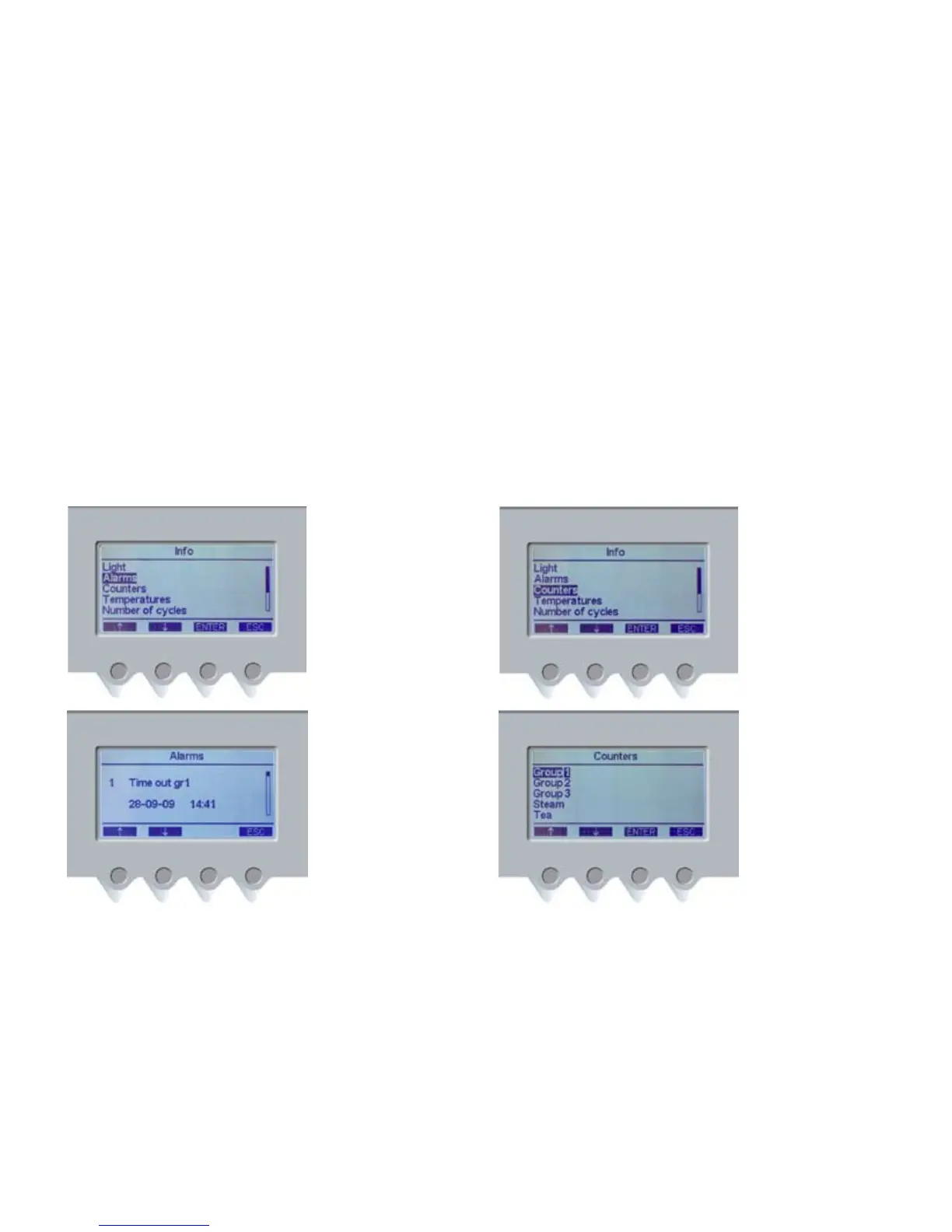
1. To access this menu
from the main menu,
press INFO (PD4) and then
navigation buttons (PD1)
and (PD2) to select the
ALARMS heading. Press
ENTER (PD3) to access the
ALARMS menu.
2. Example of triggered
alarm: the first line shows
alarm description and
progressive number (no.1).
The second line shows the
date and time in which
the alarm was triggered.
All memorized alarms
can be scrolled through
by using the navigation
buttons (PD1) and (PD2).
The alarm memory can
not be deleted by the user,
but only by the technical
service. Press ESC (PD4) to
return to the main menu.
1. To access this menu
from the main menu, press
INFO (PD4) and then the
navigation buttons (PD1)
and (PD2) to select the
COUNTERS heading.
Press ENTER (PD3) to access
the COUNTERS menu.
2. Use navigation buttons
(PD1) and (PD2) to select
the required heading
and press ENTER (PD3)
to display the chosen
counter.
Press ESC (PD4) to return
to the main menu.
ALARMS MENU
This menu displays any possible anomalies in machine
functioning.
COUNTERS MENU
This menu displays coee-, hot water- and MCS counters.













 To Next Page