62 Operational Reference Genie HM-HC Series-GigE Vision Camera
. . .
. . .
0
1
2
3
252
255
254
253
255
254
253
252
2
1
0
3
Output
Circuit
Sensor &
A/D
Circuit
Pixel
Data
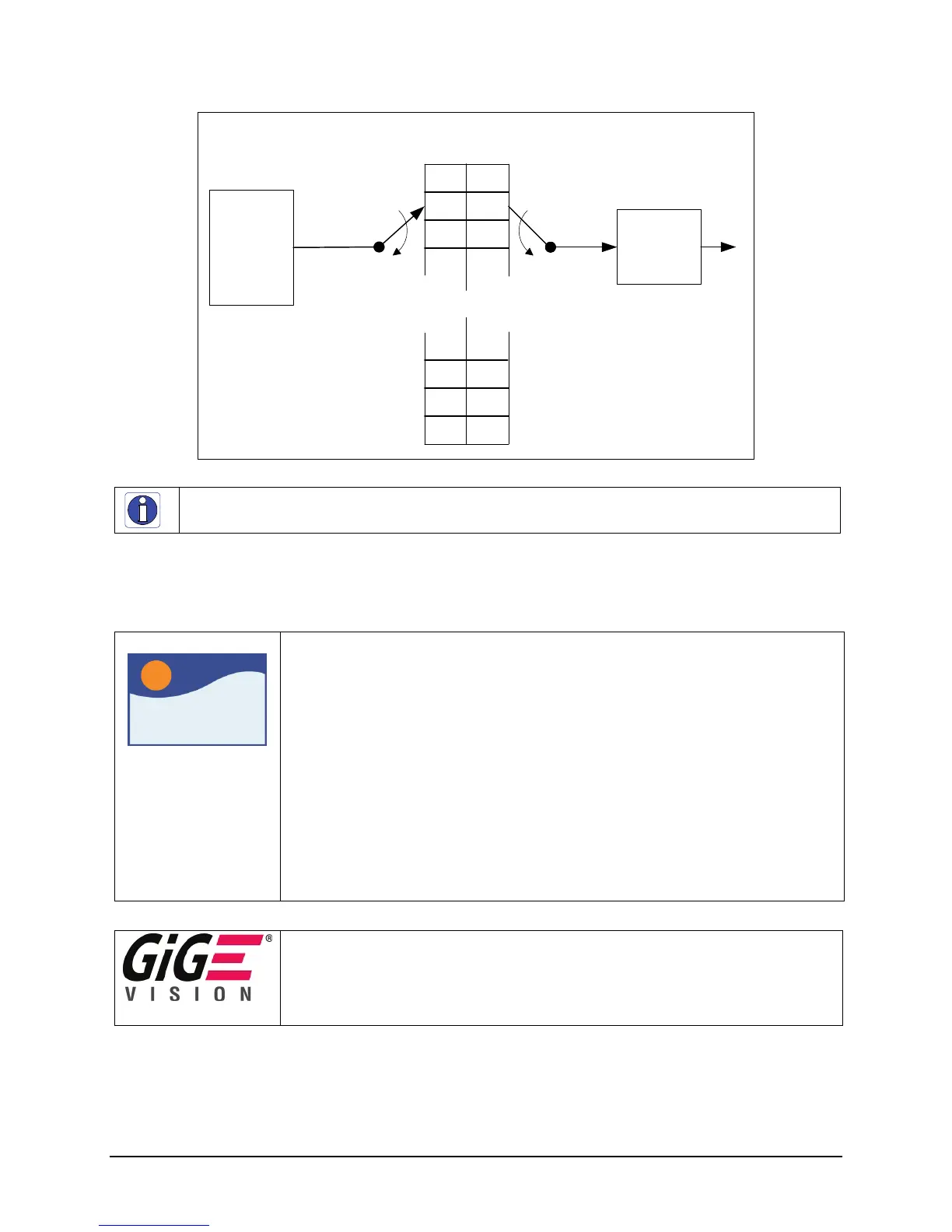
Simplified Genie LUT Block Diagram
(8-bit example)
Programmed as
Invert Function
Simplified 8-bit LUT Block Diagram
Note: LUTs are not available on the HC camera models.
LUT Control via Sapera LT or GigE Vision Compliant Applications
Sapera
Genie Sapera parameters for LUT control:
LUTEnable = {FALSE, TRUE}
LUTFormat = {Mono 8, Mono 10 – Unsigned}
LUTNumberEntries = Number of entries in the LUT
(256 for an 8-bit LUT, 1024 for a 10-bit LUT)
LUTData = Array of data representing the LUT content
Sapera++ classes used:
SapLut Class implements LUT management.
BOOL SapAcqDevice::SetFeatureValue(const char *featureName, SapLut *featureLut)
BOOL SapAcqDevice::SetFeatureValue(int featureIndex, SapLut *featureLut)
BOOL SapAcqDevice::GetFeatureValue(const char *featureName, SapLut *featureLut)
BOOL SapAcqDevice::GetFeatureValue(int featureIndex, SapLut *featureLut)
In CamExpert, these features are available from the “Pre-Processing” menu.
XML features for LUT control:
LUTSelector = Select the LUT to control { Luminance=0 }
LUTEnable = Enable the selected LUT { False, True }
LUTIndex = LUT data index { 0 to 255 for 8-bit LUT, 0 to 1023 for a 10-bit LUT }
LUTValue = Value of selected LUT element at index LutIndex.











 To Next Page