DIS User Manual
User Manual CU 6105.docx
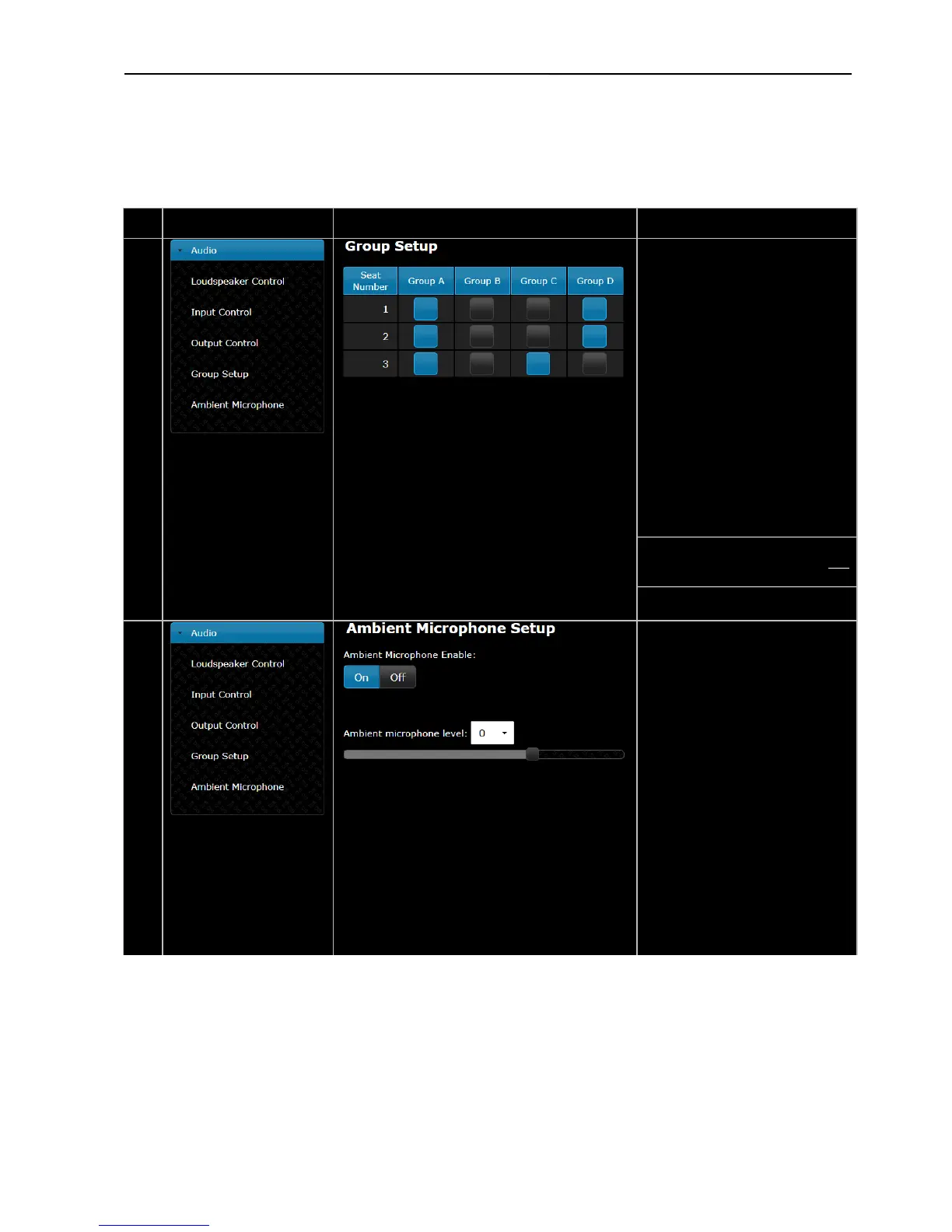
Group Setup –
The Conference units can be
assigned individually to four
‘Group A’ is always used as the
source to the built-in loudspeakers.
A unit can be selected in ‘Group A’
and/or in one of the other three
groups. If a unit is not selected in
‘Group A’ the audio from this unit
cannot be available in the built-in
loudspeakers.
The ‘Group’ facility is used if
separate microphones are required
to be recorded or if external
present in ‘Group A’ and in one
other group.
Ambient Microphone –
Used to enable/disable a connected
AM 6040 Ambient Microphone Unit.
When ‘enabled’, the Ambient Noise
Microphone is active.
When ‘Audio In 1 or 2’ is routed to
‘Loudspeaker’’ and ‘Audio In
Volume’ is set to a value between
40dB and 0dB the microphone will
be disabled.
If ‘Audio In 1 or 2’ is not routed to
‘Loudspeaker’’ or ‘Audio In Volume’
is set to off, the microphone will
stay disabled until enabled.
Please refer to section ‘6.7 Ambient
Microphone’ for more details
about using an ambient
microphone.



 To Next Page