DIS User Manual
User Manual CU 6105.docx
in the seat.
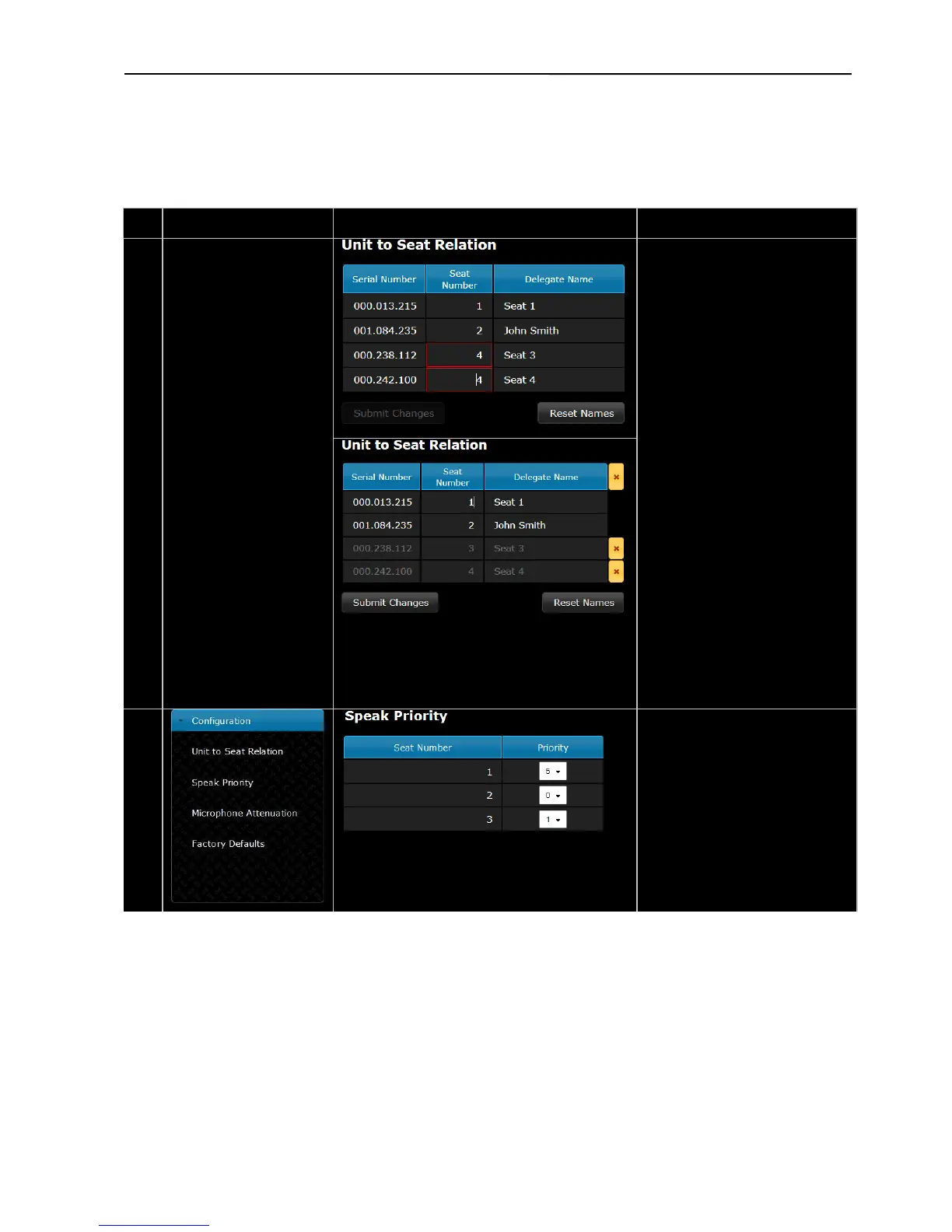
After assigning names, the ‘Submit
Changes’ has to be activated.
The ‘Seat Number’ can be changed
as well. If the same number is typed
into two seats, it is marked with a
red frame and the ‘Submit Changes’
button is disabled. The ‘Seat
Number’ is a numerical in the range
1 to 65535.
When the mouse curser is moved to
a seat number field, the red light
ring in the microphone in the
flashing until the curser is moved to
another field or ‘Submit Changes’
has been activated. This feature
If units are disconnected they are
marked with a yellow indication in
the list. The units can be removed
from the list either individually or
all by clicking the yellow button
next to the title.
The ‘Reset Names’ button delete all
assigned delegate names.
Speak Priority –
Each unit can be assigned an
individual speak priority from 0 to
5.
As default a Chairman Unit has
speak priority 5 and a Delegate Unit
has speak priority 1.



 To Next Page