23
SettingtheRecordQuality
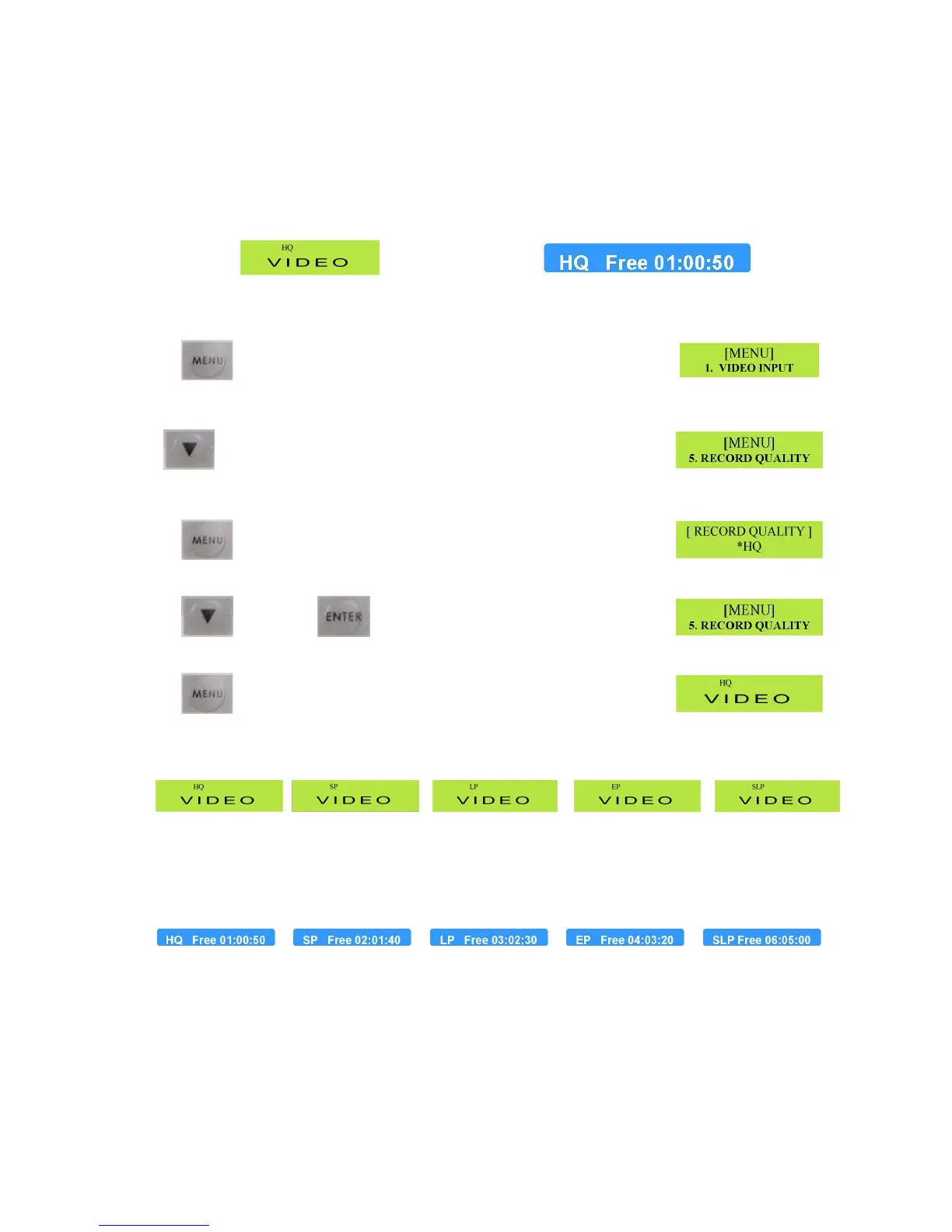
TheMP6000MDhasfiveRecordingQualityoptionsHQ,SP,LP,EP,SLP.TheSelectedoptionis
displayedintwoways.
LCDDisplay OnScreenforfiveseconds
WewillconcentrateontheLCDDisplay
TochangetheQualitysetting,pressthemenubutton.
TheLCDDisplayshouldshowtheSetUpMenu
Nowpressthedownarrowfourtimes.
x4 TheLCDDisplayshouldnowshowtheRecordQualitysetting
PressthemenubuttontocalluptheRecordQualityoptions.
TheLCDDisplayshouldlooklikethis.
Pressthedownarrowbuttontoselecttherecordqualityyourequireandthenpresstheenterbutton
Then TheLCDdisplayshouldlooklikethis
Finallypressthemenubuttontoexitsetupandreturntogeneraldisplay
TheLCDdisplayshouldlooklikethis–Theselectedrecord
qualitywillbedisplayed(inthiscaseHQ)
AsyouselecteachdifferentRecordQualityoptionyouwillnoticethattheonscreendisplayindicateshow
manyminutesofrecordtimeareavailableattheselectedquality,thisinformationbarisdisplayedforfive
seconds.
ThefiguresabovearetypicalforanemptyDVD+Rdisc.



 To Next Page