40
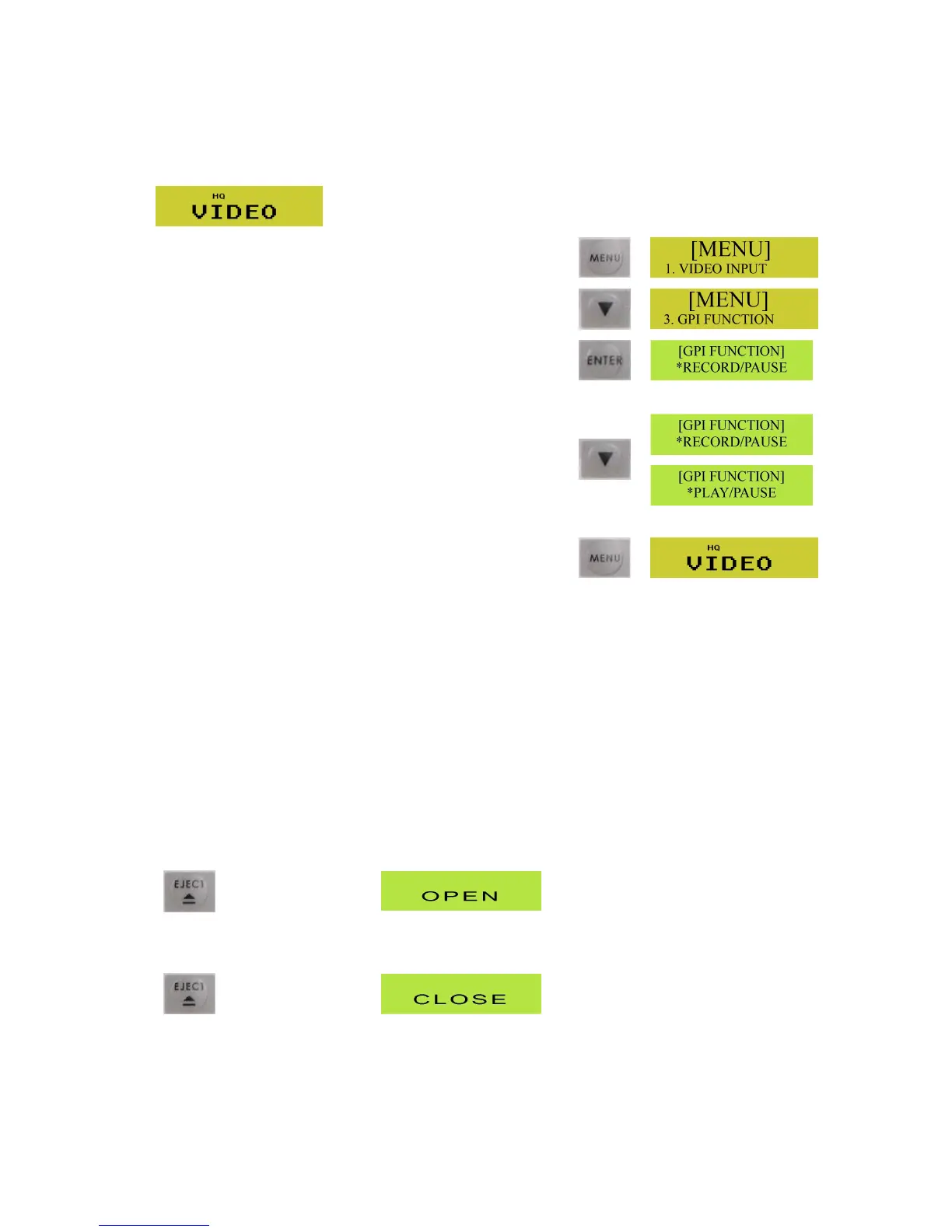
TheGPIFunctioncanbesettoeithercontrolPlay&PauseorRecord&Pause.
ToselecttheGPIFunctionyourequire,startwiththeLCDDisplayshowingtheGeneralDisplay
PresstheMenubuttontocalluptheMenuOptions
UsetheDownArrowbuttontonavigateto3.GPIFunction
PresstheEnterbuttontoentertheGPIFunctionmenu
UsetheDownArrowbuttontoselecteitherRecord/Pauseor
Play/Pause
Onceyouhavehighlightedtherequiredmode,presstheMenu
buttontosaveandexit.
Onceset,thesettingwillremainasthedefaultsetting.
Add itionalFeaturesofDVD+RWDiscs
ThereareafewextrafeaturesthatareonlyavailablewithDVD+RW(Rewritable).
FormattingaNewDVD+RWDisc
IfyouareusingabrandnewDVD+RWdiscthathasneverbeenrecordedpreviously,itmustfirstofallbe
formatted.TheMP6000MDwilldothisautomatically
PresstheEjectbutton,themessageOPENwillbedisplayedontheLCDdisplay,andthedisctraywill
open.
PlaceaDVD+RWdisconthedisctray;label/printedsideup.
PresstheEjectbuttonagain,sothatthetrayretracts,andtheCLOSEmessageappears.



 To Next Page