38
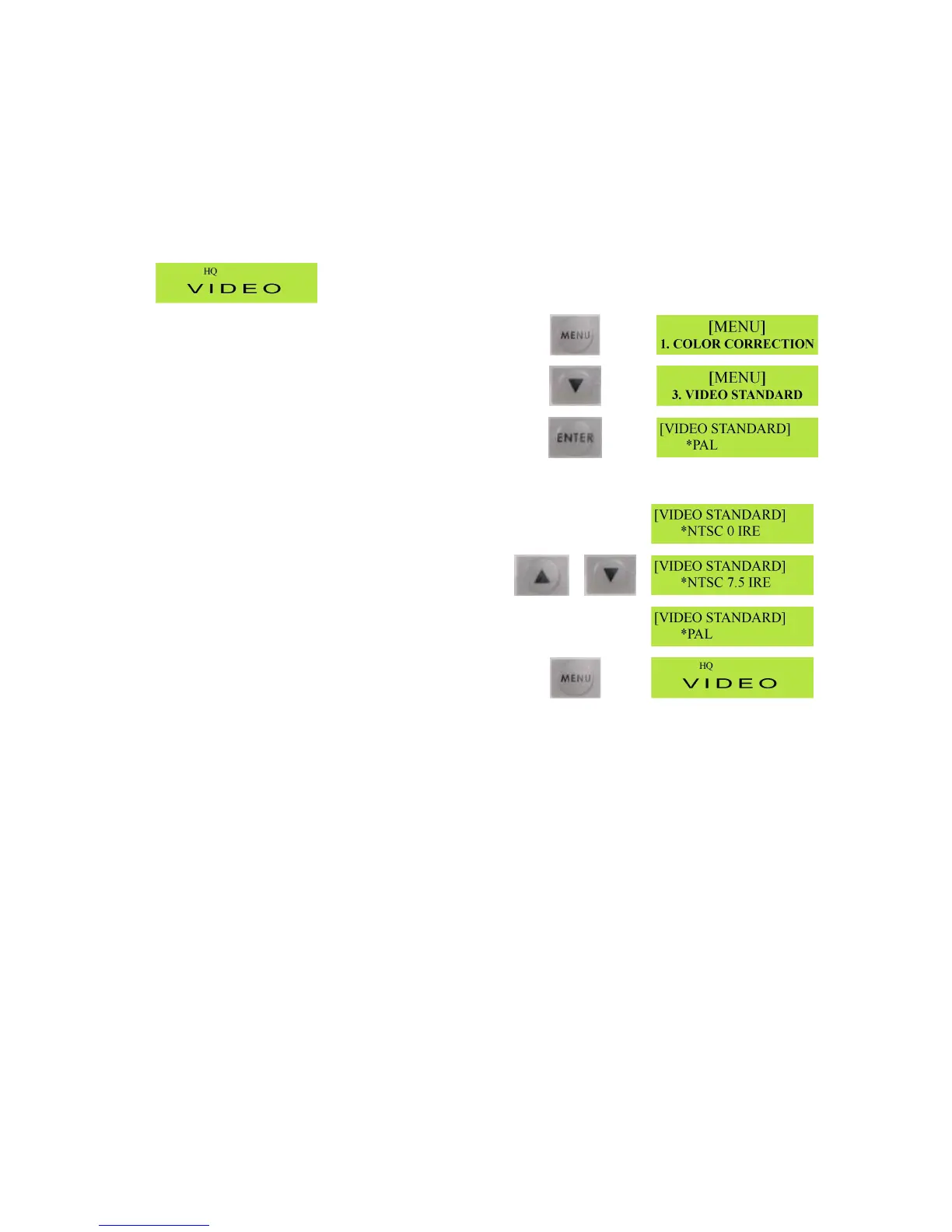
SettingtheVideoStandard(PAL/NTSC)
TheMP6000MDcanbesettoPALorNTSC.GenerallyiftheunitisboughtitEuropeitwillbesettoPAL
asadefault,whereasifitisboughtintheU.S.orASIAitwillbesettoNTSCasadefault.
Ifyouwanttoswitchfromonestandardtoanotherhere’swhattodo.
StartwiththeMP6000MDLCDdisplayshowingtheGeneralDisplay.
PresstheMenubuttontocalluptheMenuoptions
PresstheDownArrowbuttontwicetocallup3.Video
Standard
PresstheEnterbuttontocalluptheVideoStandard
options
UsetheUporDownArrowbuttonstoselectthevideo
standardyouwanttouse.
Onceyourchosenvideostandardisdisplayed,press
theMenubuttontosaveandexit.
Note:NTSC“0IRE”isusedinJapan,NTSC“7.5IRE”isusedinotherNTSCcountriessuchastheU.S.,
Canadaetc.
GPIFunction
TheMP6000MDhasasimpleGPI(GeneralPurposeInterface)functionthatallowshardwiredcontrolof
eitherRecord&PauseorPlay&Pause.GPIworksoneithermomentarycontactclosure,ormaintained
closure,soitisveryeasytomakeasimplecontrolcablewitha3.5mmstereojackplugatoneendanda
switchorbuttonofyourchoiceattheother.TheDipSwitchesontherearpaneloftheMP6000MD
determinethetypeofGPIremotecontrol.IfDipSwitch2isOff(up)theGPIismomentaryclosure(also
knownaspulse),thismeansthatonepressofthebuttonwillstarttherecording,andthenextpresswill
pausetherecording.IfDipSwitch2isOn(down)theGPIbecomesmaintainedclosure(alsoknownas
level),thismeanstheMP6000MDwillrecordwhilethebuttonishelddown,andwillpauseassoonasthe
buttonisreleased.



 To Next Page