39
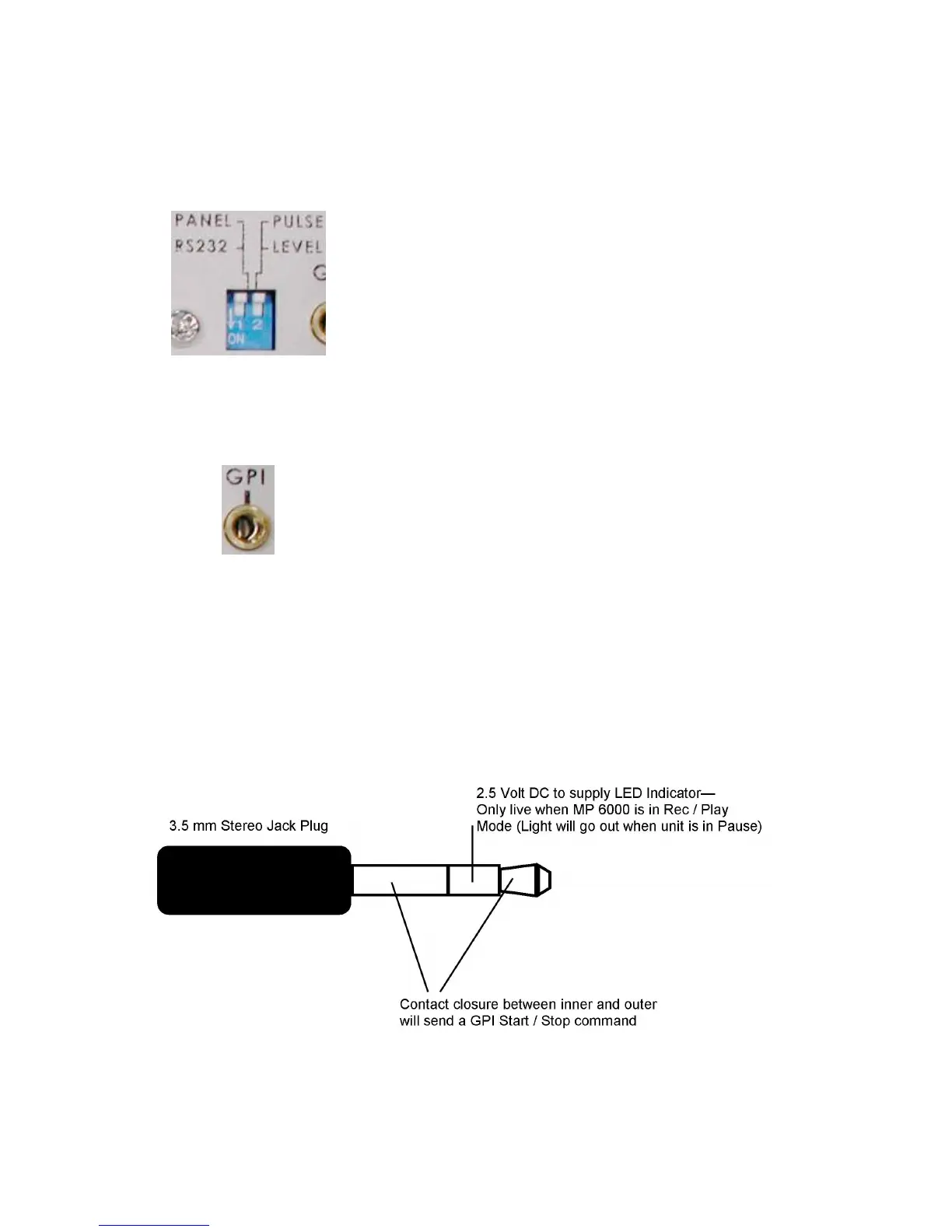
DipSwitch1switchestheMP6000MDbetweensimpleGPIcontrolandRS232control.IfDipSwitch1is
Off(up)theMP6000MDrespondstoGPI,ifitisOn(down)thenitrespondstoRS232.TheFrontPanel
andtheGPIinterfacewillbedeactivatedifRS232controlisselected.(Onlythe“EJECT”buttonwillwork.)
DipSwitches
GPIPort
DIPswitch
DIPswitch1OFF(up),
•GPItriggerisenabled.
DIPswitch1ON(Whenthisfunctionisturne don, thefront
panel and G PI function will be disabled. Only “EJECT”
willwork.)
•ExternalRS232devicecontrolenabled.
DIPswitch2OFF(up)
•GPIfunctionissettomomentaryclosure(PulseTrigger).
DIPswitch2ON
•GPIfunctionissettomaintainedclosure(LevelTrigger).
Note:Pleasemakesure theMP6000is turnedoffbefore
changingDIPswitchsettings.
The3.5mmStereoJackPlugshouldbewiredforcontactclosurebetweentheinnerpinandouterpin.The
middleofthethreecontactssuppliesavoltagewhichcanbeusedtolightanLEDasanindicationthatthe
MP6000MDisrecording.



 To Next Page