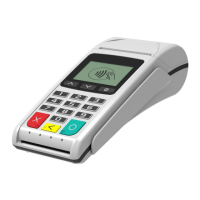
The BluePad-50 Plus MSR is a handheld PIN pad with integrated smart, magnetic stripe, and contactless card reader, designed for secure payment processing. It offers advanced security features and smart card processing capabilities, making it suitable for various PDA applications.
Function Description
The BluePad-50 Plus MSR serves as a versatile payment terminal, enabling transactions via magnetic stripe cards, smart cards (chip cards), and contactless cards. It includes an integrated PIN pad for secure PIN entry. The device supports both symmetric encryption algorithms (DES, 3DES, and AES) and asymmetric encryption (RSA), managing multiple keys through Master Session- or DUKPT-based processes. Its primary function is to facilitate secure and efficient payment transactions in a portable form factor.
Important Technical Specifications
Processor: ARM Cortex® M4 Security Microcontroller
Memory:
- 32KB I&D-Cache
- 1MB Internal RAM
- 8KB OTP
- 8MB Serial Flash (Application Memory)
Display:
- Type: LCD, 262K colors
- Size: 2 inches
- Resolution: 240 x 320 pixels
Keypad:
- ON / OFF key
- 10 numeric keys
- 2 functional keys
Magnetic Card Reader:
- 3-track bi-directional reading
- Standards: ISO 7810, 7811, and 7813
Smart Card Reader:
- Standard: ISO7816, EMV L1 certified
Contactless Card Reader (for payment applications - option):
- AMEX ExpressPay
- Discover D-PAS
- MasterCard Contactless
- VISA PayWave
- China Union Pay
- JCB
Contactless Card Reader:
- NFC-A/ISO 14443 Type-A
- NFC-B/ISO 14443 Type-B
- NFC-F/Felica
- NFC-V/ISO 15693
Battery: Rechargeable lithium-ion polymer battery 3.7V, 620mAh
Connectivity:
- USB (Device)
- BLE 5.1
- Wireless (WiFi module 802.11 b/g/n)
- UART pass through rear pads
Audio Indication: Electro-Magnetic Buzzer
OS Compatibility: iOS, Android, Windows
Reliability:
- 500,000 chip card cycles
- 1,000,000 magnetic card swipes
Certifications: CE, FCC, EMV Level 1, EMV Level 2, EMV Level 1 Contactless, PCI PTS 6.0
Dimensions (LxWxH): 120.8 x 69 x 15.7 mm
Weight: 133 g
Environmental:
- Operating: -10°C to +45°C / 5 to 90% RH
- Storage: -20°C to +70°C / 5 to 90% RH
Power Supply:
- 5V through USB C
- 5V through Docking station
Accessories: Docking station
Usage Features
Ergonomic Design: The BluePad-50 Plus MSR features a bold, sleek, and lightweight ergonomic design, making it convenient for consumers to hold for PIN entry.
Intuitive Interface: Large, colored control keys simplify training and reduce support requests, while a highly readable display supports multiple languages.
Security: The device incorporates tamper-detection circuitry to resist unauthorized intrusion and supports a broad spectrum of hardware and software-based security features. It meets specifications for PIN-entry devices (PED) and sophisticated file authentication. It has received PCI PTS 6.0 SRED Security Certification.
Card Processing:
- Magnetic Stripe Cards: To conduct a transaction, position the card as shown in Figure 6, insert it into the MS card reader slot, and quickly swipe it. The device is then handed to the customer for signature or PIN entry.
- Smart Cards (ICC): For smart card transactions, position the card with gold contacts facing upward and insert it into the ICC card reader slot in a smooth, continuous motion until it seats firmly. The device is then handed to the customer for PIN entry. The card should remain in the reader until the transaction is completed to avoid voiding it.
- Contactless Cards: To perform a contactless transaction, place the contactless card near the BluePad-50 Plus display where the contactless logo is shown. Remove the card when the display indicates the transaction is completed. Special software is required for this function.
Device Operation Modes:
- Operating Mode: Quick press the power button to start. The display shows the clock and battery status.
- System Mode: To enter, hold the power button while switching on the PINPAD. This mode allows access to various tests and settings like INFO VERSION, INFO HARDWARE, TEST DISPLAY, TEST KEYBOARD, TEST MSR, TEST SCR, KEYS DOWNLOAD, and CLEAR DEA KEYS. Navigation is done using the '1' (up), '2' (down), '✔' (select), and 'X' (exit) keys.
- Application Download Mode: To enter, hold the '1' button while switching on the PINPAD. This mode is used for firmware and application updates via a USB interface. The process should not be interrupted to prevent memory corruption.
Bluetooth Pairing: Turn on the BluePad-50 Plus and a Bluetooth-enabled smart device. In the smart device's Bluetooth menu, locate the BluePad-50 Plus (identified by its serial number), press "pair," and confirm if the passkey is the same on both devices. For Apple devices, the "Scan to Pairing" feature allows scanning the serial number on the device's label to initiate pairing.
Firmware and Application Updates: Firmware and applications can be updated via an application using the Firmware API. The BluePad-50 Plus needs to be paired with another device via external interfaces, and the update is initiated through the "Update device firmware" option in the application on the COTS (smart device).
Maintenance Features
Non-User Serviceable Parts: The BluePad-50 Plus unit contains no user-serviceable parts. Users should not attempt to disassemble the unit, as this may void the warranty. All services, adjustments, or repairs should be performed by authorized Datecs service providers.
Cleaning: To clean the unit, use a clean cloth slightly dampened with water and a mild soap. For stubborn stains, alcohol or an alcohol-based cleaner can be used. Thinner, trichloroethylene, or ketone-based solvents should never be used as they can deteriorate plastic or rubber parts. Cleaners or solutions should not be sprayed directly onto the keypad or display. Card readers should not be cleaned by the user; contact a Datecs distributor for service.
Battery Replacement: The main battery of the BluePad-50 Plus is non-removable. For battery replacement, users must contact their local Datecs representative or service provider.
Safety Guidelines:
- Avoid using the device in dusty, smoky, damp, or dirty environments or near magnetic fields to prevent damage to internal circuits.
- Only use approved or compatible power adapters, chargers, or batteries to avoid damage, shortened lifespan, fire, or explosion.
- Keep the device and battery away from excessive heat and direct sunlight, and do not place them on or in heating devices like microwave ovens, stoves, or radiators.
- Dispose of batteries and accessories according to local regulations, not in normal household waste, to prevent fire or explosion hazards.
- Do not use, store, or transport the device where flammables or explosives are stored (e.g., gas stations, oil depots, chemical plants) to avoid the risk of explosion or fire.
Troubleshooting: The manual provides guidelines for common issues such as a blank display, unresponsive keypad, and failed transactions. For persistent problems or issues not described, users should contact their local Datecs service provider.

 Need help?
 General

 To Next Page