BLUEPAD-50 PLUS MSR USER GUIDE
UM 07.01.36/v1.3.0 1 DATECS Page 18 of 25
Bluetooth Pairing
Turn on BluePad-50 Plus and Commercial off-the-shelf/smart device with Bluetooth capabilities. In
smart device enter to Bluetooth menu and locate BluePad-50 Plus (used Bluetooth name in Air is
BluePad-50 Plus serial number). Press on pair and confirm if passkey is same on both devices.
Bluetooth Pairing with Apple device by using “Scan to Pairing”
1. Turn on BluePad-50 Plus (hold On/Off button, around ~2sec).
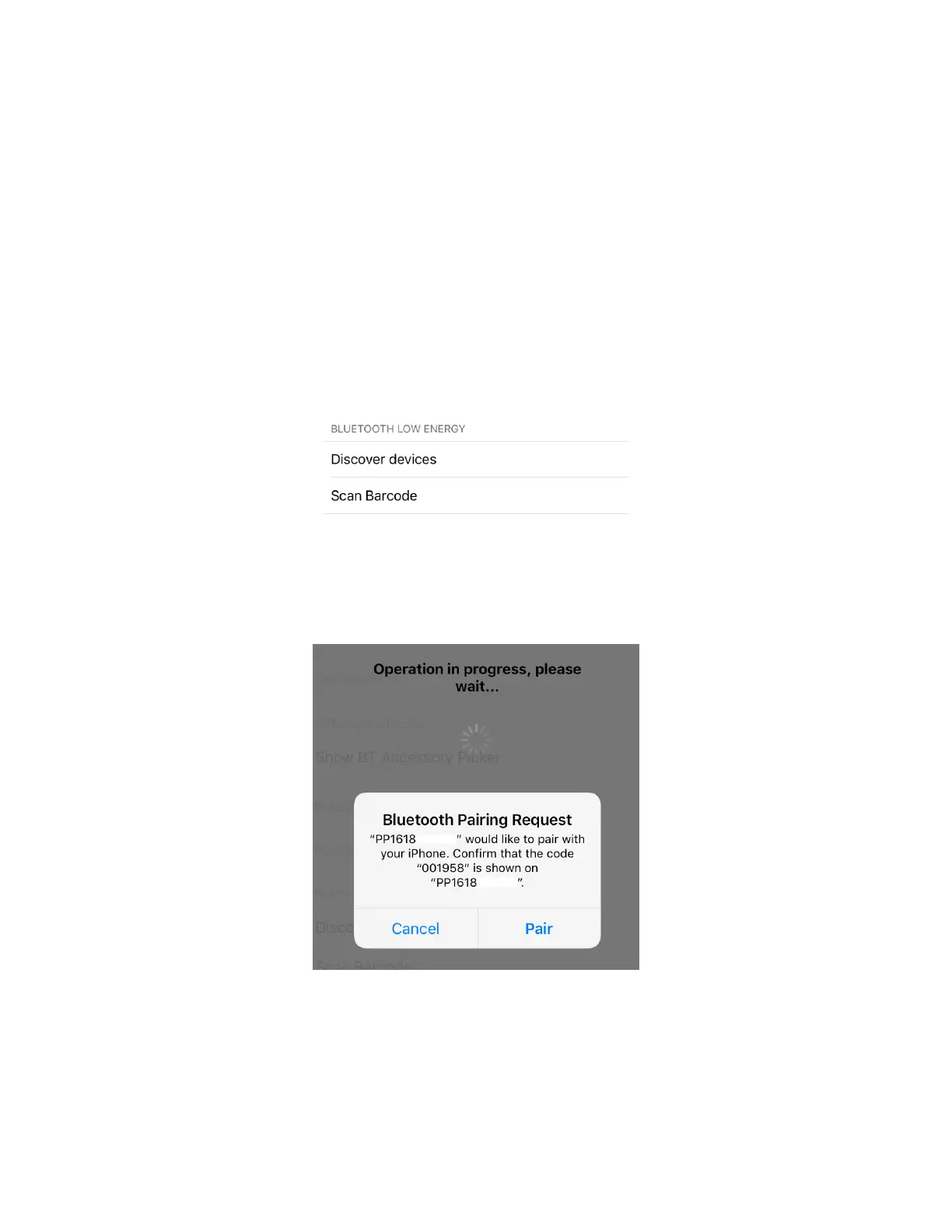
2. Run the iOS application, go to the settings “Scan barcode”:
Figure 3
Then the camera of the phone will be activated.
3. Scan the serial number on the label of BluePad-55 with back camera.
4. Then of the screens on both devices will be showed the “Pairing Request”.
Figure 4
5. Please confirm if the passkey is same on both devices.



 To Next Page