3 Operation
M1204616 3-5
Start a case
Use the Start Case menu to set up the case and to start the gas flow.
A case can be started using default settings or using custom settings.
The default settings are configured by the Super User. See the
“Super user mode” section for information on the Start Case menu
defaults.
Default Settings selection shows the first of five default case types
when the Start Case menu is accessed. Four of the default case
types are configured by the Super User. The fifth default case is Last
Case. The Last Case selection uses the settings from the previous
case.
The values of Patient Weight, Patient Age, Other Gas, and Volume
Apnea are set to the pre-selected settings defined by the Super User
corresponding the case type.
WARNING Make sure that the patient breathing circuit is correctly
assembled and that the ventilator settings are clinically
appropriate before starting ventilation. Incorrect breathing
circuit assembly and incorrect ventilator settings can
injure the patient.
w Make sure that the preset alarm limits are appropriate for
the patient before starting ventilation. Incorrect alarm
settings can injure the patient.
Note Volume Apnea is not shown on the Start Case menu when the
Volume Apnea Selection is set to Disable in the Super User
settings.
Note The Set Vent by Weight menu item is accessible when the
ventilation mode is set to VCV or PCV-VG. Use this setting for breath
rate and tidal volume calculations based on the set patient weight.
The Default Settings selection shows ‘Weight’ when Set Vent by
Weight is selected.
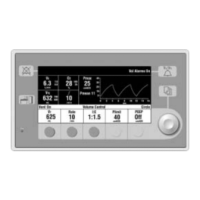
Start Case
Default Settings
Patient Weight
Set Vent by Weight
Patient Age
Other Gas
CO2 Alarms
Volume Apnea
Start Case Now



 To Next Page