31
watt
Displaywindownr.5
startsat199
switchesfromWatttoRelax.
A valueisdisplayed,which .
Therelaxationfunctionisa thatiscarriedoutbymeasuringtheelectricalresistanceoftheskin.
Themeasuredvaluesareindicatedbymeansofopticalandaudiosignals.
Biofeedbackisthusthetranslationintoperceptiblesignalsofphysiologicalprocessesoccurringinourbody,whichour
sensescanbarely,ornotatall,perceive.Therelaxationfunctionisawayofhelpingyourelaxandeliminatestress.You
shouldusethisoptionparticularlyafteraphysicalendurancetraining.
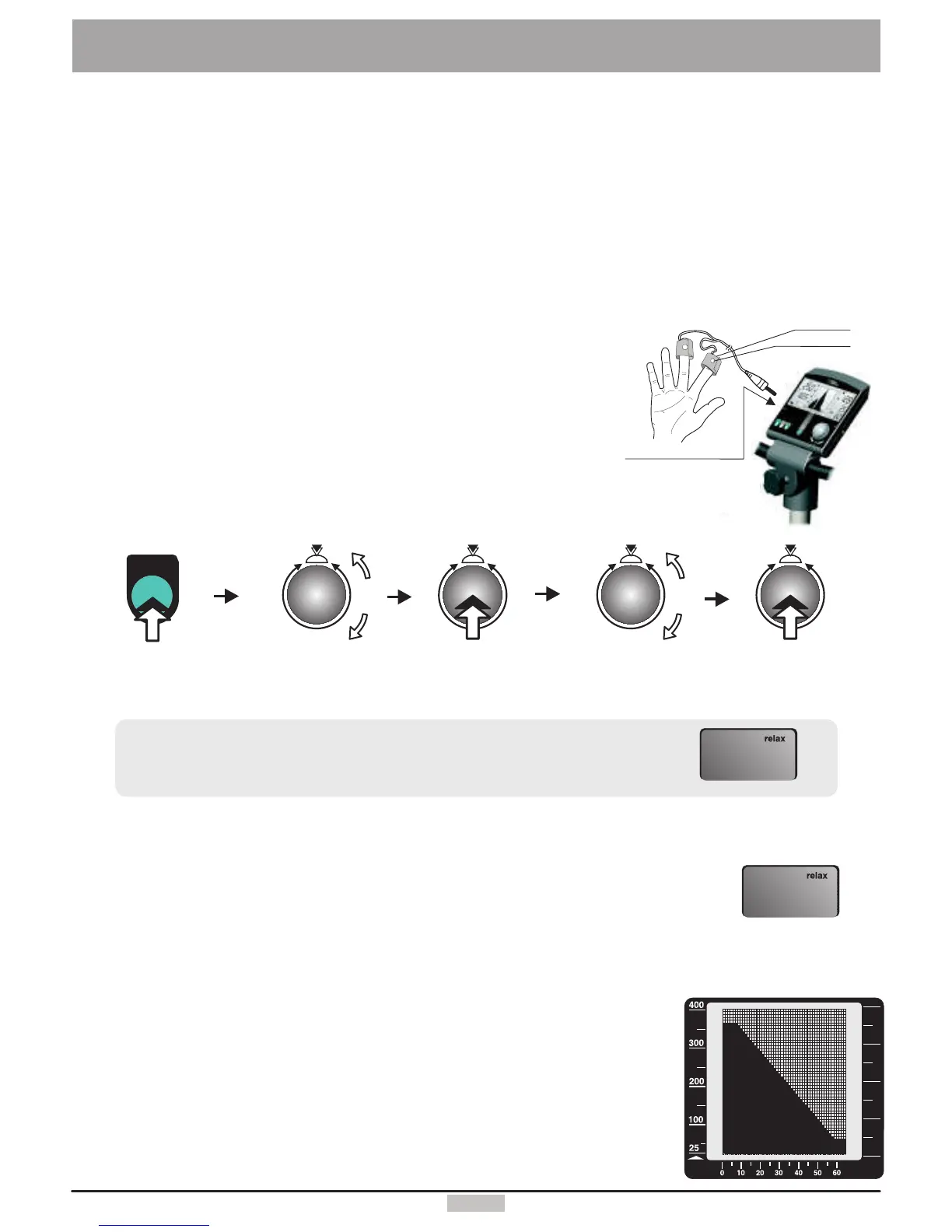
TaketheVelcrobandsofthefingers' sensoroutofthepackageandopenthem.
Placetheopentapeononeofyourfingertip.Makesurethereisgoodcontactbetweenthesilverbuttonsandyourskin.
Thewirefromthetapeshouldleadawayfromthebackofyourhand.
PutdownthesideoftheVelcrotapewiththesensorbuttononyourindex
fingerandwraptheothersidearounditandpressitfirmlyinplace.
Wraptheothertapearoundyourmiddlefingerinthesamefashion.
Plugtheconnectoroftherelaxationsensor
intothe inputsocketno.9onthedashboard.
Biofeedbackprocess
Connectingtherelaxationsensor
1.
2.
3.
4.
5.
“relax”
Relaxing
Relaxprogram/processdescription
Wattrelax5.
Thedisplayedvaluedropsgraduallyasyourelaxaftertraining,andincreaseswiththestress
level.
The candropallthewaytoalmost .Theusershouldthereforecontributeto
his/herrelaxingandavoidanyotherstress.Youcansupportthisprocessbygettingoffthe
deviceandsitinarelaxedposition,orlaydownclosetothetrainingdeviceandcalmdown.
Thegraphicscreensupportsthetransparencyoftherelaxationfunctionbydisplayingacurve
representingtherelaxationprocess.Thedisplayedlineshowsthetransitionfromthe
maximalvalue(199)totheminimumrelaxvalue(0).Thisprocessisvisibleindisplaywindow
nr.5.Thesameprocessispresentedinagraphicalformindisplaywindownr.6
(seeillustrationtotheright).
Relax-value zero
Theactualrelaxlevelisindicatedbyablinkingbarinthedisplaywindow.
Thecompleterelaxingprocessisdividedinto25levels.A shortbeepsoundsignals
wheneachlevelisreached.Thesuccessivebeepsareeachlowerintonality.
Velcrotape
Sensorbutton
Relaxsensor
connectorno.9
TheRelaxationFunction
Press
Control
button
menu
menu
Press
menukey
Select
“Relax”
(turn)
Press
Control
button
Select
“Training”
(turn)
5.
199
5.
0


 To Next Page