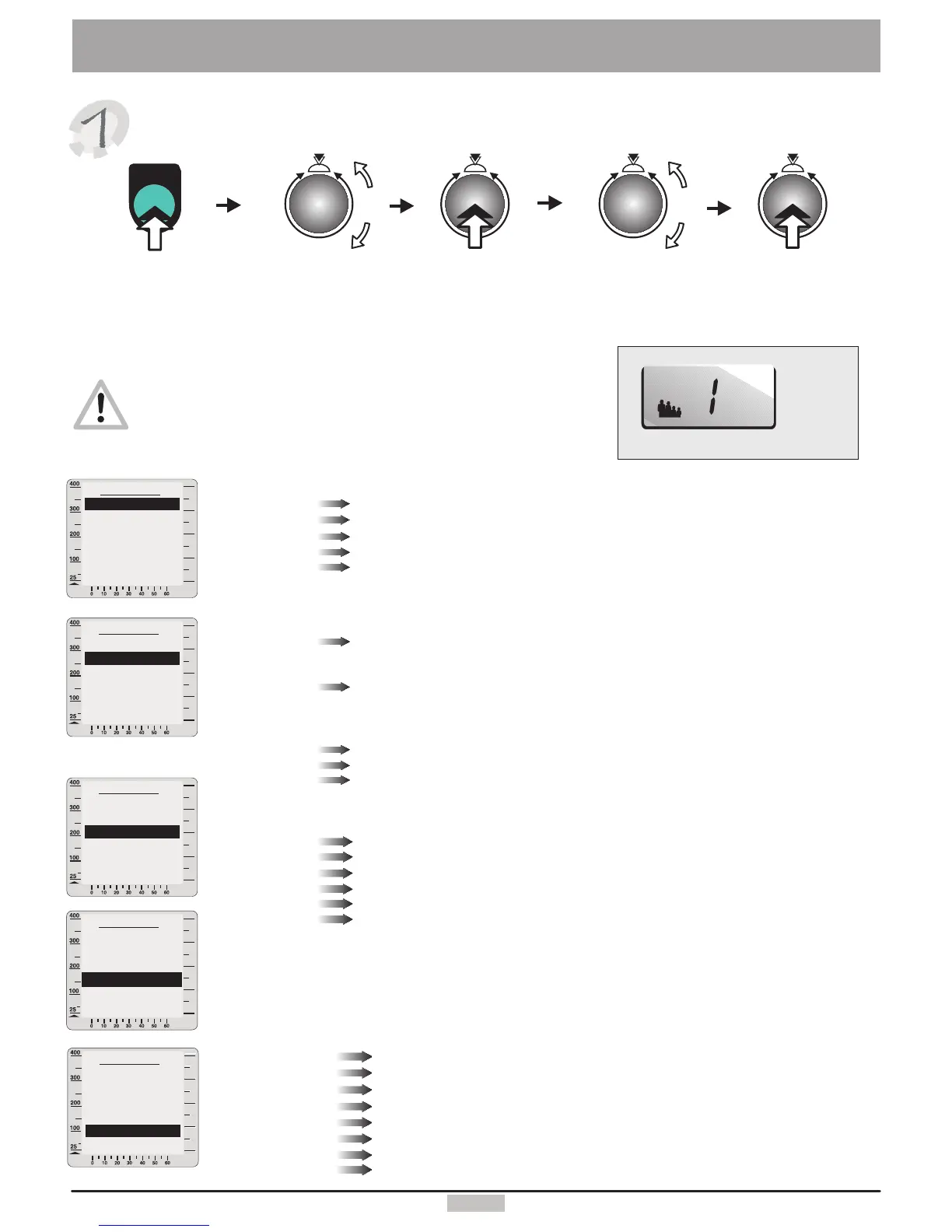
User'sdata
SystemSettings
Ifyouwanttochangetheuser'sdatayoushouldalwaysnote
thepresentlyselecteduser.Thisinformationwillalwaysbeshown
intheuserwindow(16).(SeeChoosingtheUserp.4)
watt
Userdata
Back
Physicaldata
Limitvalues
Coaching
Delete
Miscellaneous
watt
watt
Youcanalsoenteryourownlimitvalues.
Youwouldthenbeinformedifoneofthesevaluesisexceeded.
Watt
Heartrate
Trainingtime
Distance
Phys.kJoule
Youcanselectherethemaximalload(between25and400watts).
Ifyouchoosee.g.180Wtheloadwillnotexceedthisvalue,
andthewattdisplaywillblink.
Whentheactualheartrateexceedstheenteredlimitvalue
thesystemreducesautomaticallytheappliedload,and
anaudiblealarmsounds.“OFF”meansnoheartratelimitactive,
“Auto”meansheartratecorrespondingtotheageoftheuserapplied.
A signalmelodyplayswhenthetimelimitisexceeded.
A signalmelodyplayswhenthedistancelimitisexceeded.
A signalmelodyplaysdissipatedkJoulevaluesreachestheenteredvalue.
Turnandpressthecontrolbuttontoenterandstoreyourphysicaldata
Birthdate
Gender
Height
Weight
Fatcontent(%)
Enteryourbirthdate
ChooseM(male)orF(female)toenteryourgender.
Enteryouheightincm.
Enteryourweightinkg.
Enteryourbodyfatcontent(ifknown).
Press
control
button
menu
menu
Pressthe
menukey
Turnto
select
“User'sdata”
Press
control
button
Turnto
select
“Settings”
watt
Thedeletefunctionwillresetallthedataoftheselectedusertotheinitialstate.
watt
Enteryouractualperformancecapacity.
Enterthenumberoftimesyouwanttotrainperweek.
Chooseyourtarget.
TheminimumheartrateachievedduringthelastCoachingperformancetest.
ThemaximumheartrateachievedduringthelastCoachingperformancetest.
TheperformanceachievedduringthelastCoachingperformancetest.
YoucanalsoenterandsavetheCoachingdatabyturningandpressingthecontrolbutton
Evaluation
Frequency
Trainingtype
Min.heartrate
Max.heartrate
Max.Perfor-
mance
Userdisplaywindow
16.
5
Startpoint
Cooldown
Start-up
Window2
Window4
Wattincrease
Wattdecrease
Heartrateadapting
Choosestartpoint“ON”ifyouwanttostarttheprogramatthepointofyourchoice.
Chooseaprogramtorunattheendofatrainingsession(seepage12)
Choosetheprogramthatyouwishtorunafterswitchingthedeviceon.
ChoosethedatatodisplayinWindow2.
ChoosethedatatodisplayinWindow4.
Setthewattincreaserate(inseconds)forheartratecontrolledprograms.
Setthewattdecreaserate(inseconds)forheartratecontrolledprograms.
Adaptthefixedheartrateprogramstoyourownheartraterange
Userdata
Back
Physicaldata
Coaching
Delete
Miscellaneous
Limitvalues
Userdata
Back
Physicaldata
Limitvalues
Delete
Miscellaneous
Coaching
Userdata
Back
Physicaldata
Limitvalues
Coaching
Miscellaneous
Delete
Userdata
Back
Physicaldata
Limitvalues
Coaching
Delete
Miscellaneous


 To Next Page