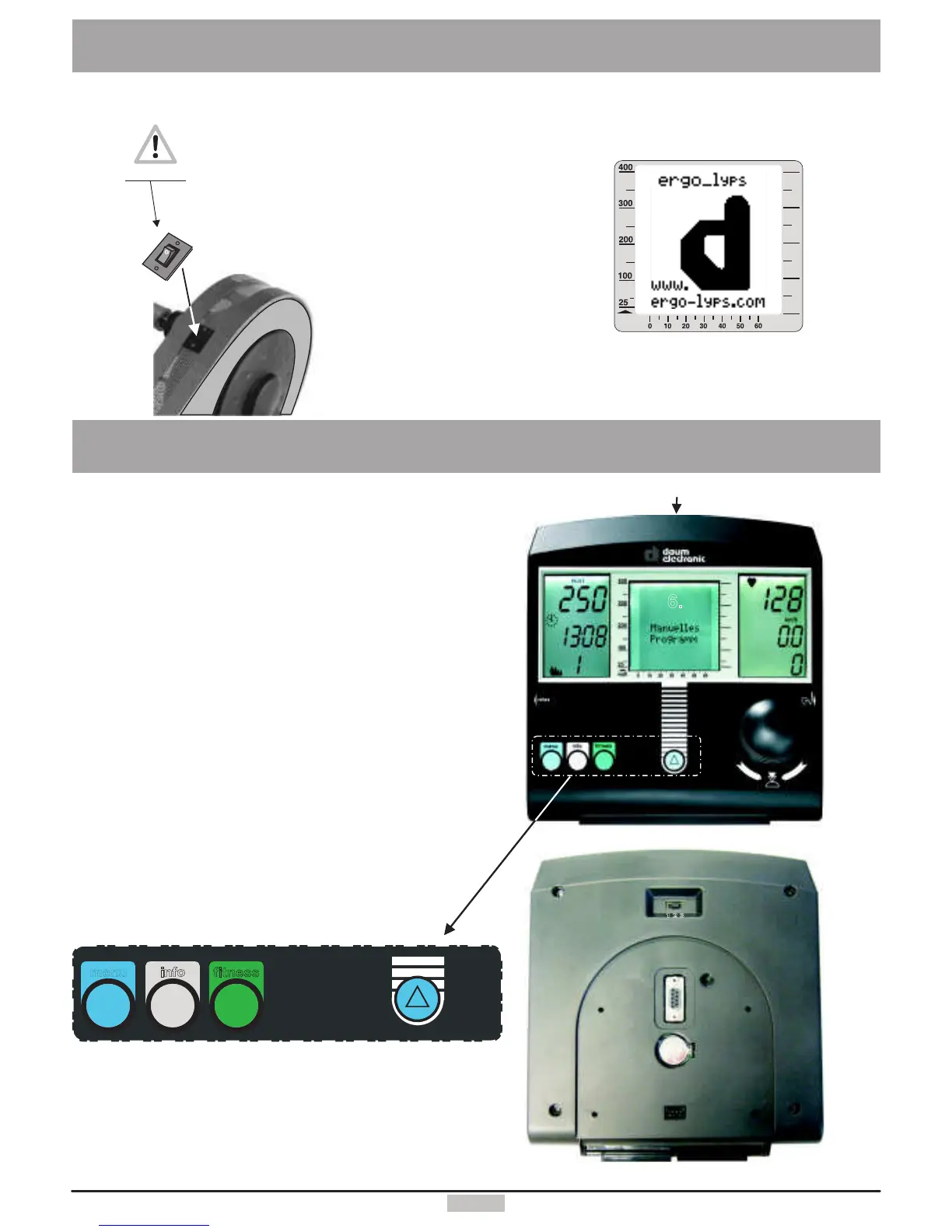
TheDashboard
2
The islocated
ontherearofthedevice.
On/Offswitch
SettingUp
WhenthedeviceisswitchedOn,
theLCDscreendisplaysabig“d”
andthesystemplaysastart-uptune.
Afterthisthesystemdisplays
theprogramlastused.Themanual
programisdisplayedonthefirststart-up.
watt
On/Off
1.
2.
3.
4.
5.
6.
7.
8.
9.
10.
11.
12.
13.
14.
15.
16.
17.
18.
19.
20.
6.
5.
2.
16.
1.
17.
4.
3.
9.
8.
7.
10. 11.
12.
13.
menu
fitne ss
inf
o
18.
15.
14.
19.
20.
Heartratedisplay
Dissipatedenergyandtimedisplay
RPMdisplay
Speedanddistancedisplay
Loadinwattdisplay
Graphicscreen
Controlbutton
Heartratesensorconnector
Relaxsensorconnector
Menukey
Infokey
Fitnesskey
Functionkey
Resetkey(recessed)
PCconnector
Userdisplay
Memorycardreader/writer
Slidingswitch:1.cardreaderoperation
2.ErgoWinu.dashboardupdateoperation
3.Cardreaderupdateoperation
Connectordashboardcable
Dashboardbattery



 To Next Page