66
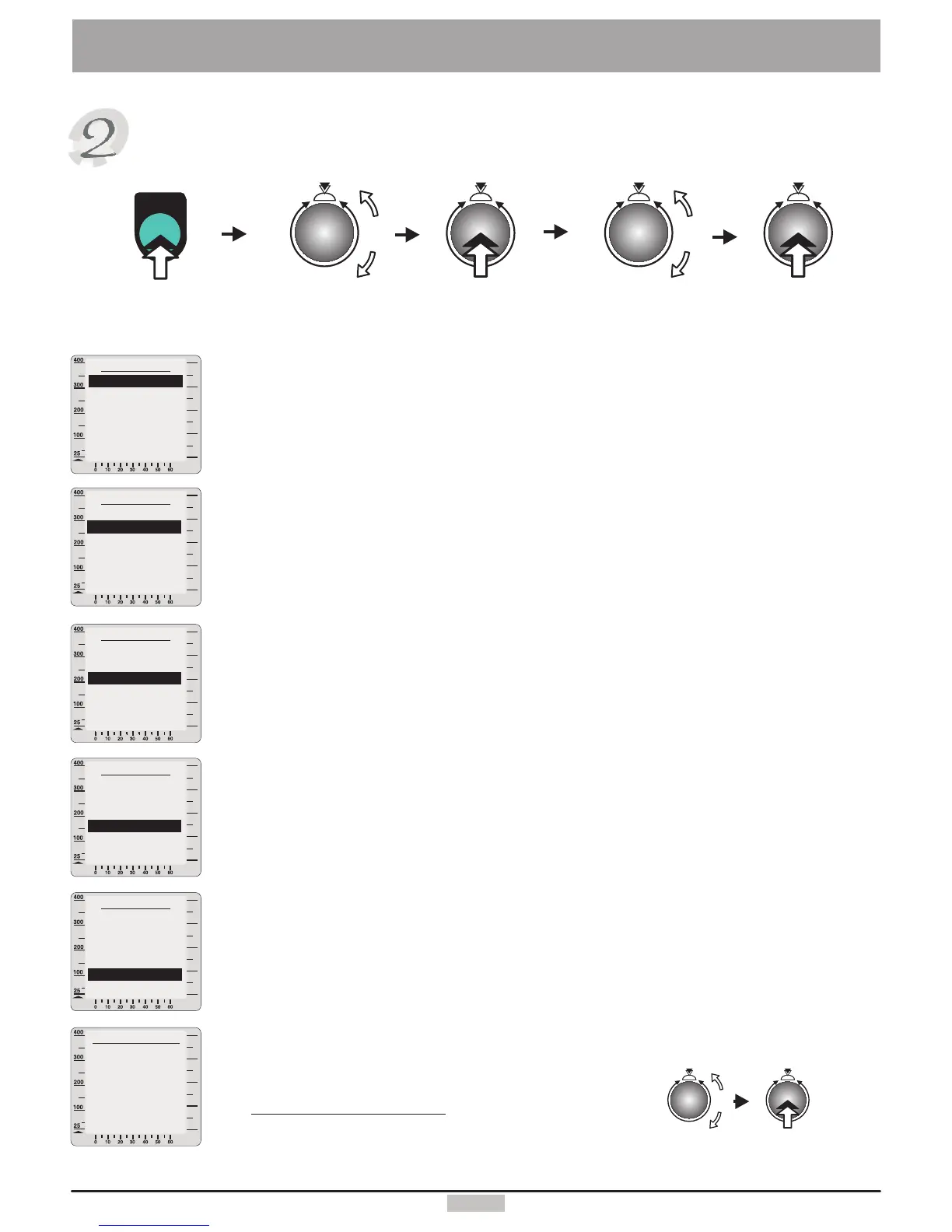
SystemSettings
Devicedata
Dateentry
1.Turnandpressthecontrolbuttontosettheday.
2.Turnandpressthecontrolbuttontosetthemonth.
3.Turnandpressthecontrolbuttontosettheyear.
(DD/MM/YYYY).
Settingthetime
1.Turnandpressthecontrolbuttontosetthehour.
2.Turnandpressthecontrolbuttontosettheminute.
3.Turnandpressthecontrolbuttontosettheseconds.
(HH:MM:SS).
Contrast
Youcanchooseavalueforthecontrastforthegraphicscreenfrom10to25.
Theoptimalvalueliesnormallyaround16.
Language
Choosetheappropriatelanguage:
German,English,French,Italian,Portuguese,Finnish,Danish,Dutch.
Note:Only2languagesareavailableforanysoftwareedition.
AdjustingtheRPM(forthehighperformancesportdomain)
Materialwearanddeviationsofmechanicalsettingsmayresultina
discrepancybetweenthedisplayedRPMvalueandrealpedallingspeed
achieved.Wehavethereforeprovidedthesoftwarewitha“RPMadjusting”
function,whichyoucanusetocheckthedisplayedRPMvaluesandadjustit
ifneeded.
Pedalatconstantspeed(e.g.60RPM)for1minute
(theclockinwindowNo.2willshowtimeprogress)
andcountthepedalrevolutions(measuredvalue).
Thefollowingformulagivesthesettingvalue:
Displayedvalue(WindowNo.3)
=Settingvalue(%)
Measuredvaluex100%
watt
Devicedata
Date
Time
Contrast
Language
AdjustingtheRPM
Back
watt
watt
watt
watt
watt
RPMAdjusting
100.0%
Back
Press
control
button
menu
menu
Press
key
Turnto
select
“Devicedata”
Press
control
button
Press
control
button
Turnto
select
“Settings”
“Set value”
(turn)
Devicedata
Date
Contrast
Language
AdjustingtheRPM
Time
Back
Devicedata
Date
Time
Contrast
AdjustingtheRPM
Language
Back
Devicedata
Date
Language
Time
Contrast
AdjustingtheRPM
Back
Devicedata
Date
Time
Language
AdjustingtheRPM
Contrast
Back


 To Next Page