35
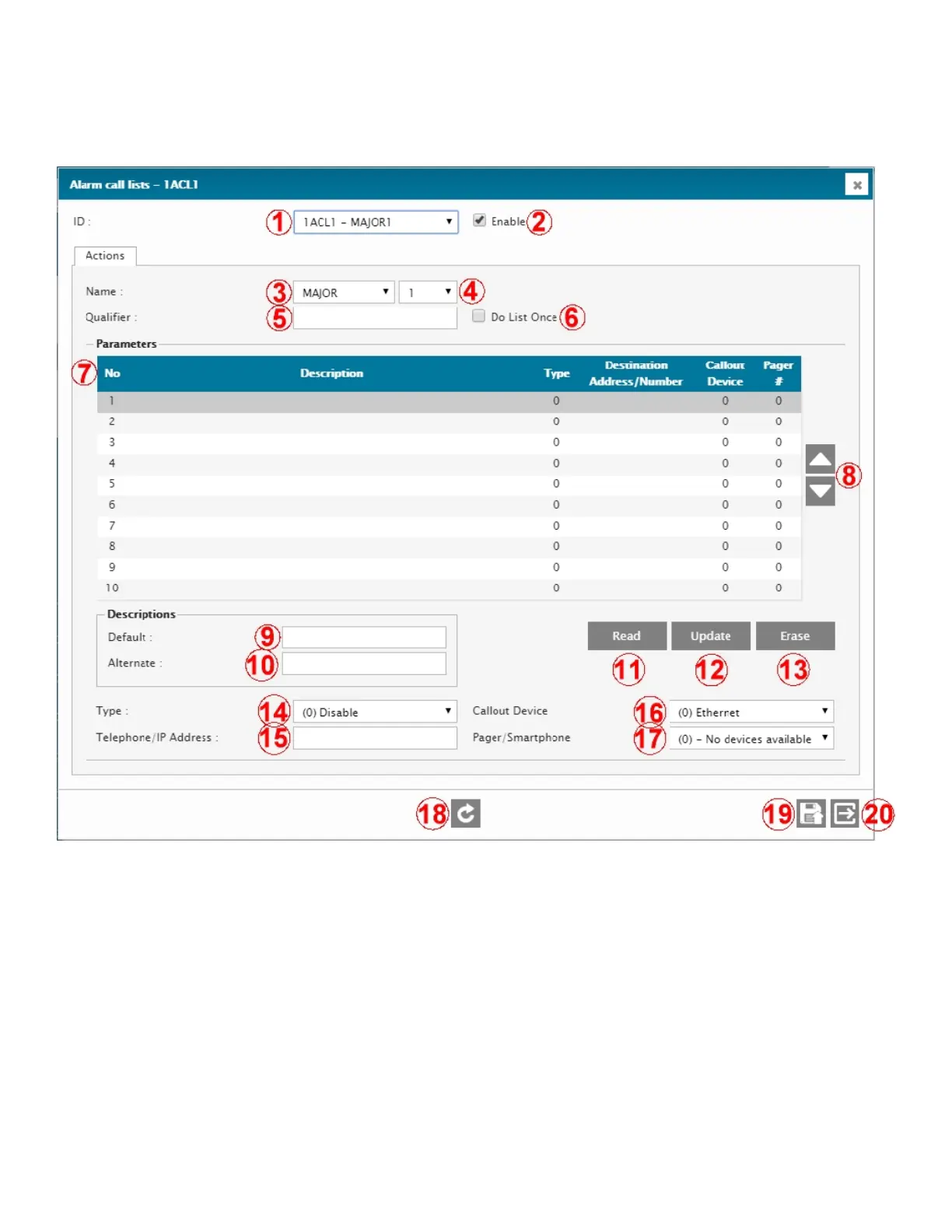
Please configure your list(s) as required for your operations as described below.
Alarm-Call List (ACL) configuration menu
1 – ID
ID of the current ACL.
2 – ENABLE
Enable / disable the current ACL.
3 – NAME
ACL Name. Allows to set the ACL with a pre-defined name. Available names are: CRITICAL, MAJOR, ALERT,
SEVERE, ERROR, WARNING, MINOR, NOTICE, NOTIFICATION, INFO, INFORMATION. Th is name will appear
in the alarm title when received.
4 – NUMBER
ACL number. Select the desired ACL number (1 through 8).
5 – QUALIFIER
Lock / unlock the ACL based on the status of an input, output, or flag. When the given qualifier is HIGH, or ACTIVE,
or ON, the ACL is enabled. When the Qualifier is LOW, or NORMAL, or OFF, the ACL is disabled.



 To Next Page