51
4.3.1.1. Main Screen
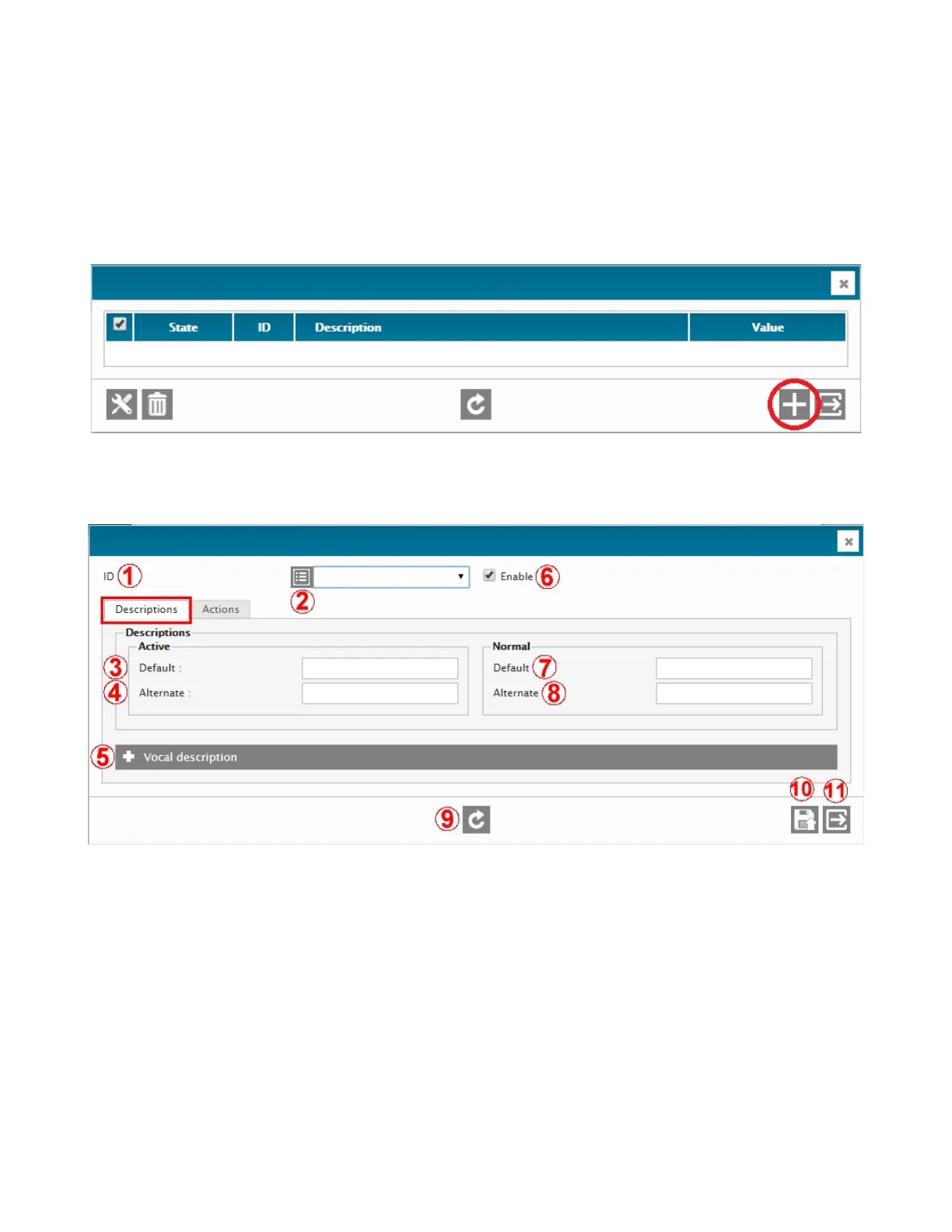
The first generic input menu screen is the Main screen. At any time, to add an entry, click on the + button. If the screen
already contains entries, right-click on any one in order to access its configuration menu.
4.3.1.2. Description Screen
The second generic input menu screen is the Description screen.
1 – ID
A label to indicate that Field 2 is the I/O Identifier. Selection from the drop-down menu in 2
2 – DESCRIPTION RETRIEVAL
Click to retrieve and display the current normal description of that ID. Normally hidden to minimize data transfers
on low speed or high fee data connections.
3 – DEFAULT ACTIVE DESCRIPTION
Description of the input when it is active (alarm condition). Up to 68 charaters are allowed. Examples: High indoor
temperature, Low fuel level, Door is open, Smoke!, High water level, etc.
4 – ALTERNATE ACTIVE DESCRIPTION
18-character non-unicode text description of the input when it is active. Used for FAX and SMS only.
5 – VOCAL DESCRIPTION
Access the vocal description menu.
6 – ENABLE



 To Next Page