52
Enable / disable the input. Useful to deactivate an input, without losing all its settings, when the input is causing
intermittent problems or nuisance alarms
7 – DEFAULT NORMAL DESCRIPTION
Description of the input when it is normal. Up to 68 characters are allowed. Examples: Indoor temperature OK, Fuel
level OK, Door is closed, No smoke, Water level OK, etc.
8 – ALTERNATE NORMAL DESCRIPTION
18-character non-unicode text description of the input when it is normal. Used for FAX and SMS only.
9 – REFRESH / READ
Refresh / read the screen content.
Copying settings from one input into another input
When configuring many inputs with identical or closely-matching settings, it is possible to “copy” the settings from
an input and “paste it” into another input, saving configuration time and minimizing possible typing errors. First,
select the source input ID from the menu, then click the Refresh / Read button (#9), then go select the
destination input ID from the menu, and click the Save / Write button (#10).
10 – SAVE / WRITE
Save the screen content.
11 – EXIT
Exit menu.
4.3.1.3. Vocal Description Screen
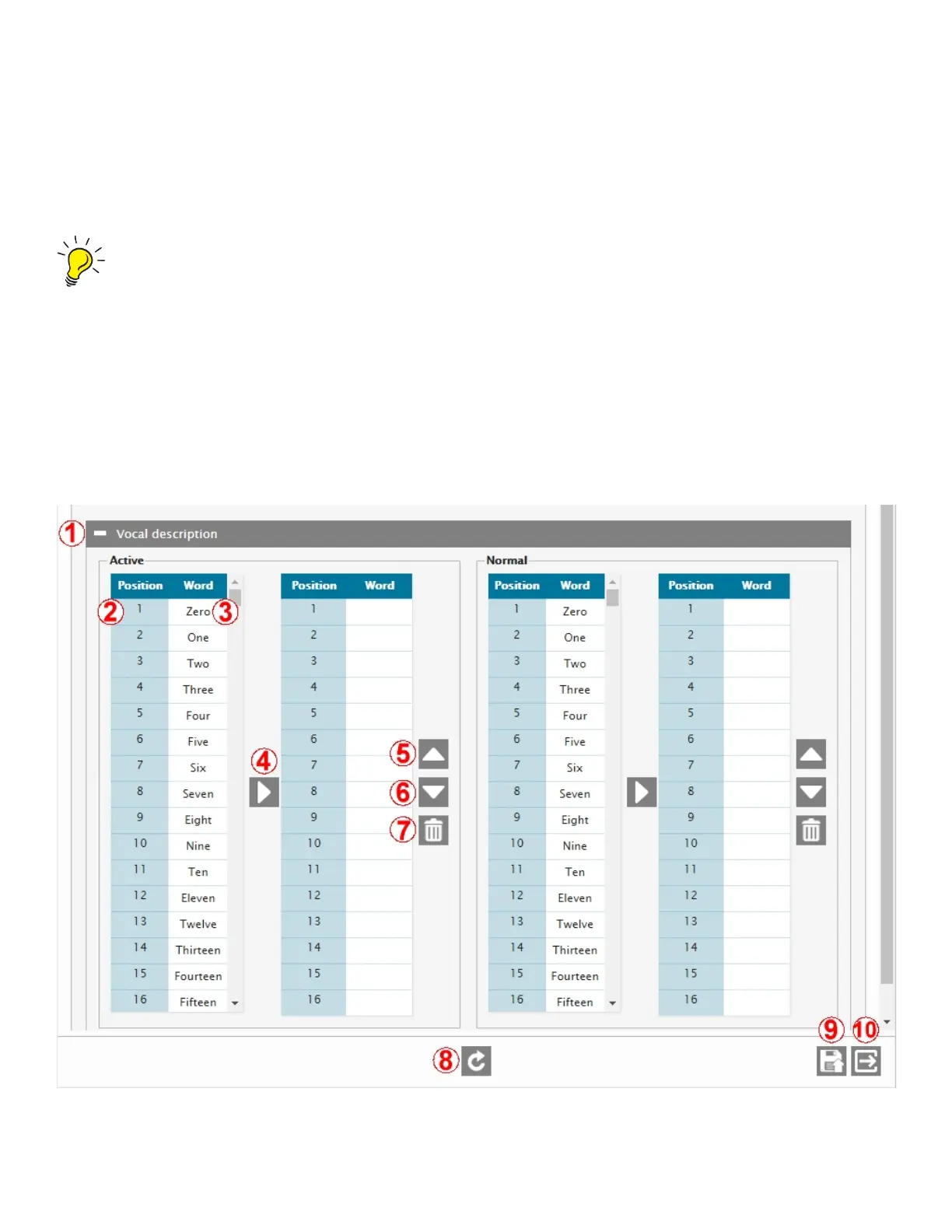
The third generic input menu screen is the Vocal Description screen. It allows you to build sequences of words in order to
create phrases, which will then be sent by the Cortex when it calls with vocal alarms. A phrase can be built for both Normal
and Active input states. See below for descriptions of the fields in the vocal description screen.



 To Next Page