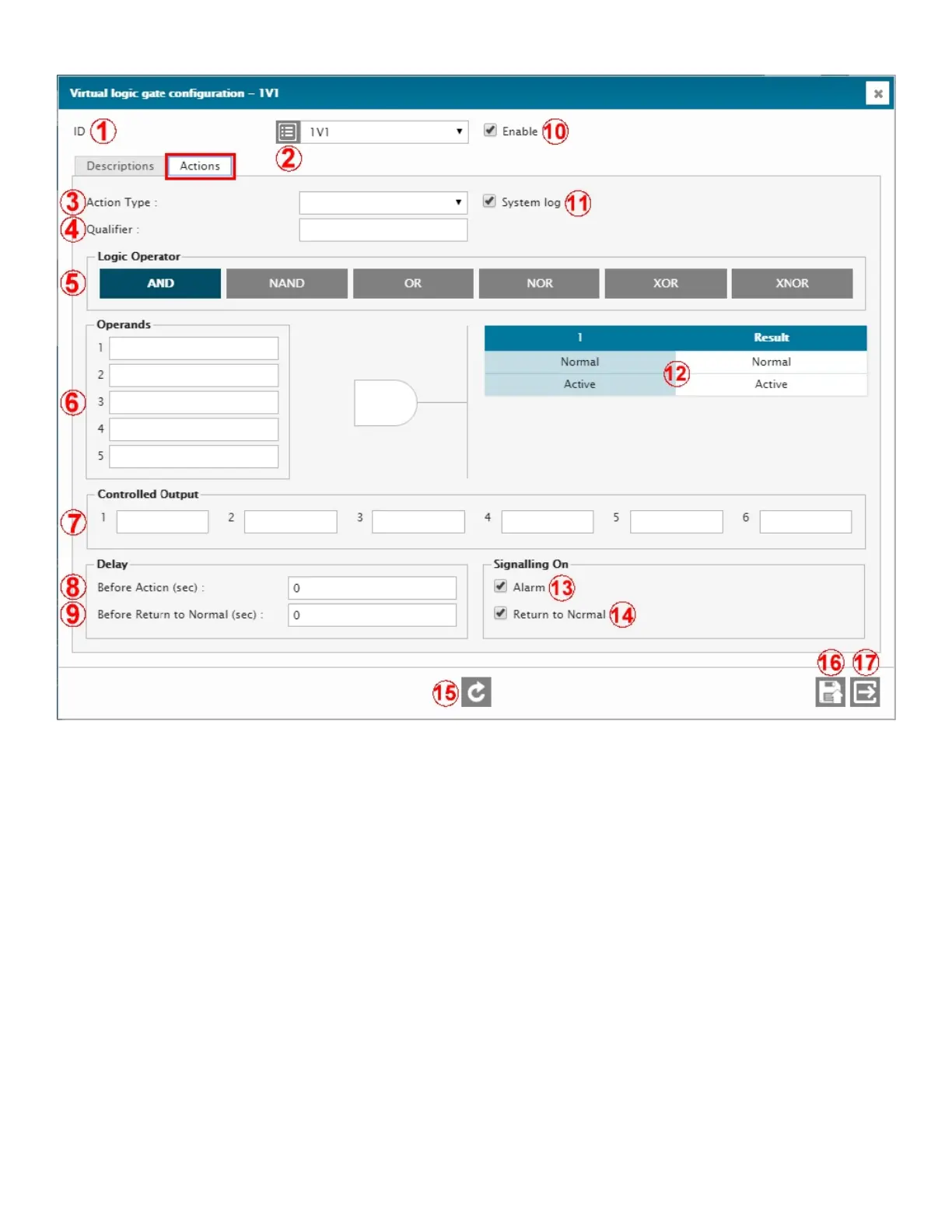
72
1 – ID
ID of the selected input. Select from the drop-down menu.
2 – I/O DESCRIPTION RETRIEVAL
Click to retrieve and display the current normal or active description. Normally hidden to minimize data transfers on
low speed or high fee data connections.
3 – ACTION TYPE
Selects the action type that will happen when an out-of-limit condition occurs. 3 types are available: Major alarm,
Minor alarm, and Command (CMD). On CMD, no alarm will be triggered. Use this Action when you want to take
actions without triggering any alarms.
4 – QUALIFIER
Qualifying element (operand) which can be any input, output, flag, timer, SNMP GET, Logic Gate, etc. Essentially
any ID in the Cortex can be used to mute or unmute the input to prevent it from taking any action. When the Qualifier
is active, the input will be monitored and be able to generate alarms. When the qualifier is non-active (or normal),
the input will be muted and it will not be able to generate an alarm. To invert the Qualifier’s level, simply put a ! in
front of its ID. For example, use !1D01 to invert it. Leave the Qualifier field blank for a “don’t care” condition.
5 – LOGIC OPERATOR
There are six different logic gate types to choose from. Each has its own logical behavior and the truth table (#12)
shows the resulting outputs..
6 – OPERANDS
Inputs and outputs that can be used as logic signal sources for the VLG. Can be status inputs, metering inputs,
relays, timers, flags, other VLG’s, SNMP Traps, SNMP GETs. Essentially, any Identifier (ID) that exists in the Cortex



 To Next Page