75
Select the active (energized) duration of a relay when it is pulsed. Duration is settable from 0.1 sec to 9999 seconds,
in 0.1 second steps.
5 – CONTROLLED BY
Display of the 6 first inputs currently set to control the relay. If more than 6 inputs actually control the relay, all will
be taken into account, but only the first 6 inputs to have been configured will be displayed. This field is not user-
settable, it is system-generated from unit’s configuration file.
6 – ENABLE
Enable / disable the relay. Useful to deactivate the relay, without losing all its settings.
7 – AUTOMATIC ONLY
Set relay to operate under control of the Cortex only. Manual control of the relay is not allowed. Prevents user-error
for critical relays such as those used for antenna switches.
8 – SYSTEM LOG
Log the relay activity in the System Log.
9 – REFRESH / READ
Refresh / read the screen content.
10 – SAVE / WRITE
Save the screen content.
11 – EXIT
Exit menu.
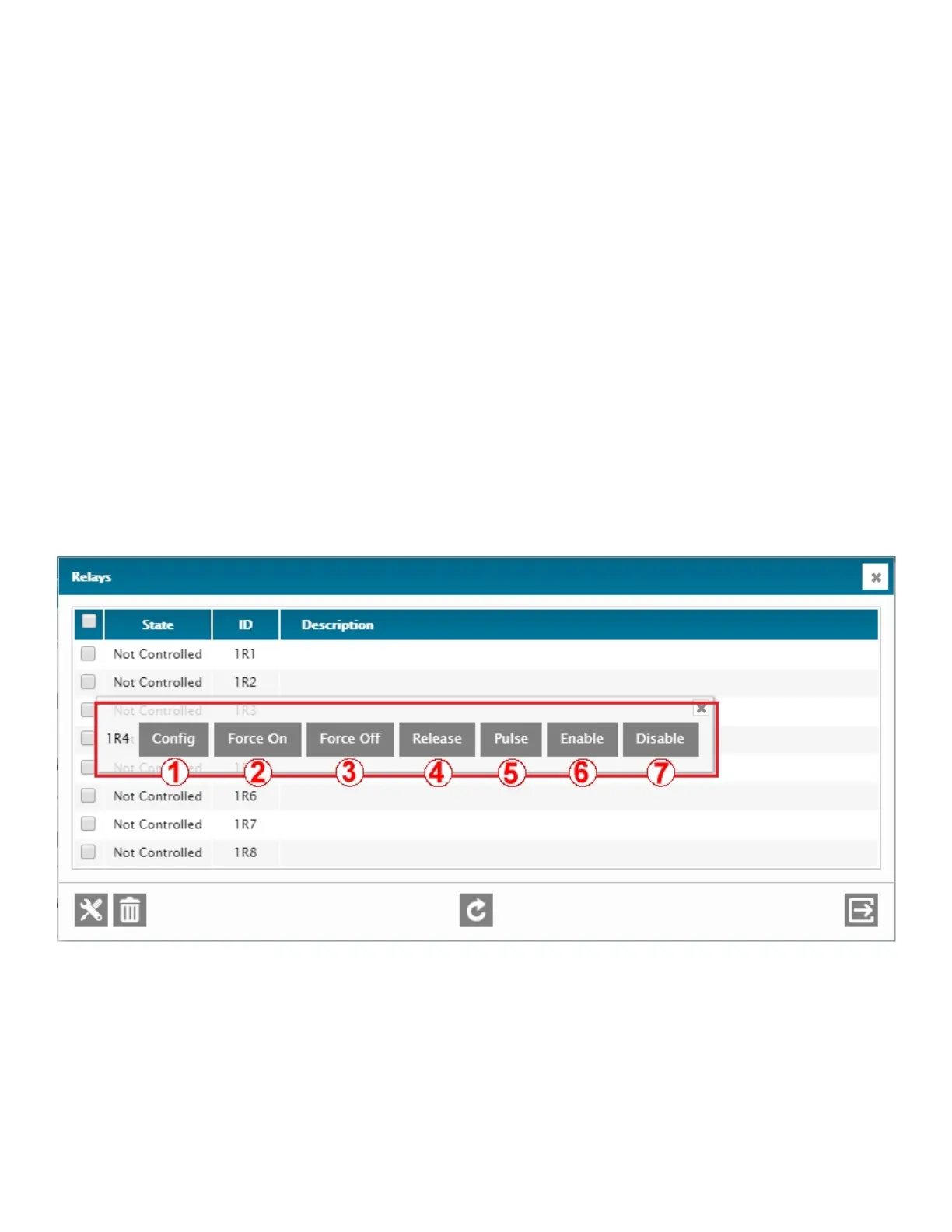
RELAY QUICK-ACCESS MENU
A quick-access menu is available by right-clicking on any relay line in the main relay menu screen. This quick-access menu
offers manual commands that are only available here, like Force On, Force Off, Release, and Pulse.
1 – CONFIG
Access the configuration menu of the selected relay. Bulk configuration is possible.
2 – FORCE ON
Manually force-on (energize) the selected relay. IMPORTANT: When a relay is forced- on, it will stay on for as long
as it is not manualy released – and no automatic action can clear it. If the relay had previously been set for
Automatic Only, this command would not be available.
3 – FORCE OFF
Manually force-off (de-energize) the selected relay. IMPORTANT: When a relay is forced-off, it will stay off for as
long as it is not manualy released – and no automatic action can energize it. If the relay had previously been set
for Automatic Only, this command would not be available.



 To Next Page