EasyManua.ls Logo

Davis Instruments Vantage Pro2 - User Manual

Default Icon
56 pages
Print Icon
To Next Page IconTo Next Page
Loading...
Vantage Pro2
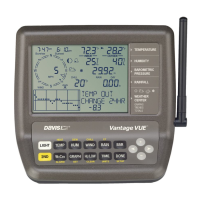
Console Manual
For Vantage Pro2 & Vantage Pro2 Plus Weather Stations
™™
Davis Instruments, 3465 Diablo Avenue, Hayward, CA 94545-2778 U.S.A. • 510-732-9229 • www.davisnet.com
®

Other manuals for Davis Instruments Vantage Pro2

Questions and Answers

  • G
    gmoralesSep 12, 2025
    Why is the wind direction reading dashed out on my Davis Instruments Weather Station?
    • M
      Matthew BruceSep 12, 2025
      If the wind direction reading is dashed out on your Davis Instruments Weather Station, and you have a wireless model, check the reception. If you have a cabled model, the cable may be faulty. If these steps don't solve the problem, the anemometer might be faulty, and you should contact technical support.
  • Z
    Zachary WarnerSep 10, 2025
    Why does the wind speed read 0 on my Davis Instruments Weather Station?
    • G
      gspencerSep 12, 2025
      If the wind speed on your Davis Instruments Weather Station reads 0 all the time or intermittently, the problem may be with the anemometer. Test it by spinning the wind cups, check the reed switch fields on the diagnostic screen, and contact technical support.
  • D
    Darius ObrienSep 9, 2025
    Why does my Davis Instruments Vantage Pro2 display odd values?
    • D
      david51Sep 9, 2025
      If your Davis Instruments Weather Station display shows odd or missing values, you may have synchronized with another weather station nearby. Change the transmission and reception IDs to a different ID.
  • A
    Alicia MedinaSep 8, 2025
    What does 'receiving from' mean on Davis Instruments Weather Station?
    • M
      michellepowellSep 8, 2025
      If your Davis Instruments Weather Station display shows only “RECEIVING FROM.....”, it means the console has rebooted. Hold the DONE key to return to Current Weather Mode. Check the time setting if power was lost.
  • D
    Daniel AustinAug 23, 2025
    Why are there no rain readings on my Davis Instruments Vantage Pro2 Weather Station?
    • B
      Becky ClarkeAug 23, 2025
      If you are getting no rain readings on your Davis Instruments Weather Station, make sure the cable tie is removed from inside the rain collector. Refer to the ISS manual for further assistance.
  • J
    Jessica LeblancSep 6, 2025
    Why does the wind chill reading seem too high or too low on my Davis Instruments Vantage Pro2?
    • J
      jacob94Sep 6, 2025
      If the wind chill reading on your Davis Instruments Weather Station seems too high or low, check the temperature calibration numbers. Wind chill depends on temperature and wind speed, so ensure those sensors are working.
  • M
    Mr. Jerry CarlsonSep 4, 2025
    Why does the heat index reading seem too high or too low on my Davis Instruments Vantage Pro2 Weather Station?
    • E
      Edward BradleySep 5, 2025
      If the heat index reading on your Davis Instruments Weather Station seems too high or low, check the temperature calibration numbers. The heat index depends on temperature and outside humidity, so ensure those sensors are working.
  • S
    sarah30Sep 4, 2025
    Why does the outside temperature seem too low on my Davis Instruments Vantage Pro2?
    • G
      George OrtegaSep 4, 2025
      If the outside temperature reading on your Davis Instruments Weather Station seems too low, check the calibration number and adjust if necessary. Also, make sure sprinklers aren't hitting the ISS radiation shield; if they are, relocate it. Refer to the ISS manual for more information.
  • T
    Todd MiddletonSep 2, 2025
    How to correct sunrise and sunset times on Davis Instruments Vantage Pro2 Weather Station?
    • A
      angelica11Sep 3, 2025
      If the sunrise and sunset times are incorrect on your Davis Instruments Weather Station, check your latitude, longitude, time zone, and daylight saving time settings. The console calculates these times based on those settings.
  • D
    Dr. Justin JordanSep 1, 2025
    Why is the dew point reading too high or low on my Davis Instruments Weather Station?
    • P
      Patricia AndersonSep 1, 2025
      If the dew point reading on your Davis Instruments Weather Station seems too high or low, check the temperature calibration numbers. Dew point depends on temperature and outside humidity, so ensure those sensors are working correctly.

Summary

Chapter 1 Welcome to Vantage Pro2

Console Features

Overview of the console's hardware and capabilities.

Vantage Pro2 Options

Details on optional sensors, stations, and software for the system.

Chapter 2 Installing the Console

Powering the Console

Instructions for powering the console unit.

Installing Batteries

Procedure for installing backup batteries in the console.

Console Location

Guidance on optimal placement for accurate readings and visibility.

Wall Mounting

Steps for securely mounting the console onto a wall.

Chapter 3 Using Your Weather Station

Setup Mode Configuration

Guide to configuring station settings and options.

Current Weather Mode Operations

How to view and manage current weather data and units.

Highs and Lows Mode

How to view recorded daily, monthly, and yearly high/low values.

Alarm Mode

How to set and manage various alarm conditions.

Graph Mode

How to view historical weather data in graphical format.

Chapter 4 Troubleshooting and Maintenance

Vantage Pro2 Troubleshooting Guide

Solutions for common display and sensor issues.

Console Maintenance

Procedures for changing batteries and general care.

Davis Instruments Vantage Pro2 Specifications

General IconGeneral
Update Interval2.5 seconds
Wind Direction Resolution
Wind Direction Range0 to 360°
Rain CollectorSelf-emptying tipping bucket
UV Index Range0 to 16
Solar Radiation Range0 to 1800 W/m²
Console DisplayLCD with backlight
Wireless Transmission Range1000 feet (300 meters) line of sight
Temperature Range-40 to 150 °F (-40 to 65 °C)
Humidity Range1 to 100%
Barometric Pressure Range16.00 to 32.50 inHg (540 to 1100 hPa)
Wind Speed Range0 to 200 mph (0 to 322 km/h)
Rain Collector Size0.01 inch (0.2 mm) resolution
Rain Measurement Accuracy±4% at rates up to 2 in/hr (50 mm/hr)
Power SupplySolar-powered with battery backup
Console Power SupplyAC adapter or 3 C batteries

Related product manuals