EasyManua.ls Logo

Davis Instruments Vantage Pro2 - User Manual

Default Icon
56 pages
Print Icon
To Next Page IconTo Next Page
Loading...
Vantage Pro2
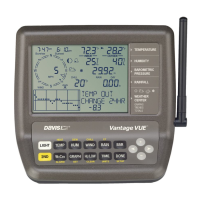
Console Manual
For Vantage Pro2 & Vantage Pro2 Plus Weather Stations
™™
Davis Instruments, 3465 Diablo Avenue, Hayward, CA 94545-2778 U.S.A. • 510-732-9229 • www.davisnet.com
®

Other manuals for Davis Instruments Vantage Pro2

Questions and Answers

  • N
    Nicholas GomezAug 31, 2025
    Why is the outside temperature reading too high on my Davis Instruments Vantage Pro2 Weather Station?
    • J
      Joshua RamirezAug 31, 2025
      If the outside temperature reading on your Davis Instruments Weather Station seems too high, check if the ISS is near a mechanical or radiant heat source. Check the calibration number and adjust if necessary. You might need to relocate the ISS or temperature sensor. Refer to the ISS or other transmitter manual for further assistance.
  • K
    karen84Aug 30, 2025
    Why is the wind speed reading too high or low on my Davis Instruments Vantage Pro2?
    • K
      Kimberly ArellanoAug 30, 2025
      If the wind speed reading on your Davis Instruments Weather Station seems too high or too low, for low readings, remove the wind cups and check for any friction. Also, check the location of the anemometer to make sure it is not sheltered from the wind. Consult the ISS manual for more troubleshooting steps.
  • B
    Brenda RodriguezAug 29, 2025
    Why does the inside humidity seem too high or too low on my Davis Instruments Vantage Pro2 Weather Station?
    • T
      Tristan WilsonAug 29, 2025
      If the inside humidity reading on your Davis Instruments Weather Station seems too high or low, ensure the console isn't near a humidifier or dehumidifier. Check the calibration number and adjust if necessary. If the inside humidity is low and the inside temperature is too high, consult the information about inside temperature. Also, ensure the console backlight is not on.
  • A
    Amber QuinnAug 28, 2025
    What to do if Davis Instruments Weather Station display shows dashes?
    • C
      Cassidy BensonAug 28, 2025
      If your Davis Instruments Weather Station display shows dashes instead of weather data, this could be due to several reasons: the ISS is not plugged in (for cabled stations), sensors are not transmitting (for wireless stations), the console is not receiving data (for wireless stations), a reading has exceeded the specified limits, or calibration numbers may be causing readings to exceed display limits. For the first three causes, consult the ISS or reception troubleshooting sections. For the last, check the calibration number and adjust if necessary.
  • S
    Stephanie MillerAug 27, 2025
    Why is the inside temperature reading too high on my Davis Instruments Vantage Pro2?
    • J
      Jasmine KochAug 27, 2025
      If the inside temperature reading on your Davis Instruments Weather Station seems too high, move the console out of direct sunlight. Ensure that the console or sensor isn't touching an exterior wall that heats up, and that it's not near any heat sources like lamps or appliances. Also, make sure the console backlight is off. Check the calibration number and adjust if necessary.
  • C
    Christine MolinaAug 26, 2025
    What to do if Davis Instruments Weather Station display locks up?
    • S
      Sarah RandolphAug 27, 2025
      If your Davis Instruments Weather Station console "locks up", reset it by removing both the AC and battery power, then restore the power. If this happens often when using AC power, plug the AC power adapter into a surge suppressor.
  • A
    Anthony RogersAug 25, 2025
    What to do if the Davis Instruments Vantage Pro2 Weather Station display is blank?
    • S
      Sean SmithAug 26, 2025
      If the display of your Davis Instruments Weather Station is blank, it means the unit isn't getting power. You should check the power adapter connections and consider replacing the batteries.
  • M
    Matthew StanleyAug 25, 2025
    What to do if Davis Instruments Vantage Pro2 is not uploading data?
    • T
      Todd BryantAug 25, 2025
      If your Davis Instruments Weather Station isn't uploading data, try these steps: 1. Repower the device by unplugging the main power cable, waiting one minute, and then plugging it back in. 2. Ensure the status LED indicates normal function; otherwise, the device hasn't registered on the network. Check the LEDs. 3. Verify power to the weather station and ensure all cables are securely connected. 4. Measure the battery power using a voltmeter. If the issue persists, further assistance may be needed.

Summary

Chapter 1 Welcome to Vantage Pro2

Console Features

Overview of the console's hardware and capabilities.

Vantage Pro2 Options

Details on optional sensors, stations, and software for the system.

Chapter 2 Installing the Console

Powering the Console

Instructions for powering the console unit.

Installing Batteries

Procedure for installing backup batteries in the console.

Console Location

Guidance on optimal placement for accurate readings and visibility.

Wall Mounting

Steps for securely mounting the console onto a wall.

Chapter 3 Using Your Weather Station

Setup Mode Configuration

Guide to configuring station settings and options.

Current Weather Mode Operations

How to view and manage current weather data and units.

Highs and Lows Mode

How to view recorded daily, monthly, and yearly high/low values.

Alarm Mode

How to set and manage various alarm conditions.

Graph Mode

How to view historical weather data in graphical format.

Chapter 4 Troubleshooting and Maintenance

Vantage Pro2 Troubleshooting Guide

Solutions for common display and sensor issues.

Console Maintenance

Procedures for changing batteries and general care.

Davis Instruments Vantage Pro2 Specifications

General IconGeneral
Update Interval2.5 seconds
Wind Direction Resolution
Wind Direction Range0 to 360°
Rain CollectorSelf-emptying tipping bucket
UV Index Range0 to 16
Solar Radiation Range0 to 1800 W/m²
Console DisplayLCD with backlight
Wireless Transmission Range1000 feet (300 meters) line of sight
Temperature Range-40 to 150 °F (-40 to 65 °C)
Humidity Range1 to 100%
Barometric Pressure Range16.00 to 32.50 inHg (540 to 1100 hPa)
Wind Speed Range0 to 200 mph (0 to 322 km/h)
Rain Collector Size0.01 inch (0.2 mm) resolution
Rain Measurement Accuracy±4% at rates up to 2 in/hr (50 mm/hr)
Power SupplySolar-powered with battery backup
Console Power SupplyAC adapter or 3 C batteries

Related product manuals