11DayClocks
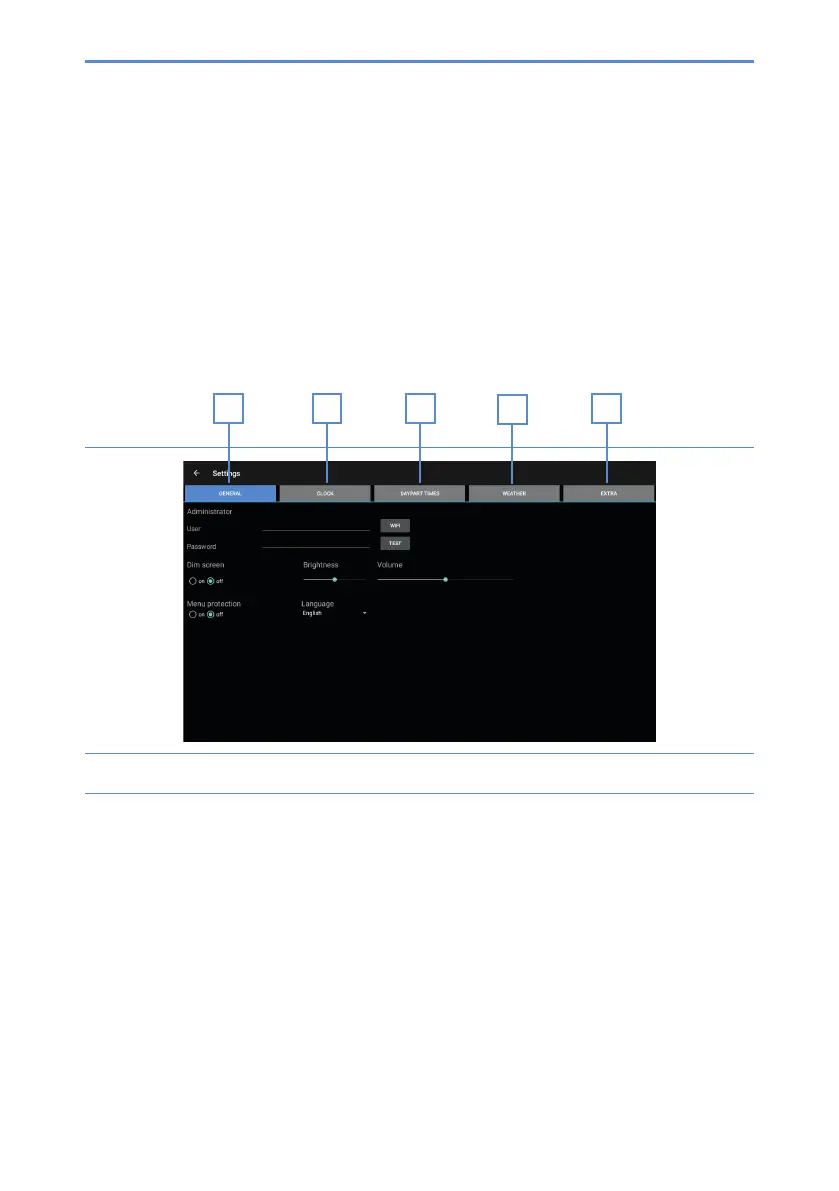
Thesettingsmenuconsistsofvemainmenus(gure6).Thesemainmenuscanbe
followedstepbysteptocongureyourDayClock.Youcanreturntothestart
screen at any time by pressing in the menu bar at the bottom of the screen.
A. General – see §4.2
B. Clock – see §4.3
C. Daypart times – see §4.4
D. Weather (only available for the DayClock 10) – see §4.5
E. Extra
Figure 6: Settings menu (General)
4.2 General settings
The general settings menu can be used to change the DayClock’s main settings
(gure6).
4.2.1 CongureyouraccountandWiFiconnection
1. Press General (A). The general settings menu will appear.
2. Press WiFi and select your WiFi network. Wait until connection has been
completed.
D
CBA
E


 To Next Page