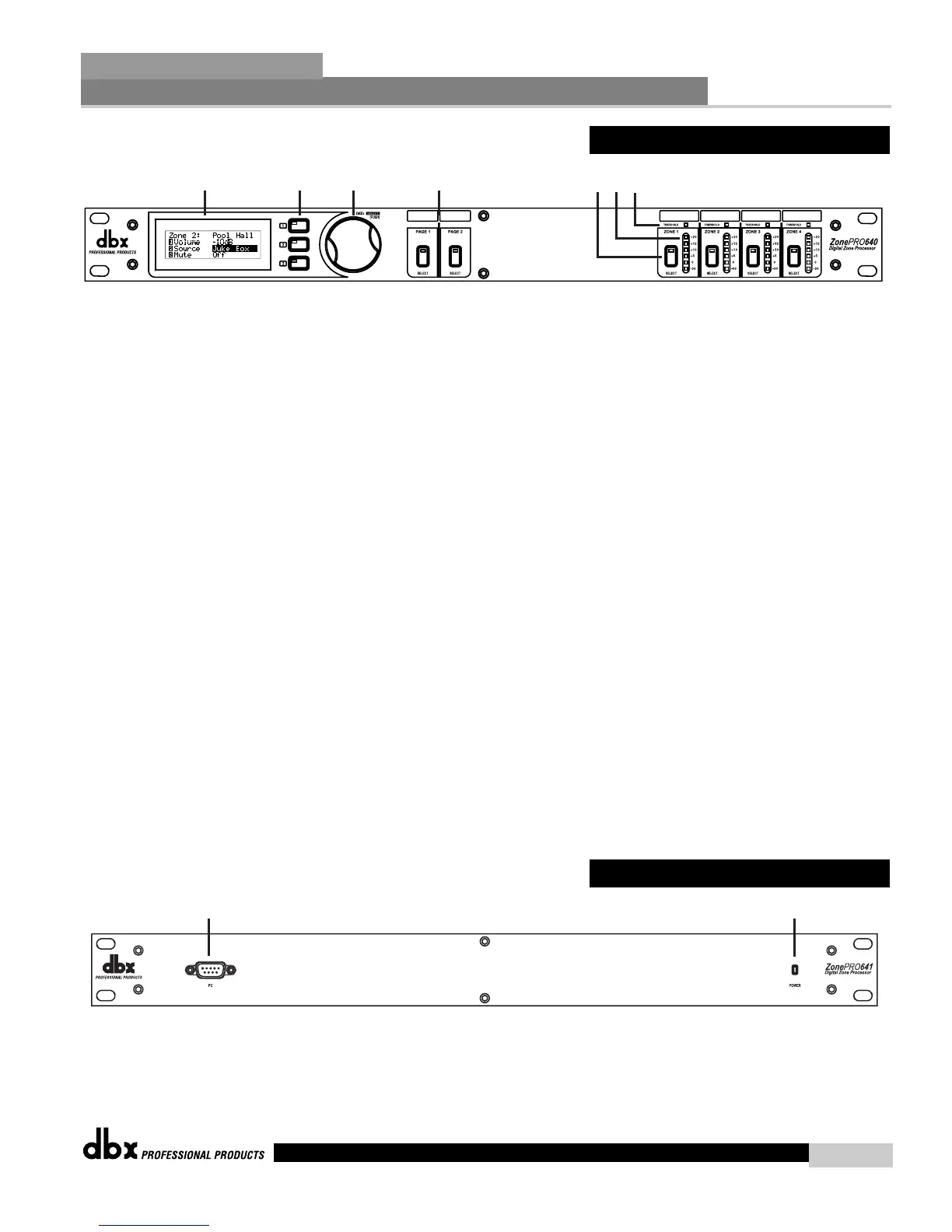
1. LCD Display
The backlit LCD display of the ZonePro 640 provides the end-user with all the necessary con-
trols including source selection, page steering, zone volume and mute.
2. Parameter Select 1-3
These three buttons (when pressed) are used in conjunction with the Data Wheel to select
and edit parameters.
3. Data Wheel
The Data Wheel is used to edit parameter values.
4. Page Buttons 1-2
The Page buttons are used to adjust the page signal path and can be used to steer paging to
selected zones.
5. Zone Select
These buttons are used to select output zones for front panel control.
6. Output Meters
The ZonePro 640 provides the user with four independent six-segment Lightpipe output meters
that range from -30 to +20 dBu. These meters monitor the signal level directly before the D/A
converter.
7.Threshold Meters
The threshold meters indicate that the threshold level has been exceeded within the output
Compressor, Auto Gain Control, or Limiter sections, and gain reduction may be taking place
within the specific output channel.
1. PC Connection
This DB-9 connection is used to communicate to the PC via RS-232 protocol.
2. Power LED
This LED (when lighted), indicates that the ZonePro 641 is currently powered.



 To Next Page