System Setup
Section 3
ZonePro
™
13
ZonePro
™
User Manual
controller, then select the desired zones with each of the 16 switch positions. Like a ZC-3, the
ZC-7 only has four positions so it will only support up to four zones or groups of zones, but it
does have momentary switches that can be used in a push to call fashion, where each switch
must be pushed and held to route the page to that zone or group of zones. First, select the
microphone to be steered, then for each switch position choose the zones or groups of zones
that are to be paged. Once you have performed all your zone controller configurations, click
NEXT to move to the Routing Configuration.
3.2.4 Routing Setup
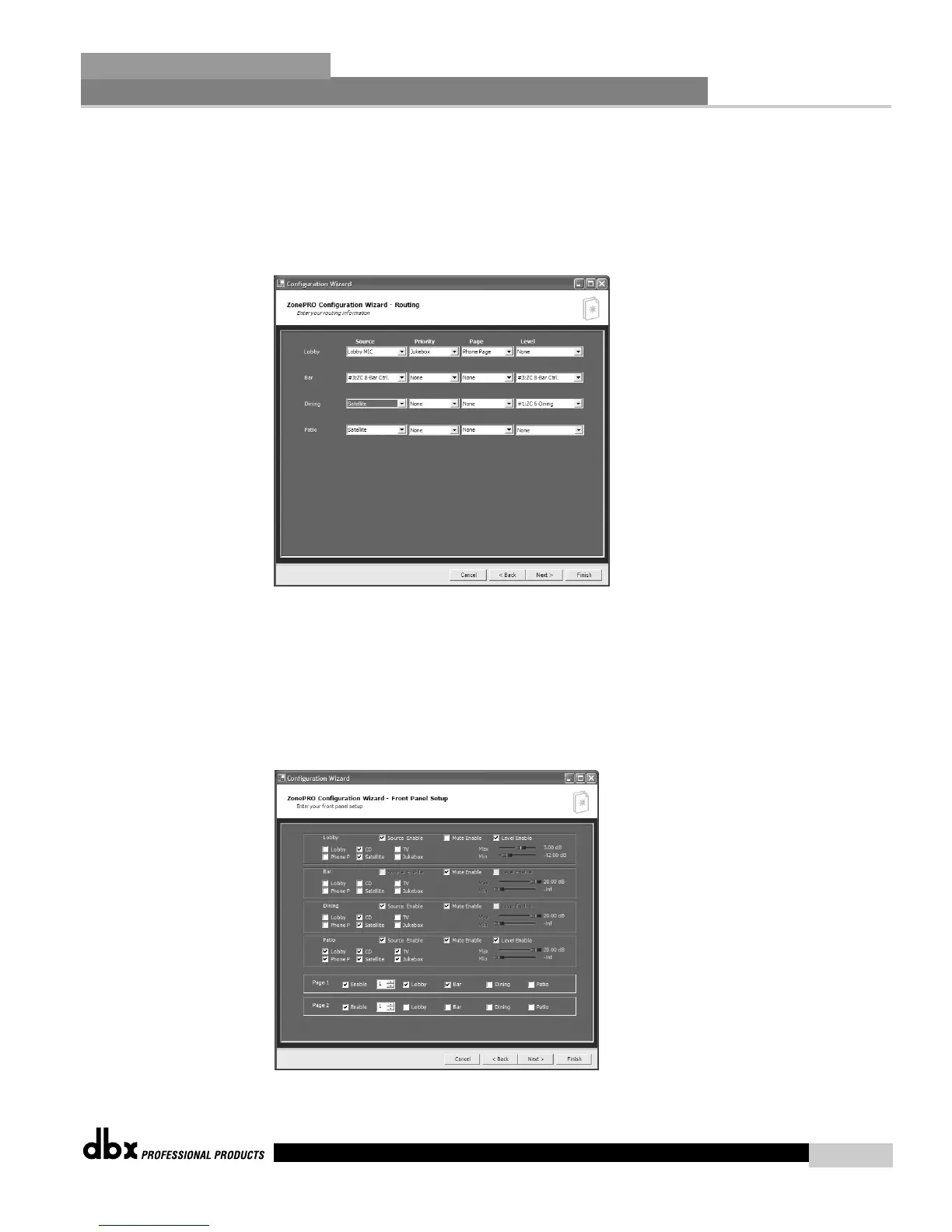
• The Routing Setup Page allows selection of the main Source, the Priority override source,
the Page source, and the output level for each of the output zones. If Zone Controllers are
used for either source selection or level control, these should be selected in the Source or
Level pulldown menu. If zone controllers are being used for Page Steering select None in
the Page menu for those outputs unless a microphone is always paging to that zone in
addition to the page steering.



 To Next Page