14
Section 3
ZonePro
™
ZonePro
™
User Manual
3.2.5 Front Panel Setup
• The Front Panel Setup Page allows selection of which controls will be available to the end-
user of the 640 unit. If Zone Controllers are being used for page steering, source, or vol-
ume control of an output zone these parameters will not be available from the front panel.
• Once all the Wizard pages have been completed the configuration is ready to be loaded,
this is accomplished by selecting finish. You will now be returned to the normal editing
mode of the ZonePro GUI.
The Scene Wizard function is used to setup the various scenes that may be required within the
installation. The Scene Wizard menu offers a single page window that provides a menu based
decision tree to speed setup. This sub-section will walk you through the options of the Scene
Wizard function.
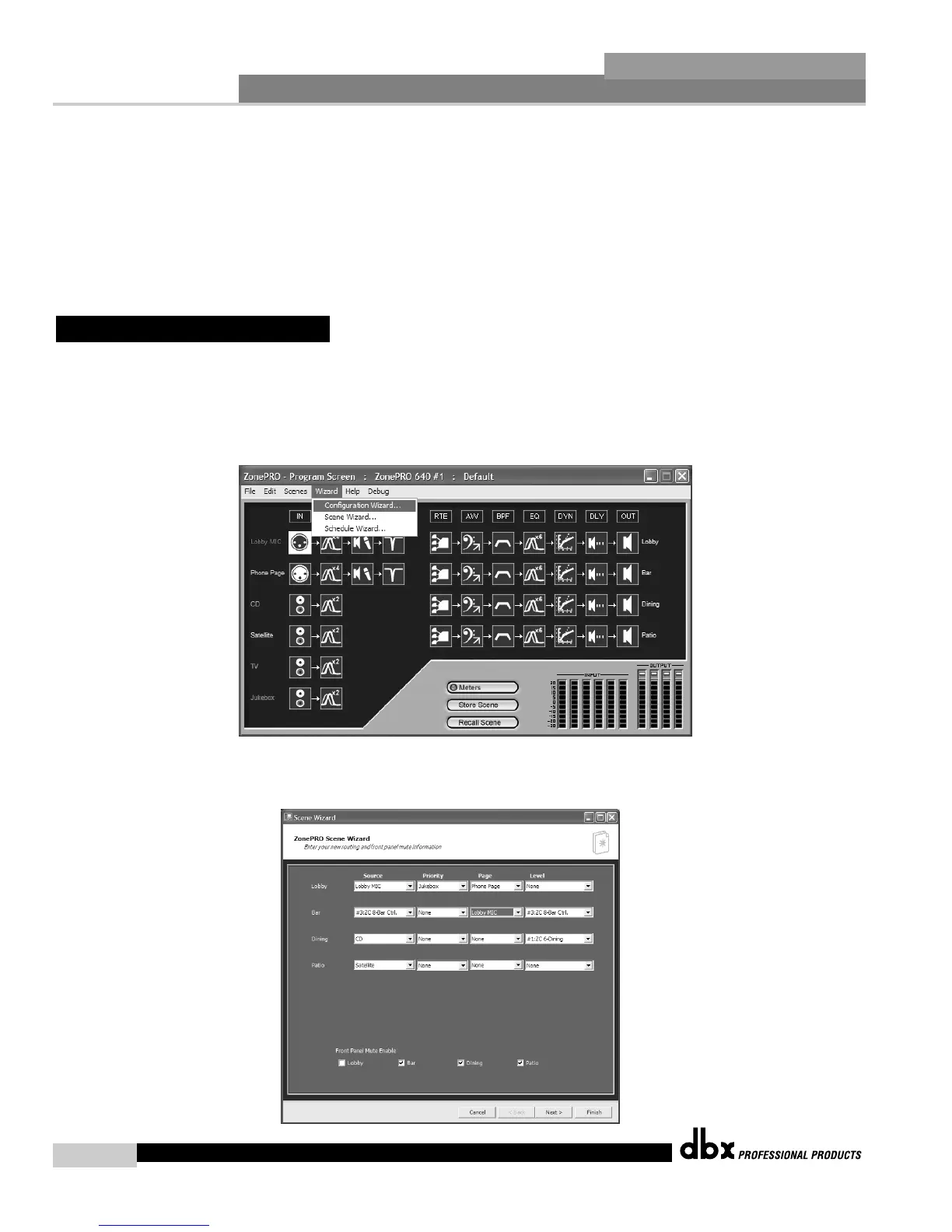
• From the Program Screen view of the setup, the display will appear something like this:
• Select the Wizard pull down from the menu bar and then select the option labeled Scene
Wizard. Once selected, a window will appear as follows:
3.3 - Scene Wizard



 To Next Page