dCS Elgar Plus User Manual Manual for Software Issue 4.3x
dCS Ltd August 2005
Manual filename: Elgar Manual v4.4x.doc Page 16 email: more@dcsltd.co.uk
English version web-site: www.dcsltd.co.uk
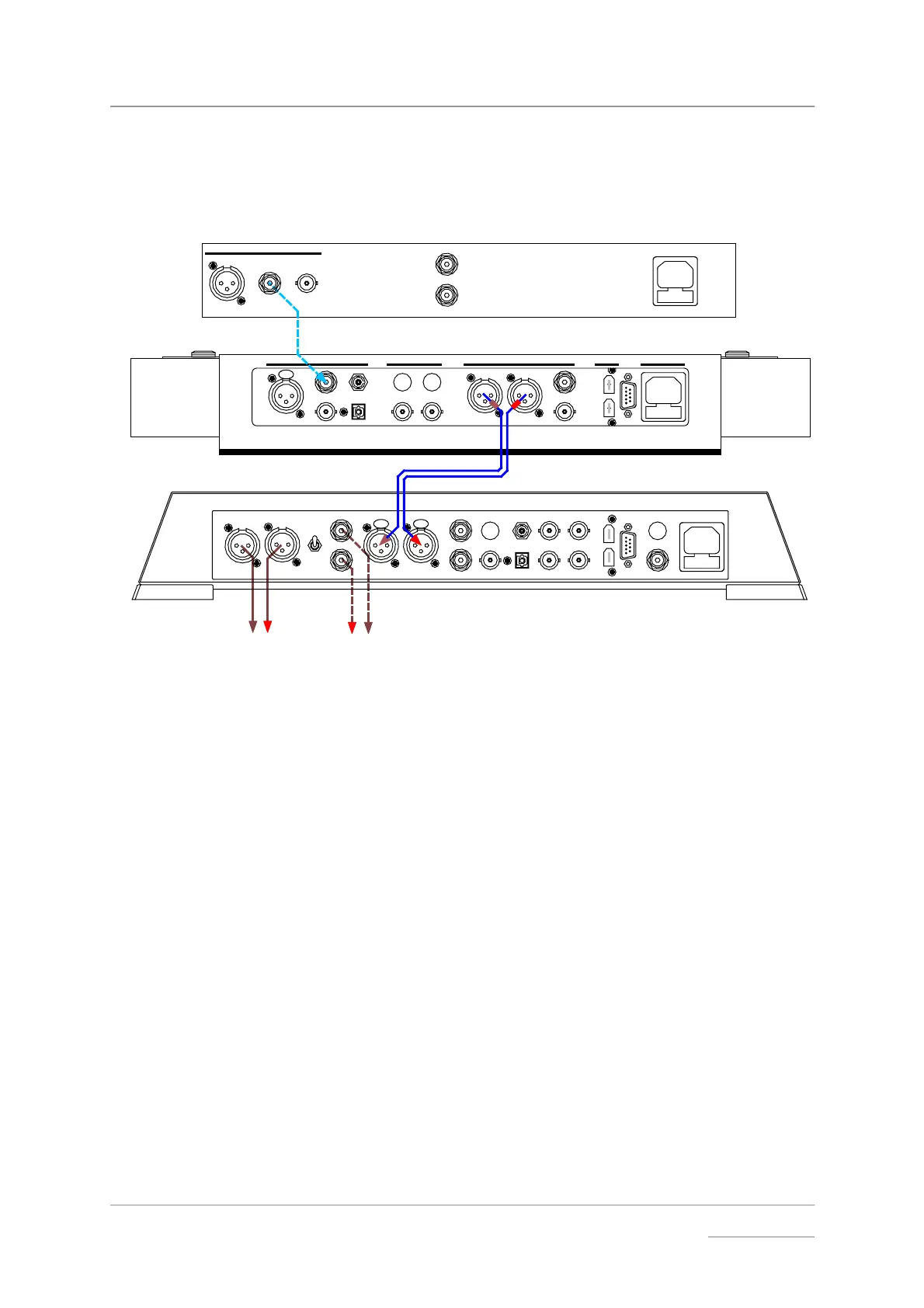
Using Elgar Plus with a Standard Purcell and a CD Player
If your Purcell is not 1394-equipped, you can still upsample the output from a
standard CD player to 24 bit 192kS/s.
LR
RL
Balanced
Outputs
To Power Amplifier or Preamplifier
Unbalanced
Outputs
- or -
dCS Purcell Upsampler
DIGITAL INPUTS DIGITAL OUTPUTS POWER
1
RCA
BNC
AES RCA
BNC
AES1 AES2
PUSH
SUC
1394
OPTION
TOSLI NK
ST
AB
IN
WORDCLOCK
OUT
RCA phono
cable
PUSH PUSH
LROUTPUT
LEVEL
HIG H
LOW
L
R
AES 1 AES 2 RCA1 ST
TOSL INKRCA2
CH1
DSD / SDIF
REC OUT
SUC
POWER
1394
CH2
IN - WORDCLOCK - OUT
BNC
A
B
dCS Elgar Plus DAC
BNC
cable
XLR
cables
RCA phono
cables
DIGITAL OUT
L
R
Hand Crafted by
The Red Hot CD Player Co.
XLR
cables
Figure 6 - Using Elgar Plus with Purcell and a CD player
do this: Connect up as shown above.
Purcell setup:
do this: Open the menu and run the Factory routine. You can connect any of Purcell’s
digital inputs to the CD player - use Purcell’s Input button to select it. Use the
Output button to set the 44.1→
→→
→192 conversion.
Elgar Plus setup:
do this: Open the menu, run the Factory and RstSync routines. Use the Input button to
select AES 1 AND AES 2 inputs. Use the Volume control to set a comfortable
listening level. Open the menu again and choose a different Filter if you wish.



 To Next Page