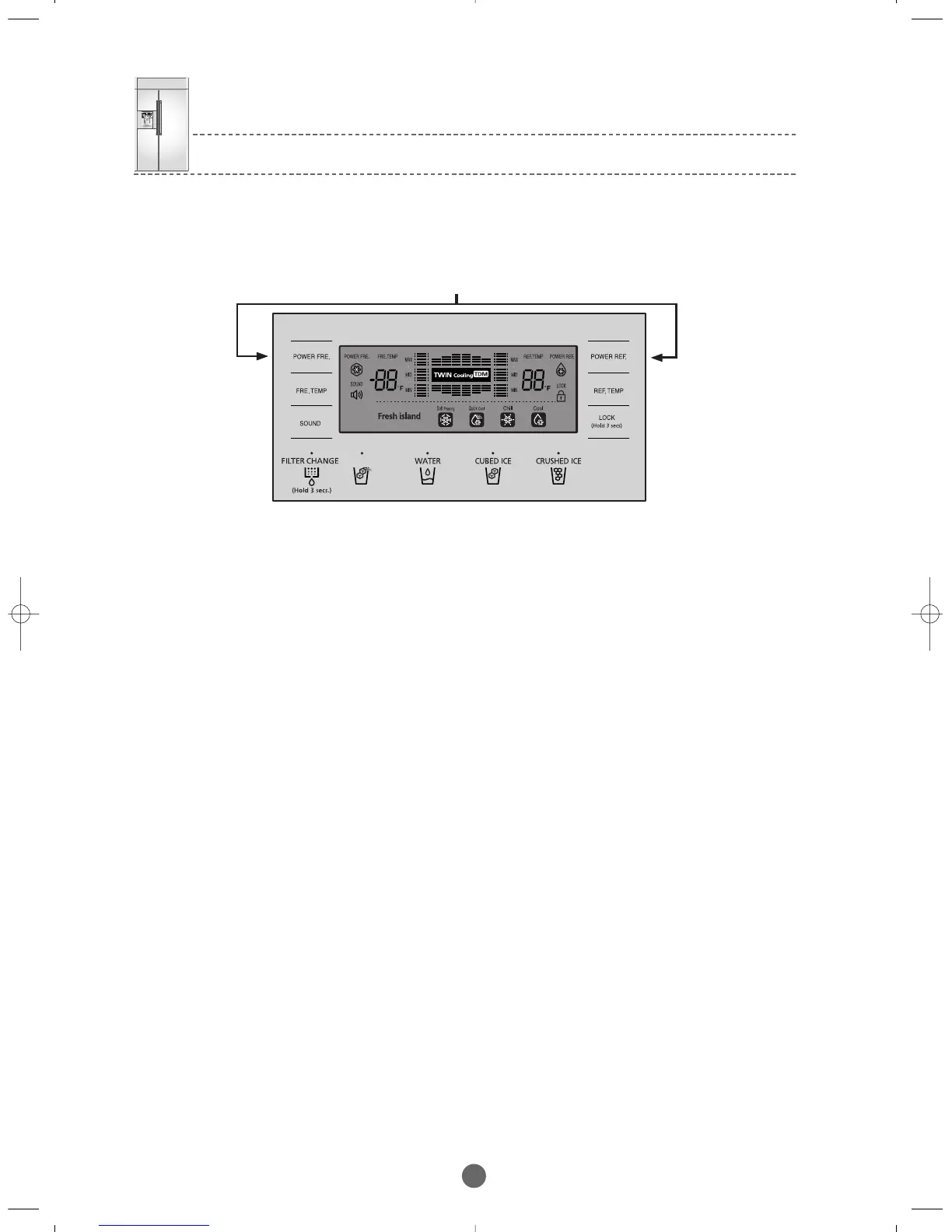
Press simultaneously for 12 seconds
① For example,if you want to shift the standard temperature of the Freezer by -3℉, follow the procedure.
This function is to change the standard temperature.If the F-Room is set to 0℉
.
and you lower it by -3℉ extra using this option, it
will be controlled within -2℉, when you lower the standard temperature by -3℉, the F-Room will be -3℉ lower than the
temperature shown on the display.
1) Press the FRE. TEMP and the POWER REF. buttons simultaneously for 12 seconds as shown in the figure.
All the Display goes off except the FRE. TEMP and the REF. TEMP temp LEDs.
2) Now it changed to the Option mode,"0"for FRIDGE and "0"for FREEZER will light up on the display.
(It is set to "0"for FRIDGE and "0"for FREEZER but can be changed for the purpose of quality improvement.)
- If "0" on FRIDGE lights up,the Freezer temperature option item can be set and the current temperature setting of the Freezer
will be shown on the FREEZER.
3) After setting "0" to the FREEZER and selecting "6" as shown in the Freezer option chart next page,the standard Freezer temperature
will be lowered by -3℉. (See the figure on the temperature changes of the F-Room).In 20 seconds after the temperature
is adjusted,MICOM stores this set value in EEPROM and restores the normal Display and exits the Option Setting mode.
4) It is possible to control the Fridge temperature,the Water Supply,the Ice-Maker Sensor temperature,the Fresh Island temperature
in the same way as shown above.
5) Since the option is already set in the EEPROM at the factory,do not change it randomly except for special conditions the option
setting completes when it restores the normal Display in 20 seconds,do not turn it off before the normal display is restored.
9) Option Setting Function
● When pressing the FRE. TEMP and the POWER REF. buttons simultaneously for 12 seconds,the Display is converted to the Option
Setting mode.
BRANDSOURCE-SM(EN) 2007.1.23 10:31 AM 페이지37



 To Next Page