EasyManua.ls Logo

Defibtech DDU-100 - User Manual

Defibtech DDU-100
74 pages
Print Icon
To Next Page IconTo Next Page
Loading...
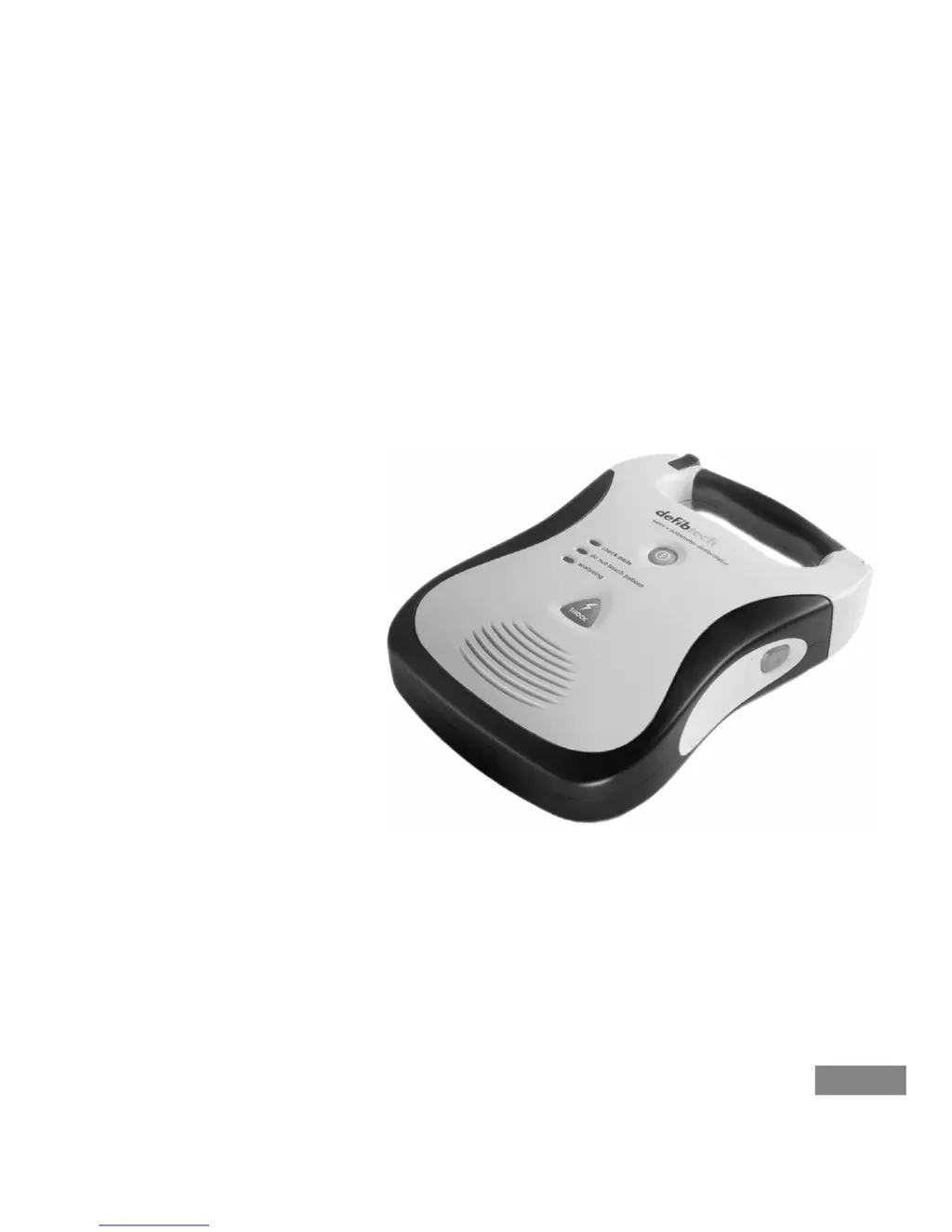
Defibtech DDU-100
Semi-Automatic
External Defibrillator
User Manual
AHA /ERC 2010
DAC-510E-EN-BF
ELECTRONIC
DISTRIBUTION

Table of Contents

Questions and Answers

  • B
    Barry KaneSep 6, 2025
    Why is the ASI blinking red on my Defibtech Medical Equipment?
    • D
      david90Sep 7, 2025
      If your Defibtech Medical Equipment unit's ASI blinks red, it could be due to several reasons: * ASI 9V battery low: Replace the ASI 9V battery. * Unit needs servicing: Turn the unit on and run a manually initiated Self-Test. * Battery pack non-functional: Replace the battery pack. * Electrode pads are not pre-connected to the unit: Connect the electrode pads to the unit.
  • M
    mooredanielleAug 22, 2025
    What to do if Defibtech DDU-100 Medical Equipment says 'Replace battery pack'?
    • L
      Laura HuberAug 22, 2025
      If your Defibtech Medical Equipment unit says “Replace battery pack,” it means the battery pack capacity is critically low. In this case, the unit will probably not deliver a shock, so replace the battery pack immediately.
  • T
    Thomas HillSep 3, 2025
    Why does my Defibtech Medical Equipment immediately turn off?
    • J
      James HicksSep 3, 2025
      If your Defibtech Medical Equipment unit immediately turns off, it could be because the battery pack is depleted (replace the battery pack) or the unit is non-functional (return the unit for service).
  • M
    Melody RandallSep 2, 2025
    How to fix Defibtech DDU-100 that will not turn on?
    • A
      Andrew LaneSep 2, 2025
      If your Defibtech Medical Equipment unit will not turn on, it could be due to several reasons: * Battery pack not inserted: Insert the battery pack. * Battery pack depleted or non-functional: Replace the battery pack. * Unit is non-functional: Return the unit for service.
  • D
    Dr. Ashley HarrisonSep 1, 2025
    Why does my Defibtech Medical Equipment beep periodically?
    • L
      Louis ZunigaSep 1, 2025
      If your Defibtech Medical Equipment unit makes periodic “beep” sound, it means the unit has detected a condition that needs user attention. Turn the unit on to run the power-on Self-Test.
  • G
    Garrett KlineAug 30, 2025
    Why is the ASI solid red on my Defibtech Medical Equipment?
    • L
      Leonard HernandezAug 30, 2025
      If your Defibtech Medical Equipment unit's ASI is solid red, it means the unit has detected an error. You should run a manually initiated Self-Test.
  • L
    Leslie ThomasAug 29, 2025
    What to do if Defibtech Medical Equipment says 'Apply pads to patient's bare chest'?
    • J
      Joshua WebbAug 29, 2025
      If your Defibtech Medical Equipment unit says “Apply pads to patient’s bare chest as shown”, it means that the pads are not connected to the patient, so place pads on patient. It may also mean that pads are not making good connection to patient (check pad connection to patient), or pads or pad cable are damaged (replace pads).
  • M
    michelle94Aug 27, 2025
    What to do if Defibtech Medical Equipment says 'Check pads'?
    • A
      Aaron CrawfordAug 28, 2025
      If your Defibtech Medical Equipment unit says “Check pads”, it means the pads are touching. Separate the pads and place them correctly on the patient.
  • H
    Heather RivasAug 27, 2025
    What does 'Pads missing' mean on Defibtech DDU-100 Medical Equipment?
    • E
      Erik RandallAug 27, 2025
      If your Defibtech Medical Equipment unit says “Pads missing”, it means the pads are not connected. Make sure the pads connector is oriented correctly and fully inserted into the unit.
  • R
    Robert HartmanAug 25, 2025
    What to do if Defibtech DDU-100 Medical Equipment says 'Replace 9 volt battery'?
    • J
      joelriddleAug 26, 2025
      If your Defibtech Medical Equipment unit says “Replace 9 volt battery”, it means the 9V battery is low or missing. The unit will still operate to treat patients, but replace the 9V battery as soon as possible.

Summary

Introduction to the DDU-100 Series AED

Overview

General overview of the DDU-100 AED, its controls, and functions.

The Defibtech DDU-100 AED

Details on the AED's speaker, buttons, LEDs, and connectors.

Indications

Conditions for which the DDU-100 AED is indicated for use.

Contraindications

Conditions under which the DDU-100 AED should not be used.

Operator Training Requirements

Requirements for safe and effective operation of the DDU-100 AED.

Dangers, Warnings and Cautions

Shock, Fire Hazard, Explosion

Hazards related to electricity, battery pack, and usage environment.

Improper Device Performance

Potential issues with device performance due to environment, pads, analysis, etc.

General

General safety statement regarding physician order.

Setting up the DDU-100 AED

Overview

Lists components and accessories included with the DDU-100 AED.

Installing the Data Card

Instructions for installing the Defibtech Data Card (DDC).

Installing the Active Status Indicator 9 V Battery

Procedure for installing the 9V battery into the battery pack.

Installing and Removing the Battery Pack

Steps for inserting and removing the main battery pack.

Connecting the Pads

How to connect the defibrillation/monitoring pads to the AED.

Performing Manually Initiated Self-Tests

Steps to perform a manual self-test on the DDU-100 AED.

Storing the DDU-100 AED

Guidelines for storing the DDU-100 AED for readiness.

Using the DDU-100 AED

Overview

Identifies AED controls and indicators.

Checking DDU-100 AED Status

How to interpret the Active Status Indicator and other status lights.

Turning on the DDU-100 AED

Procedure to power the AED on and off.

Preparation

Steps to prepare the AED and patient for use.

Heart Rhythm Analysis

How the AED analyzes the patient's ECG rhythm.

Delivering the Shock

Process of charging and delivering a shock.

No Shock Required

What happens when the AED determines no shock is needed.

Post-Shock CPR

CPR procedures after a shock is delivered.

Post Use Procedures

Steps to take after the AED has been used.

Operational Environment

Guidelines for operating the AED in various environmental conditions.

Maintaining and Troubleshooting the DDU-100 AED

Self-Tests

Description of power-on, daily, weekly, monthly, and manual self-tests.

Routine Maintenance

Daily, monthly, and post-use maintenance tasks for the AED.

Replacing the Lithium 9 V ASI Battery

How to replace the 9V battery for the Active Status Indicator.

Cleaning

Guidelines for cleaning the DDU-100 AED and its components.

Storage

Recommendations for storing the DDU-100 AED.

Operators Checklist

A checklist for operators to monitor AED readiness.

Troubleshooting

Common problems, causes, and corrective actions for the DDU-100 AED.

DDU-100 AED Accessories

Defibrillation;Monitoring Pads

Characteristics and functions of the defibrillation pads.

Battery Packs

Types of battery packs used with the DDU-100 AED.

Data Cards

Information on Defibtech Data Cards (DDC) and their types.

Recycling Information

Guidelines for recycling the AED and accessories.

Event Viewing

Defibtech Data Cards

Information recorded on DDCs when the AED is used.

Downloading the Internal Data Log

Procedure to download internal data to a DDC.

Technical Specifications

Defibtech DDU-100 AED

Physical, environmental, and performance specifications of the AED unit.

Battery Packs

Specifications for high-capacity and standard lithium battery packs.

Self-Adhesive Defibrillation;Monitoring Pads

Characteristics of Defibtech self-adhesive pads.

Defibtech Data Cards (DDCs)

Available Defibtech Data Cards and their storage capacities.

DefibView

Information about the DefibView PC software for data review.

Glossary of Symbols

Contacts

Warranty Information

Defibtech DDU-100 Specifications

General IconGeneral
Device TypeAutomated External Defibrillator (AED)
ModelDDU-100
ManufacturerDefibtech
WaveformBiphasic Truncated Exponential
Battery TypeLithium Manganese Dioxide (LiMnO2)
CPR CoachingYes
Data RecordingYes
IP RatingIP55
Relative Humidity5% to 95% (non-condensing)
Altitude Range0 to 15, 000 feet
ECG DisplayNo
Warranty8 years
Energy SelectionAutomatic
Self-TestDaily, weekly, and monthly self-tests
Voice PromptsYes
Environmental ProtectionYes
Operating Temperature0°C to 50°C (32°F to 122°F)
Storage Temperature-20 to 70°C (-4 to 158°F)
Visual IndicatorsYes
CPR FeedbackYes
Energy150 J (fixed)

Related product manuals