Preliminary
941322_VMS Instruction Book 2006.pdf2009-09-07
No. Name Range Default Description/optionsNo. Name Range Default Description/options
0 = no acidic cleaning0 = no acidic cleaning
1 = one alkaline, one acidic cleaning1 = one alkaline, one acidic cleaning
2 = two alkaline, one acidic cleaning2 = two alkaline, one acidic cleaning
3 = etc.3 = etc.
Maintenance an calibration
The following points are important to sustain
correct dosing of etergents. Note that
these two tasks should be performed by an
authorised DeLaval service engineer.
• The tubes in the peristaltic pumps should
be replaced at least two times a year.
• The dosing volume (P6-P8) of the
detergent pumps should be checked
every third month. The dosing capacity
(P32-P34) may need to be adjusted.
Starting cleaning or rinsing
from the touch screen
Note: Any ongoing backflush process must
first be finished before cleaning or rinsing
can be started.
1. Ensure that the milking station is in
manual mode.
2. Remove any cow that might be in the
milking station.
After treatment window
Note: Both gates should be closed to
prevent a cow from entering before the
system cleaning has been started. Closing
and opening gates is done in the Stall
control window.
3. Press the tab After Treatment on the
touch screen to display the After treatment
window.
4. In the After treatment window, press the
Cleaning and Rinsing button. This will open
the Cleaning and rinsing window.
4 Handling specific MA200 func-
tions
4.1 Milking in manual mode
Sometimes it is better to milk in manual mode.
For example, if an animal has a very low milk flow
at start and there is a risk that the pre-milking
time-out will occur before the milk flow is above
the low flow limit which results in a premature
take-off. The mode can be shifted back to auto-
matic when the milk flow has increased, to acti-
vate automatic retraction after milking.
Note! Manual milking requires extra attention
since the cluster is not retracted automatically.
Retract the cluster in due time to avoid over-milk-
ing the animal.
1. Press the large button to shift to manual
mode from automatic mode.
ð
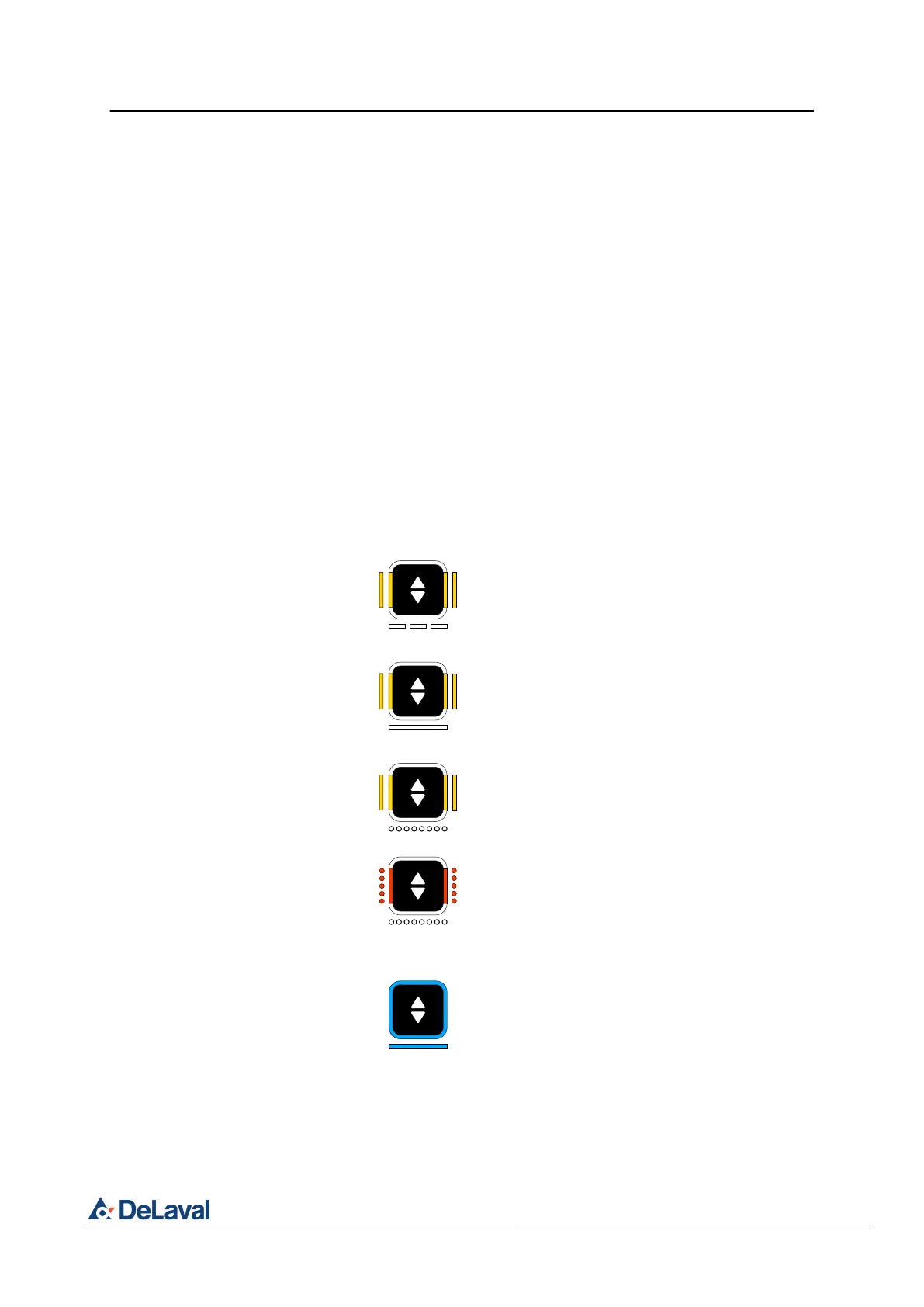
The indicator is solid yellow on the left
and right segments while the top and
bottom are white slow flashing until the
milk flow is above the low flow limit.
The indicator is solid yellow on the left
and right segments while the top and
bottom are white solid when the milk
flow is above the low flow limit.
The indicator is solid yellow on the left
and right segments while the top and
bottom are white rapid flashing when
the milk flow has reached the low flow
limit.
The indicator is flashing rapidly red the
left and right segments synchronised
together with rapid flashing of the top
and bottom segment indicating that the
milk flow has reached the take-off limit
and there is a risk of over-milking.
2. When the milk flow has increased above
the low flow limit, press the large button
again to shift back to automatic mode to
activate automatic retraction after milking.
DeLaval milking automation MA200 (Test installation)
Operation
© DeLaval 2019.
2019-05-31, Version 1 41 (62)



 To Next Page