Prerequisites
If you are replacing a component, remove the existing component before performing the installation procedure.
About this task
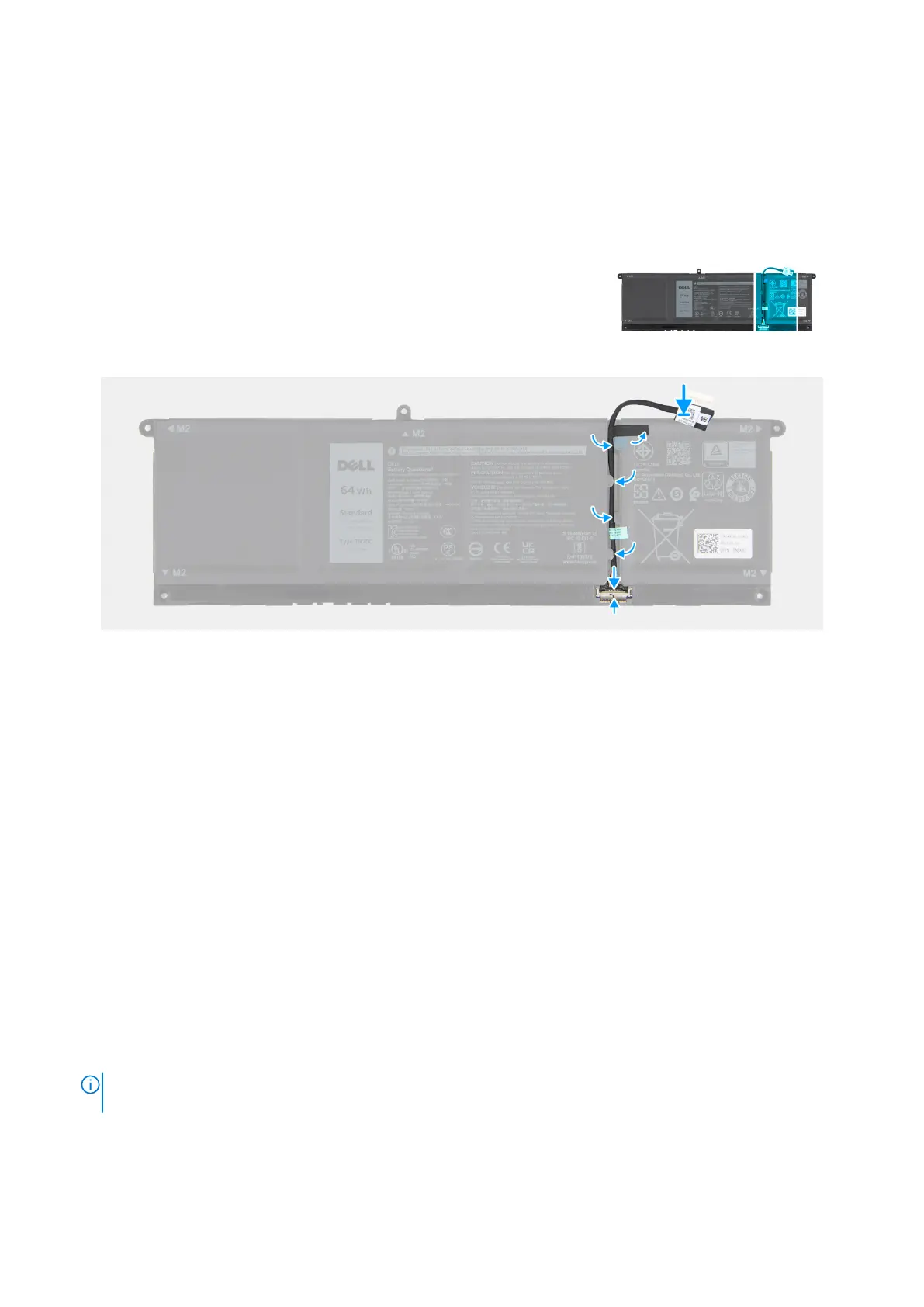
The following image indicates the location of the battery cable and provides a visual representation of the installation procedure.
Figure 18. Installing the battery cable
Steps
1. Connect the battery cable to its connector on the battery .
2. Slide the clamp upwards to secure the battery cable to the battery.
3. Route the battery cable through the routing guides on the battery.
Next steps
1. Install the battery.
2. Install the base cover.
3. Follow the procedure in After working inside your computer.
Solid State Drive (SSD)
Removing the M.2 2230 solid state drive
Prerequisites
1. Follow the procedure in Before working inside your computer.
NOTE:
Ensure that your computer is in Service Mode. For more information, see step 7 in Before working inside your
computer.
2. Remove the base cover.
Removing and installing Customer Replaceable Units (CRUs)
41










 To Next Page