4. Remove the wireless card.
About this task
NOTE: The wireless antennas are attached to the speakers as an assembly and cannot be separated for individual
replacement. When the speakers or the wireless antennas need to be replaced, services will dispatch the speaker assembly
as a single serviceable component.
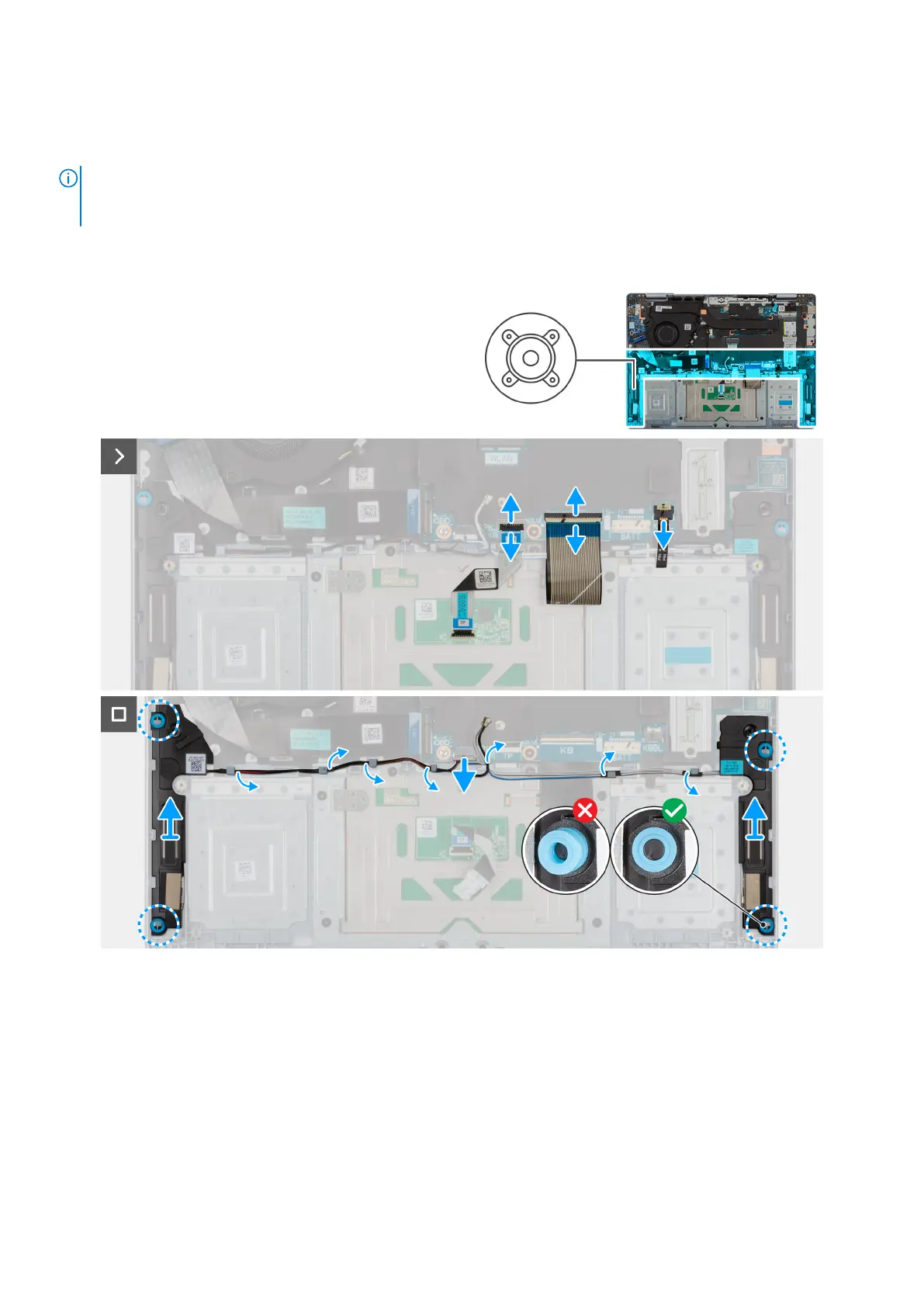
The following image indicates the location of the speaker assembly and provides a visual representation of the removal
procedure.
Figure 34. Removing the speaker assembly
Steps
1. Disconnect the speaker cable from the connector (SPK) on the system board.
2. Lift the latch and disconnect the keyboard cable from the connector (KB) on the system board.
3. Lift the latch and disconnect the keyboard-backlight cable from the connector (KBBL) on the system board.
4. Move the keyboard cable off the speaker and antenna cables.
5. Move the keyboard-backlight cable off from the speaker and antenna cables.
6. Remove the speaker and the antenna cables from the routing guides on the palm-rest and keyboard assembly.
7. Lift the speaker assembly off the palm-rest and keyboard assembly.
58
Removing and installing Field Replaceable Units (FRUs)










 To Next Page