About Your Printer
Understanding the Printer Parts
Understanding the Operator Panel
You can use your printer to do a variety of things. A few important things to note:
If the printer is connected to a computer, you can use either the printer operator panel or the printer software to
produce quality documents.
You do need to connect your printer to a computer to print, scan, or use the Save Photos to Computer function
or the Print Files mode.
You do not need to connect your printer to a computer to make photocopies, send faxes, or print from memory
cards or a PictBridge-enabled camera.
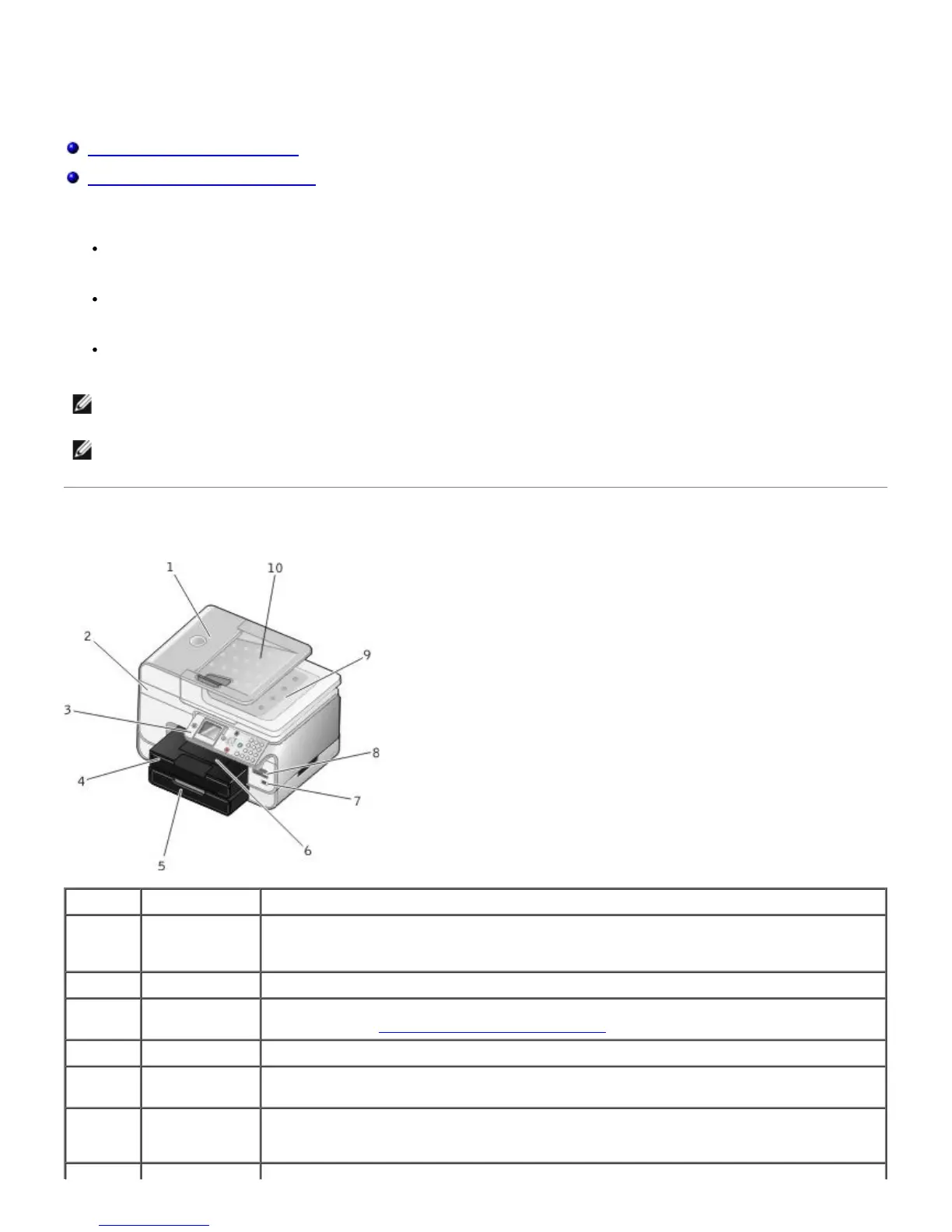
Understanding the Printer Parts
NOTE: The printer (whether it is connected to a computer or not) must be connected to a telephone line before you
can send a fax.
NOTE: If you use a DSL modem for your computer, you must install a DSL filter on the telephone line attached to
your computer.
Number: Part: Description:
1 Automatic
Document
Feeder (ADF)
Part that feeds original documents into the printer.
2 Printer unit Unit you lift to gain access to the ink cartridges.
3 Operator panel Panel on the printer you use to control copying, scanning, faxing, and printing. For more
information, see Understanding the Operator Panel
.
4 Paper tray Tray that holds blank paper.
5 Optional paper
tray
Tray that you can purchase separately to increase the amount of blank paper that your
printer can hold.
6 Paper exit tray Tray that holds the paper as it exits the printer.
NOTE: Pull the paper exit tray stop straight out to extend it.


 To Next Page