Understanding the Software
Using the Dell All-In-One Center
Using the Dell Fax Solutions Software
Using Printing Preferences
Using Memory Card Manager
Dell Ink Management System
Removing and Reinstalling Software
The printer software includes:
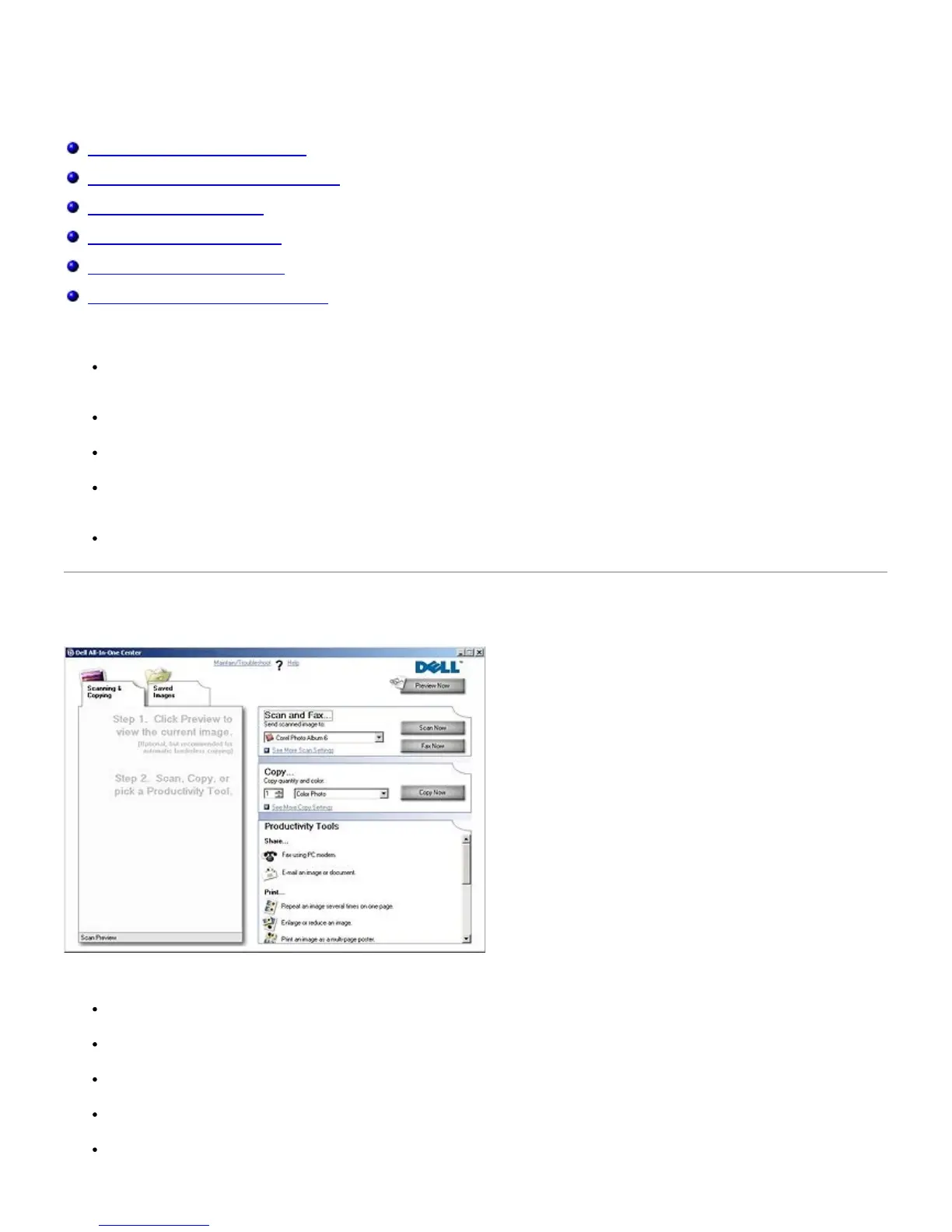
Dell All-In-One Center– Allows you to perform various scan, copy, fax, and print operations with newly scanned
and previously saved documents and images.
Dell Fax Solutions Software– Allows you to fax electronic or scanned documents.
Printing Preferences– Allows you to adjust printer settings.
Memory Card Manager– Allows you to display, manage, edit, print, and scan photos from your memory card or
USB memory key to your computer.
Dell Ink Management System™– Warns you when your printer is running low on ink.
Using the Dell All-In-One Center
The Dell All-In-One Center allows you to:
Scan, copy, fax, and use productivity tools.
Select where you want to send the scanned image.
Select the quantity and color of your copies.
Access troubleshooting and maintenance information.
Preview images you want to print or copy.


 To Next Page