Alienware Command Center (AWCC) │ 24
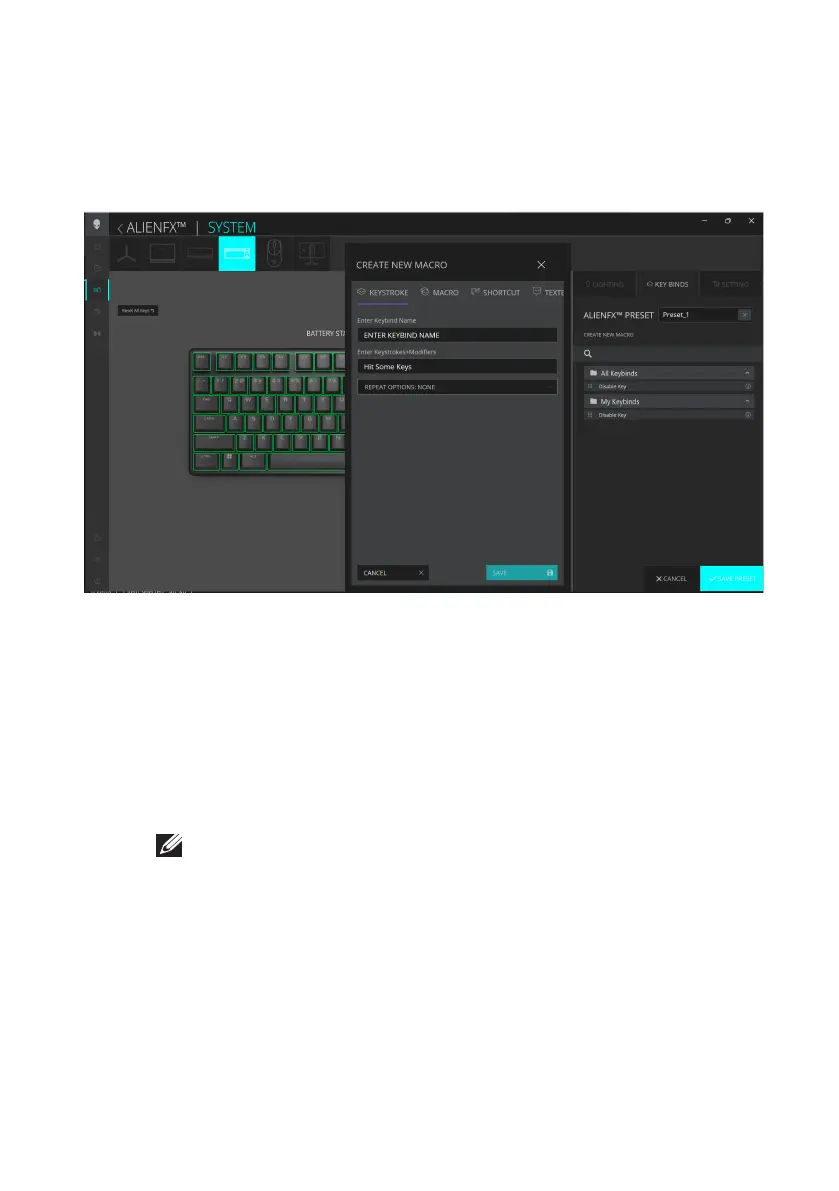
Assign and create Keybind
Keybind is a feature to reassign the original function of any keys except the
Profile Key.
Keybind creation
1. Click the ALIENFX icon.
2. In the SYSTEM tab, select ALIENFX PRESET. Click KEY BINDS from the
right panel.
3. Click CREATE NEW MACRO to create a new keybind of the
following types and map the keybind to any key except the Profile Key:
a. KEYSTROKE – Select a keystroke by pressing a key on the
keyboard.
b. MACRO – Record a series of keystroke.
c. SHORTCUT – Open a program file, a folder, a computer, or an
Internet address.
d. TEXTBLOCK – Record a block of text.
4. Click RESET ALL KEYS to clear all the keybind assignment.
5. Click SAVE PRESET to save your changes.
NOTE: KEYSTROKE and MACRO keybinds can repeat the keystroke
once, repeat by switching the keystroke, repeat the keystroke while key
is pressed, or to repeat the keystroke for several times.
Alienware Command Center (AWCC)



 To Next Page