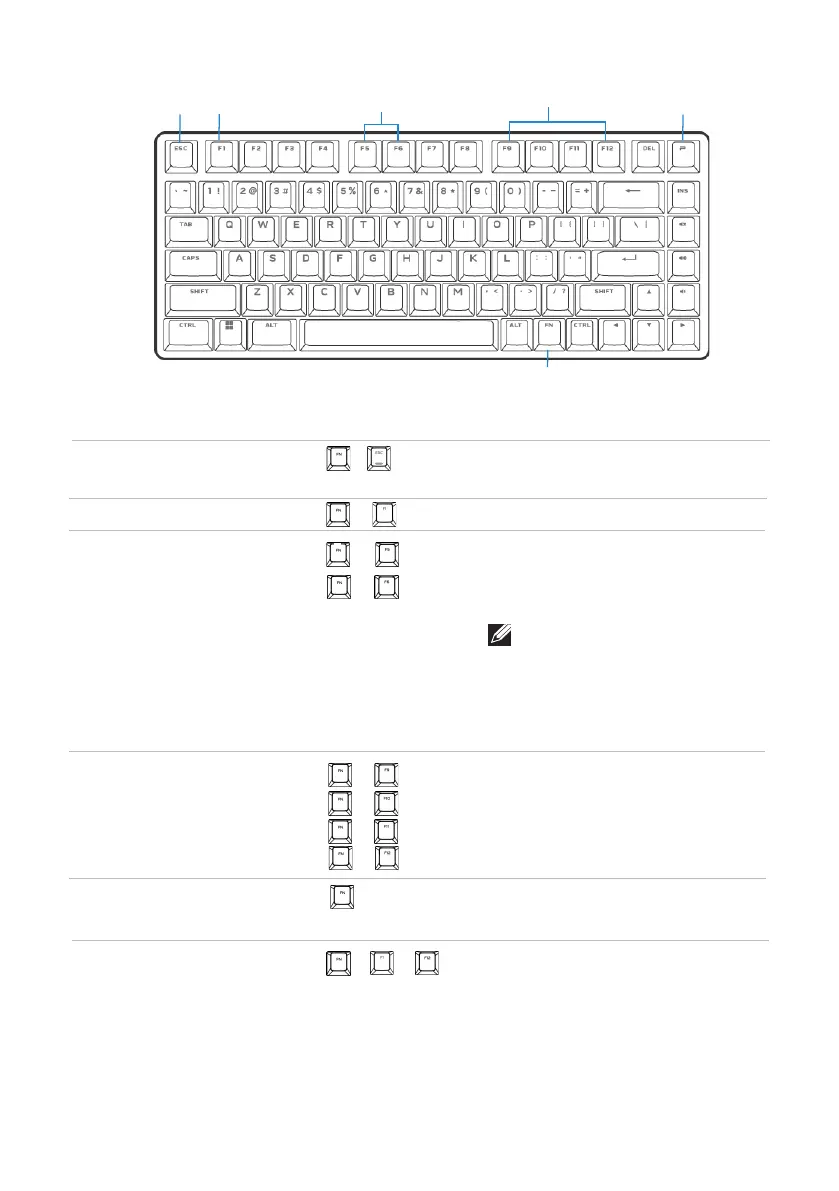
Function keys
│
7
• Press
• Press
(FN+F5)
(FN+F6)
+
3 Brightness
control
Decreases brightness.
Increases brightness from current
intensity or default intensity.
+
NOTE: Alienware Pro Wireless
Gaming Keyboard has 10
brightness levels. The default
keyboard-backlight brightness
out of the box is at 5.
Function keys
1 FN lock
2 Win lock
• Press
+
(FN+F1)
+
Disables the Windows key function.
Switches between different FN
functions from F1 to F12
Locks the F1 to F12 secondary
functions.
6 FN switich
2
3
4
6
1
• Press
+ ~
Function keys
Keyboard behavior
Callout functions
• Press
5
5 Profile
switch
Switches between lighting setup
stored in keyboard
• Press
(FN+F9)
(FN+F10)
(FN+F11)
+
+
+
4 Media
5 playback
Fast backward
Play or Pause
Stop
Fast forward
• Press
• Press
• Press
• Press
(FN+F12)
+
P



 To Next Page