2. Remove the base cover.
About this task
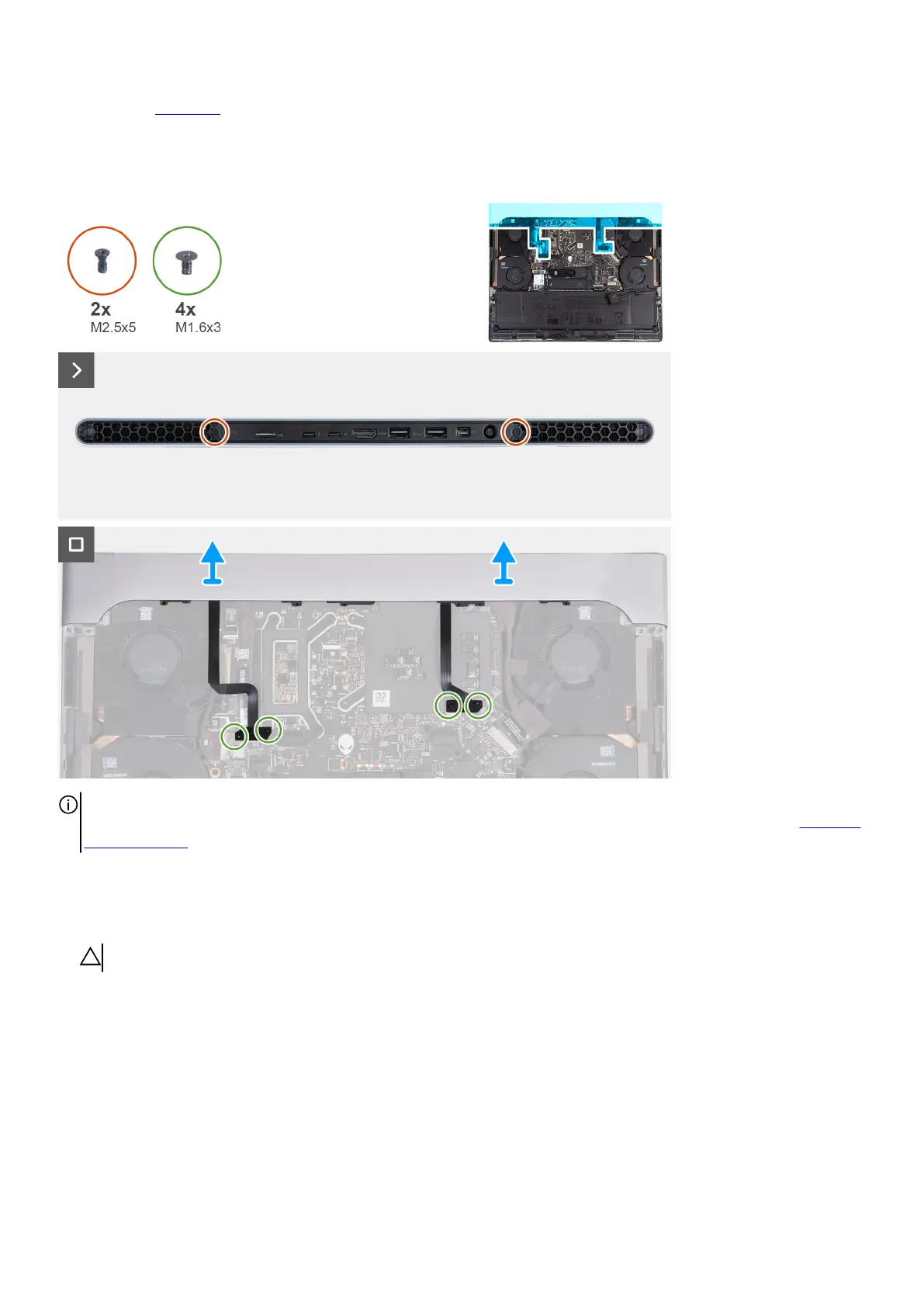
The following image(s) indicate the location of the rear I/O-cover and provides a visual representation of the removal procedure.
NOTE: To prevent damaging your computer, ensure that the Tron-light cable has been disconnected from the system board
before removing the rear I/O-cover. To see the location of the Tron-light cable, refer to System board components in Removing
the system board.
Steps
1. Remove the two screws (M2.5x5) that secure the rear I/O-cover to the palm-rest and keyboard assembly.
2. Remove the four screws (M1.6x3) that secure the left and right Tron-light cables to the palm-rest and keyboard assembly.
CAUTION: Do not pull at the bend points of the Tron-light cables and check for damage while removing and installing.
3. Firmly grasp the sides of your computer with both hands and push it outwards to remove the rear I/O-cover off the palm-rest and
keyboard assembly.
Installing the rear I/O-cover
Prerequisites
If you are replacing a component, remove the existing component before performing the installation process.
26








 To Next Page